 AFI
AFI
Not Equal To
Use Not Equal To in AFI conditional logic to fire an integration when a submitted form value is anything except the value you configure. It’s the inverse of Equal To, useful for excluding internal test submissions, blocking specific email domains, or routing every record except one.
How it works
When a form is submitted, AFI compares the value of the field you pick against the value you enter. If they’re different, the rule passes and the integration runs. If they match exactly, AFI skips this destination for that submission.
The comparison is case-sensitive and a literal string match: same rules as Equal To, just inverted.
Example
Goal: add every signup to Mailchimp except internal test submissions from [email protected].
Setup:
- Open your Mailchimp integration in WP Admin → AFI → All Integrations and click Edit.
- Open the Conditional Logic panel.
- Click Add Condition.
- In the field dropdown, pick the email field.
- Set the operator to Not Equal To.
- In the value box, type
[email protected]. - Click Save Integration.
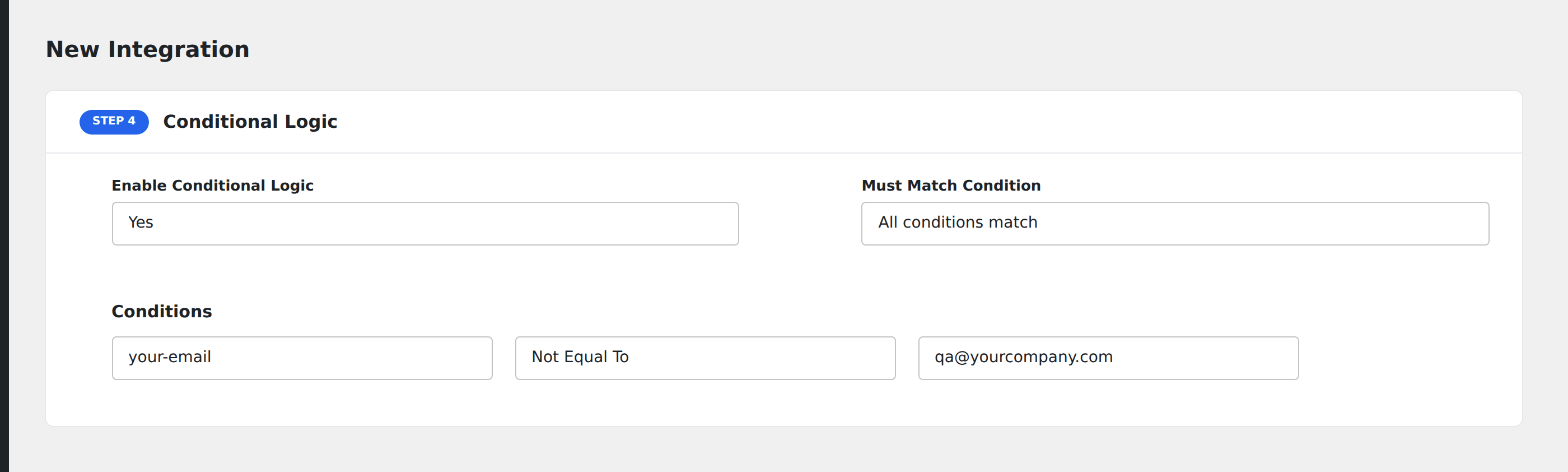
Now every submission gets sent to Mailchimp except the ones from your QA test address.
Notes
- Case-sensitive.
[email protected]and**@*********ny.comare different values. Both would pass this rule. - Empty values pass. A submission where the field is empty does not equal
[email protected], so the rule passes and the integration runs. To block empty submissions too, add a second rule using [Not Equal To] with a blank value, joined with All semantics. - Excluding multiple values. Add multiple Not Equal To conditions and set Must Match Condition to All. The integration runs only when none of them match.