 AFI
AFI
Less Annoying CRM
Less Annoying CRM is a simple flat-rate CRM popular with small businesses for its no-frills approach. Advanced Form Integration sends form submissions to Less Annoying CRM as new contacts, optionally creating or linking a company record. the Pro version adds full custom-field mapping.
What you’ll need
- An active Less Annoying CRM account.
- A Less Annoying CRM API Token (Settings → Developer API).
- The Advanced Form Integration plugin installed and activated.
Get your API token
- Log in to your Less Annoying CRM account.
- Go to Settings → Developer API.
- Generate or copy your API Token.
Connect Less Annoying CRM to AFI
- In WordPress, go to AFI → Settings.
- Enable Less Annoying CRM and click Save Changes.
- Open the Less Annoying CRM tab.
- Paste the API Token and click Save Changes.
Create the integration
- Go to AFI → Add New.
- Configure the trigger.
- In Action → Platform, select Less Annoying CRM.
- In Task, choose Add Contact.
- Pick the Assign To user. The CRM user who will own the new contact.
- Map the form fields:
- Name, Email, Phone.
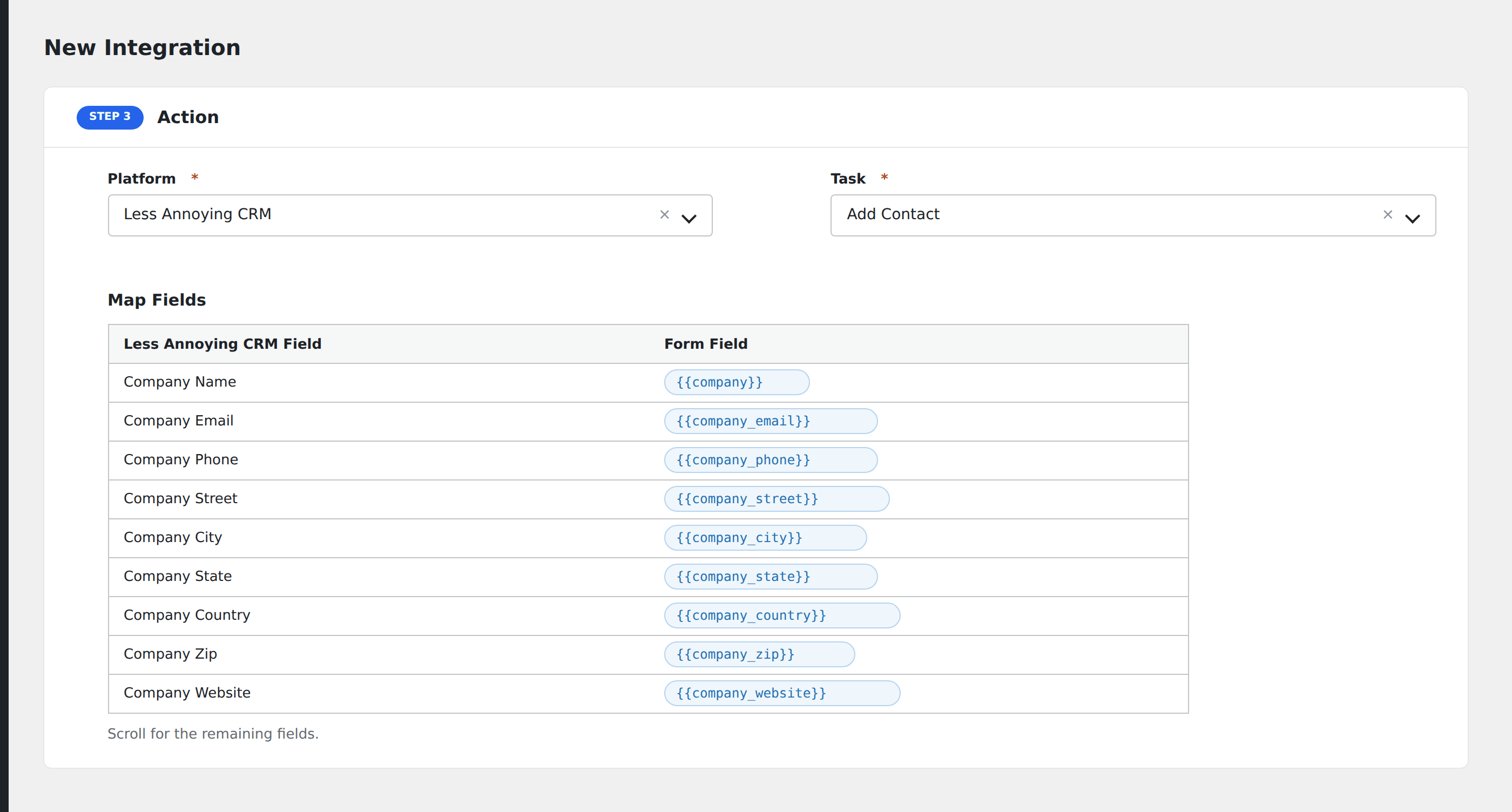
- Job Title, Company Name, Website, Address.
- On Pro: any custom contact and company fields, auto-loaded.
- Optional: configure Conditional Logic.
- Click Save Integration.
Tasks supported
Add Contact
Creates a new contact in Less Annoying CRM. If the Company Name field is mapped, AFI checks if the company exists. If found, the contact is linked to it; if not, AFI creates the company and links the contact automatically.
Pro features
The Pro Less Annoying CRM integration adds full custom field mapping for both contact and company entities. Pick the assigned user, and AFI auto-loads every custom field defined in your CRM for both record types.
Conditional logic example
Assign the contact to a specific sales rep based on the form’s region field: North America submissions to one rep, EMEA to another. Use one integration per region with a matching condition on each.
Troubleshooting
Integration doesn’t fire
Open AFI → Log and find the most recent entry. The log shows the request payload sent to Less Annoying CRM and the response received, usually pointing straight at the cause.
“Assign-to user not found”
The user must exist in your CRM and be active. Removed users still appear in the dropdown but cause assignment failures.
Email field required for matching
Less Annoying CRM uses email as the unique identifier. If you don’t map email or another unique identifier, duplicate contacts can be created on resubmissions.