 AFI
AFI
SuperOffice
SuperOffice CRM is a European CRM used by B2B sales, marketing and service teams. With Advanced Form Integration (AFI), every WordPress form submission can create a company in SuperOffice, and with AFI Pro also create or update the person who filled in the form and link them to that company. For example, a “Request a quote” form can create the prospect’s company and contact person in SuperOffice, without duplicating companies that already exist.
Supported Features
- Create Contact (Company): create a company (called a Contact in SuperOffice) with name, phones, email, website, postal address, category, business and description.
- Create or Update Contact (Company) (AFI Pro): update a matching company instead of creating a duplicate.
- Create or Update Person (AFI Pro): create or update a person on an existing company.
- Create or Update Company and Person (AFI Pro): create or update both in one step and link the person to the company.
- User-defined fields and raw JSON (AFI Pro): fill SuperOffice user-defined fields, or merge any extra API properties into the request.
What You’ll Need
- A SuperOffice CRM Online tenant (Production), or a SOD tenant for development and testing.
- A SuperOffice application (Client ID and Client Secret) registered in the SuperOffice Developer Portal. The steps are below.
- A SuperOffice user that can create and edit companies and persons. AFI acts as this user.
- AFI free to create companies. AFI Pro for persons, updating existing records, user-defined fields and raw JSON.
Connecting SuperOffice to AFI
SuperOffice uses OAuth 2.0 / OpenID Connect (Authorization Code flow). You register an application, give AFI its Client ID and secret, then sign in once. AFI detects your tenant URL during sign-in, stores the refresh token and renews the access token automatically, so there is nothing to renew by hand.
Step 1: Copy the Redirect URI from AFI
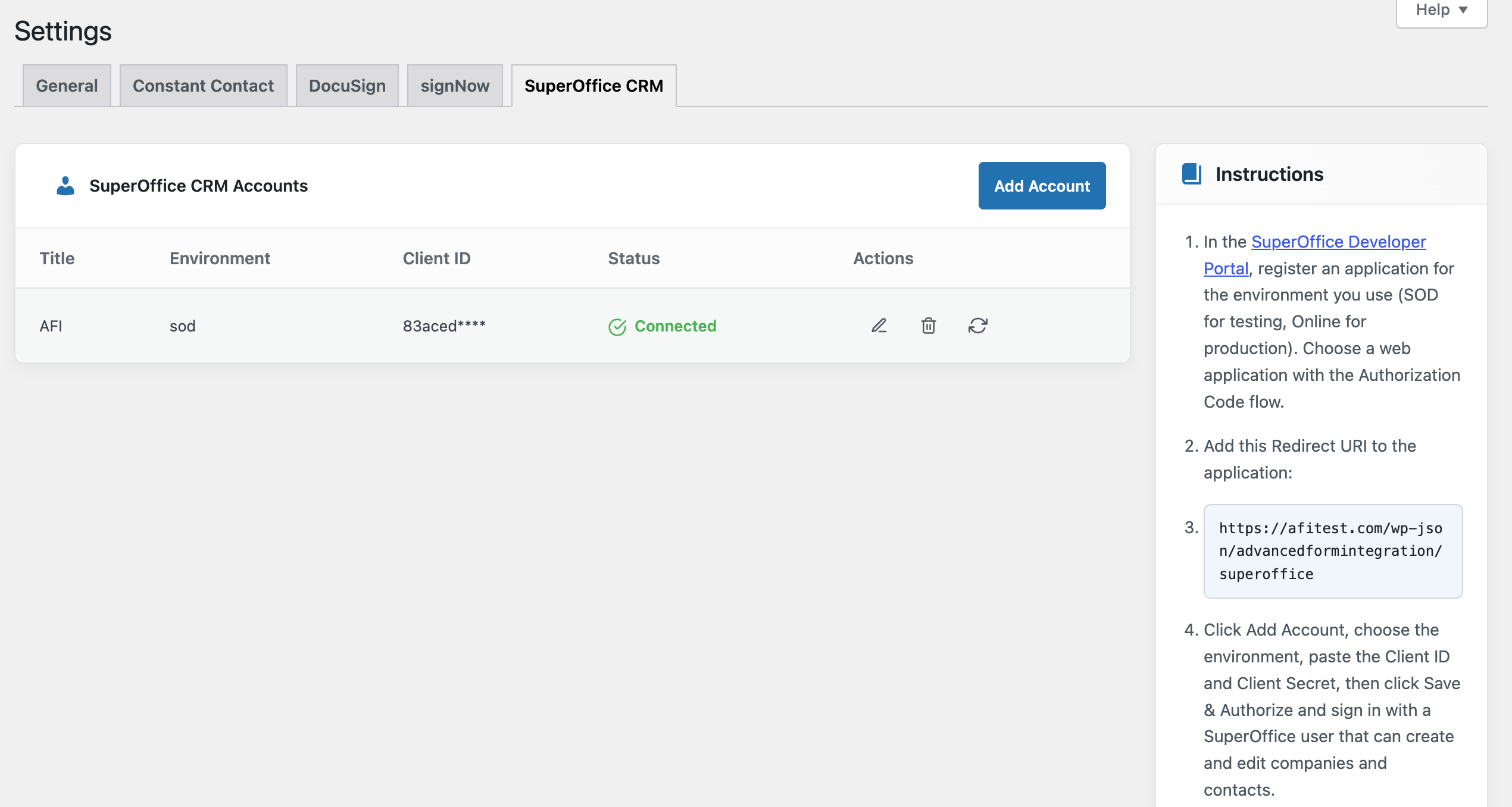
- In WordPress, go to AFI > Settings and open the SuperOffice CRM tab.
- The Instructions box shows your site’s Redirect URI. It looks like
https://your-site.com/wp-json/advancedformintegration/superoffice. Copy it exactly.
Step 2: Register an application in the SuperOffice Developer Portal
- Open the SuperOffice Developer Portal and sign in.
- Register a new application for the environment you use: SOD for development and testing, Online for production. Applications are separate per environment.
- Choose a web application that uses the Authorization Code flow.
- Add the Redirect URI you copied from AFI.
- Copy the Client ID (application ID) and Client Secret.
SuperOffice reviews new applications before they can be used in Production. Test on SOD first, then request production access for the application.
Step 3: Add the account in AFI and authorize
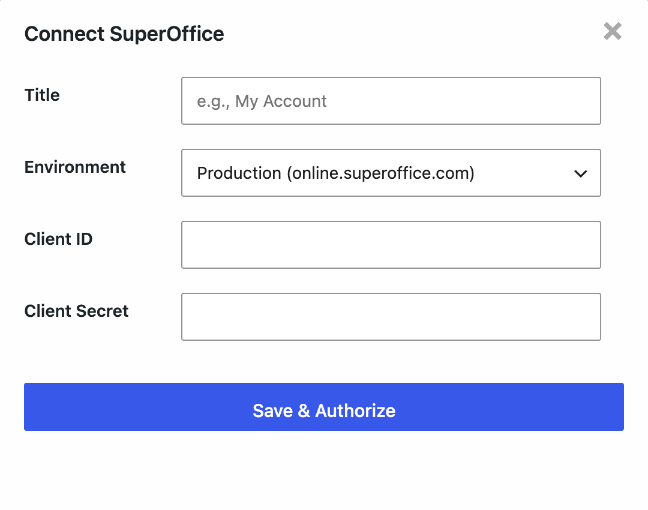
- Back on AFI > Settings > SuperOffice CRM, click Add Account.
- Enter a Title, then choose the Environment: Production (online.superoffice.com), Development / SOD (sod.superoffice.com) or Stage (qaonline.superoffice.com). It must match where the application is registered.
- Paste the Client ID and Client Secret.
- Click Save & Authorize, sign in to SuperOffice with the user AFI should act as, and approve access.
- The window closes and the account shows Connected. Use the refresh icon in the account row to test the connection at any time.
How to Create the Integration
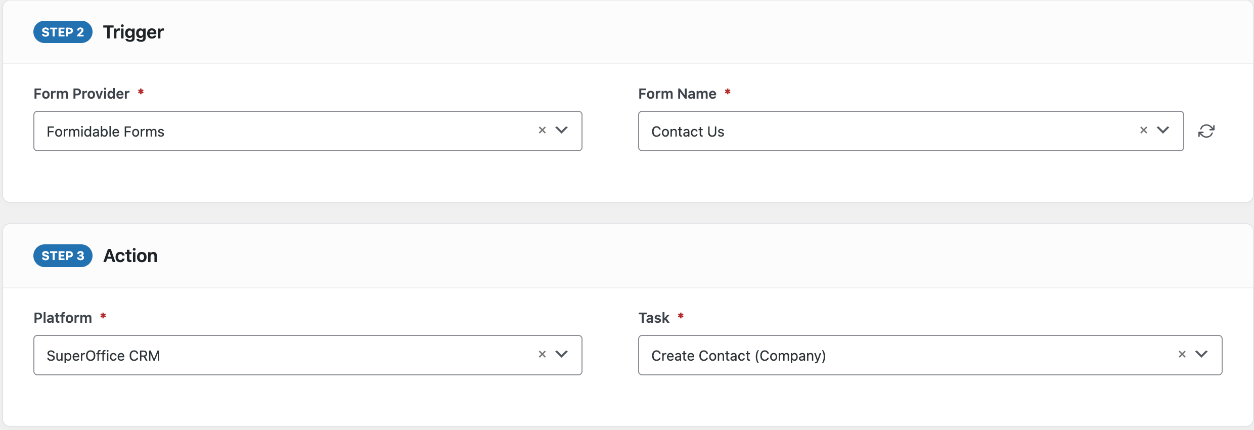
- Go to AFI > Add New.
- Under Trigger, select your form plugin and the specific form.
- Under Action, select SuperOffice CRM in the Platform dropdown. Pro users can select SuperOffice CRM [PRO].
- Choose the Task. The free version has Create Contact (Company).
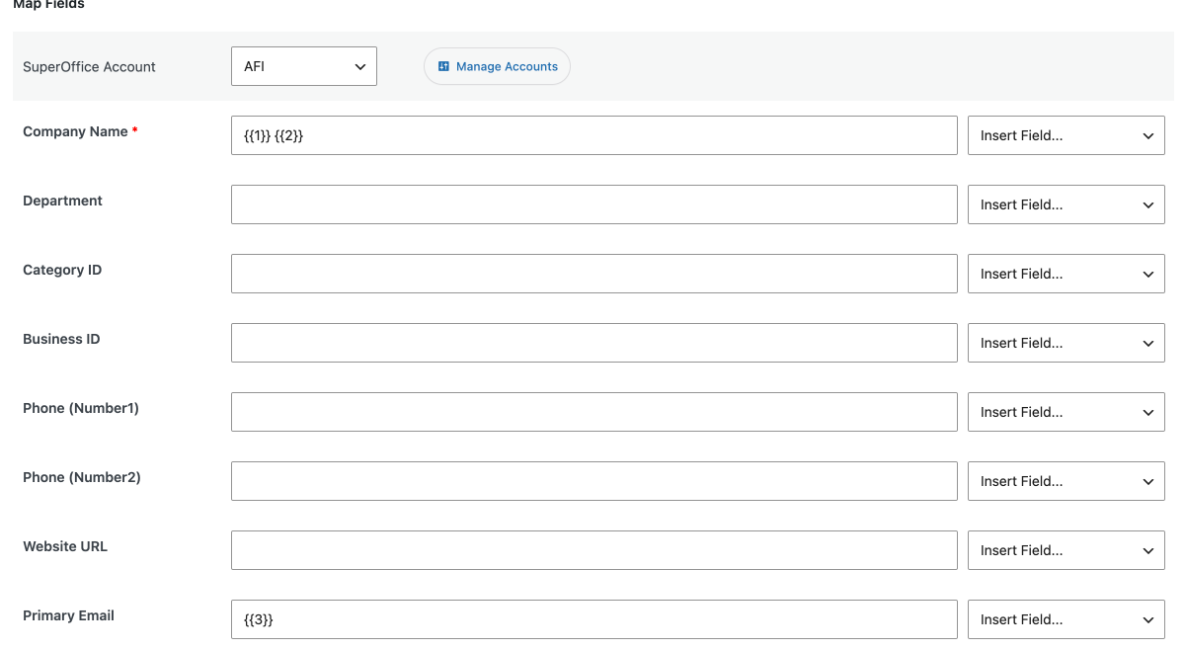
- Select your SuperOffice Account.
- Map Company Name (required) and any other fields with the Insert Field… dropdowns. You can combine static text and form fields.
- Click Save Integration and submit a test entry from the front end.
Field Mapping
Company (Contact) fields
| Field | Description |
|---|---|
| Company Name (required) | The company name. Submissions without one are skipped. |
| Department | Department name on the company card. |
| Category ID, Business ID | Numeric IDs of SuperOffice list items (Category and Business lists). Find them in SuperOffice Settings and maintenance > Lists. |
| Phone (Number1), Phone (Number2) | Company number fields. |
| Website URL | The company’s website. |
| Primary Email, Email Description | The company email address and its description. |
| Primary Phone, Phone Description | The main phone number and its description. |
| Address Line 1, Address Line 2, City, Postal Code | Postal address. |
| Country ID | Numeric SuperOffice country ID, for example 826 for the United Kingdom or 578 for Norway. |
| Description | Free text on the company card, for example the form’s message. |
| Contact ID (AFI Pro) | ID of an existing company to update instead of creating one. |
| Owner Associate ID (AFI Pro) | ID of the SuperOffice user (associate) who owns the company. Leave empty to use SuperOffice’s default. |
| Organization Number (AFI Pro) | Company registration number. Also used for matching existing companies. |
Person fields (AFI Pro)
| Field | Description |
|---|---|
| Person ID | ID of an existing person to update. |
| Contact ID | Company the person belongs to. Required for Create or Update Person when creating; not shown in the combined task, where the company from the same submission is used. |
| First Name, Middle Name, Last Name | The person’s name. |
| Job Title, Salutation, Position ID | Title text, salutation (for example Ms) and the numeric ID from the Position list. |
| Mobile Phone, Primary Phone, Phone Description | Phone numbers. |
| Primary Email, Email Description | The person’s email. Also used to match existing persons. |
Numeric ID fields are converted to numbers automatically, and empty answers are never sent, so they don’t clear values already stored in SuperOffice.
Pro: Update Existing Records Instead of Creating Duplicates
With SuperOffice CRM [PRO], the company and person tasks have Update Existing Contact and Update Existing Person settings. When a match is found, AFI updates that record; otherwise it creates a new one.
![SuperOffice CRM [PRO] Create or Update Company and Person task with Smart match selected for company and person](https://advancedformintegration.com/wp-content/uploads/2026/10/afi-superoffice-pro-matching.png)
| Company matching | How it finds an existing company |
|---|---|
| Disabled | Always creates a new company, unless Contact ID is mapped. |
| Smart match (recommended) | Uses the Organization Number when given. Otherwise a company with the same name must also share the email domain (company or person email, free mail providers such as Gmail are ignored), postcode or phone number. If there is no single clear match, a new company is created. |
| Company Name / Organization Number / Company Email | Matches on that one value. |
| Company Name or Organization Number; Organization Number, Email or Company Name | Tries each value in turn. |
| Person matching | How it finds an existing person |
|---|---|
| Disabled | Always creates a new person, unless Person ID is mapped. |
| Smart match (recommended) | Email first, then First + Last Name within the company. |
| Email Address / Name within Company / Email or Name within Company | Matches on those values only. |
Updates only change the fields you mapped and that have a value. AFI sends them as a partial update (JSON merge patch), so everything else on the company or person card, such as other phone numbers, interests and user-defined fields, stays as it is.
Create or Update Company and Person
This task shows every company field with a Company: prefix and every person field with a Person: prefix. AFI creates or updates the company first, then creates or updates the person and links them to that company.
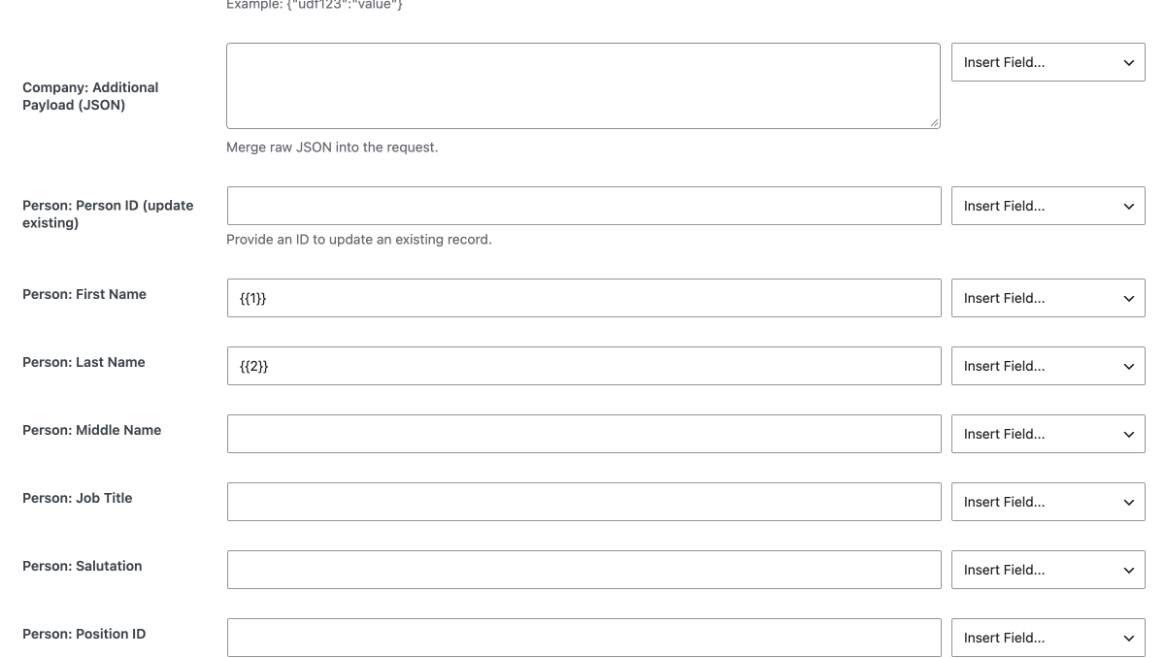
User-defined fields and Additional Payload (JSON)
- User Defined Fields (JSON): a JSON object of user-defined field keys and values, for example
{"SuperOffice:1":"{{Budget}}"}. Use the field’s ProgId from SuperOffice Settings and maintenance; form field tags can be used inside the values. - Additional Payload (JSON): any other SuperOffice API properties to merge into the request, for advanced cases not covered by the field list.
Both boxes must contain valid JSON after the form values are inserted; if not, AFI ignores that box and sends the rest of the record. Avoid mapping answers that may contain double quotes into them.
Troubleshooting
“Connected, but SuperOffice did not return the tenant REST URL”
The user you signed in with may not have access to a tenant in the selected environment. Sign in with a user from the right tenant, or switch between Production and SOD to match the application.
Sign-in fails or shows an invalid redirect URI
Check that the Redirect URI in the Developer Portal matches AFI’s exactly (http vs https, www, trailing slash), and that the application is registered for the same environment you chose in AFI. Production use also needs SuperOffice’s approval of the application.
The account shows “Connection broken — Reconnect”
The refresh token was revoked, for example because the application’s consent was removed in SuperOffice or the client secret changed. Click Reconnect and sign in again; integrations keep their settings.
Duplicate companies are created
Use AFI Pro with Update Existing Contact set to Smart match, and map an Organization Number or an email so AFI has something reliable to match on.
A record is not created or updated
Open AFI > Log and check the entry for your submission. SuperOffice returns a clear error for invalid IDs (for example a Category ID or Country ID that doesn’t exist) or missing rights. No entry at all means the trigger didn’t fire, or Company Name was empty, so AFI skipped the request.