 AFI
AFI
Snov.io
Snov.io is a lead generation and cold outreach platform with email finding, verification, and drip campaigns. Advanced Form Integration adds contacts to your Snov.io lists from WordPress form submissions.
What you’ll need
- An active Snov.io account.
- Your Snov.io API credentials (see below).
- The Advanced Form Integration plugin installed and activated.
Get your Snov.io API credentials
- Sign in to your Snov.io account.
- Go to Settings → API and copy your Client ID and Client Secret.
- In WordPress, go to AFI → Settings → Snov.io.
- Click Add Account, enter both values, and give the account a name.
- Click Save.
Snov.io uses OAuth2 client credentials. AFI exchanges the Client ID and Secret for an access token automatically.
Create the integration
- Go to AFI → Add New.
- Give the integration a name, for example
Form to Snov.io. - Under Trigger, pick the form plugin and the specific form.
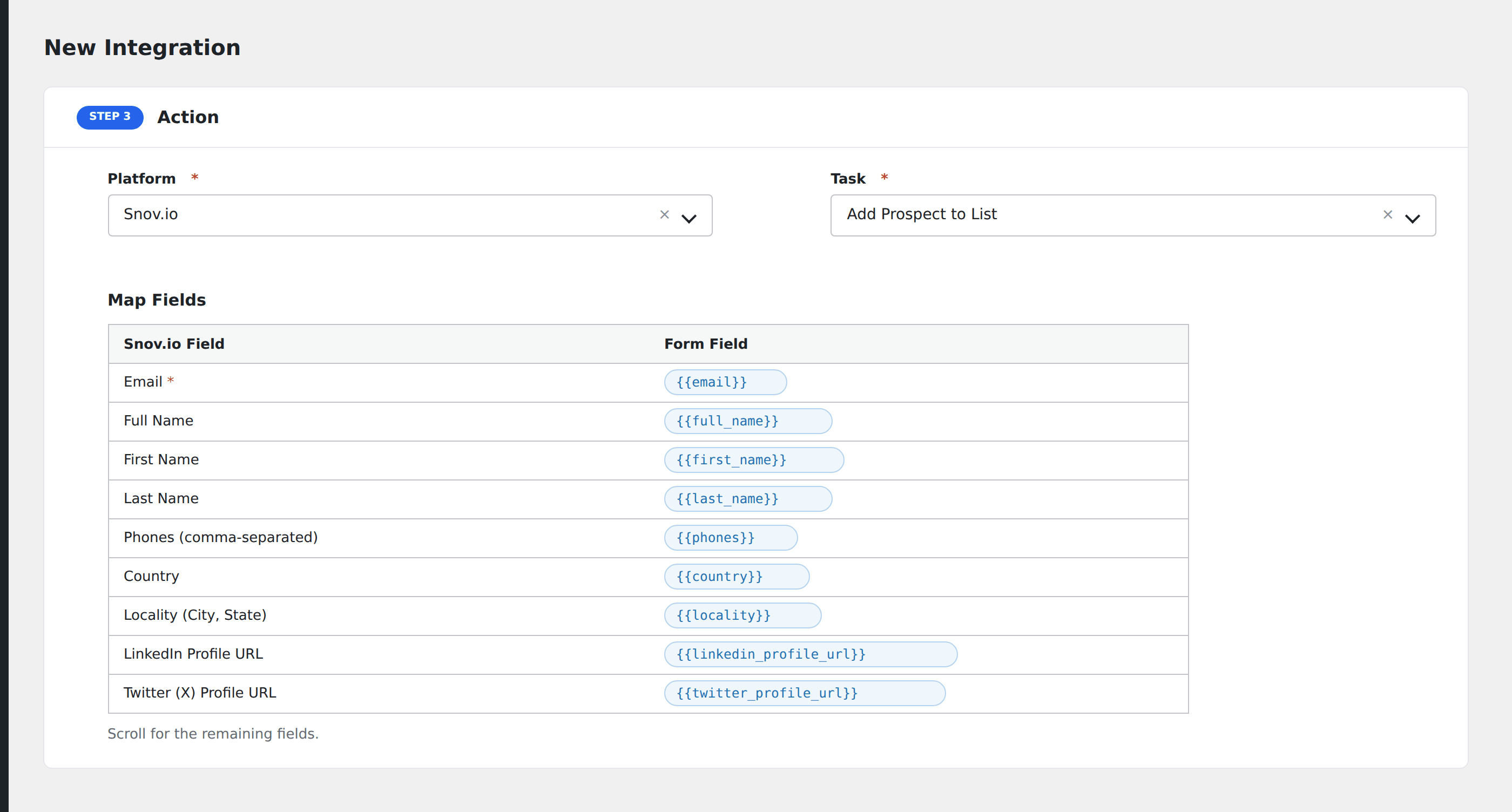
- Under Action → Platform, select Snov.io.
- In Task, choose Add Contact to List.
- Pick the saved account.
- Map your form fields onto the fields listed below.
- Optional: open Conditional Logic to limit which submissions are sent.
- Click Save Integration.
Tasks supported
Add Contact to List
Adds a contact to a selected Snov.io list via the API.
| Field | Field key | Required | Notes |
|---|---|---|---|
email |
Yes | ||
| First Name | first_name |
No | |
| Last Name | last_name |
No | |
| Phones | phones |
No | Comma-separated phone numbers |
| List ID | listId |
Yes | Selected from dropdown |
Pro features
The Pro integration extends the free version with additional capabilities. Pro uses the same Snov.io connection.
Feature comparison
| Feature | Free | Pro |
|---|---|---|
| Add contact to list | ✅ | ✅ |
| Standard fields | ✅ | ✅ |
| Custom fields | No | ✅ |
Conditional logic example
Only send data to Snov.io when specific conditions are met. For example, add a condition on a form field to control which submissions are forwarded.
Troubleshooting
Nothing arrives in Snov.io
Open AFI → Log and find the most recent entry. AFI stores the request URL, body, and raw response.
API credentials rejected
Verify your credentials in your Snov.io account settings. If they were regenerated, update them in AFI → Settings → Snov.io.