 AFI
AFI
Freshworks CRM
Overview
Freshworks CRM (originally Freshsales) is Freshworks’ sales-focused CRM with Accounts, Contacts, Deals, and built-in email and call tracking. AFI’s integration creates an Account, Contact, and Deal record in one go from each matching form submission, and can also add the contact to a Freshworks marketing list. Connection is via Subdomain + API Token from your Freshworks user profile.
Supported actions
- Create New Account, Contact, Deal (Free): combined task that creates an Account, a Contact, and a Deal in one call, with the records linked together. Either fill in only the entity types you need (e.g. Contact-only) or fill in all three to create the full triple.
AFI Pro adds richer field mapping for Freshworks CRM. More sender-plugin field types (phone, date, dropdown, hidden, custom fields) are exposed in the mapping panel, and Freshworks custom fields on Account / Contact / Deal surface alongside the standard ones.
Quick reference
| Need to… | Do this |
|---|---|
| Create just a Contact | Map Contact fields only; leave Account and Deal blank. |
| Create the full Account + Contact + Deal triple | Fill in fields under each entity; the records are linked automatically on save. |
| Add a contact to a marketing list | Enter the List ID in the List field at the bottom of the mapping; list IDs are shown next to each list in Freshworks. |
| Map custom fields | On Pro, Freshworks custom fields appear in the mapping dropdown automatically; refresh the dropdown after adding new fields in Freshworks. |
| Re-pull dropdowns | Click the refresh icon next to any dropdown in AFI to re-fetch from Freshworks. |
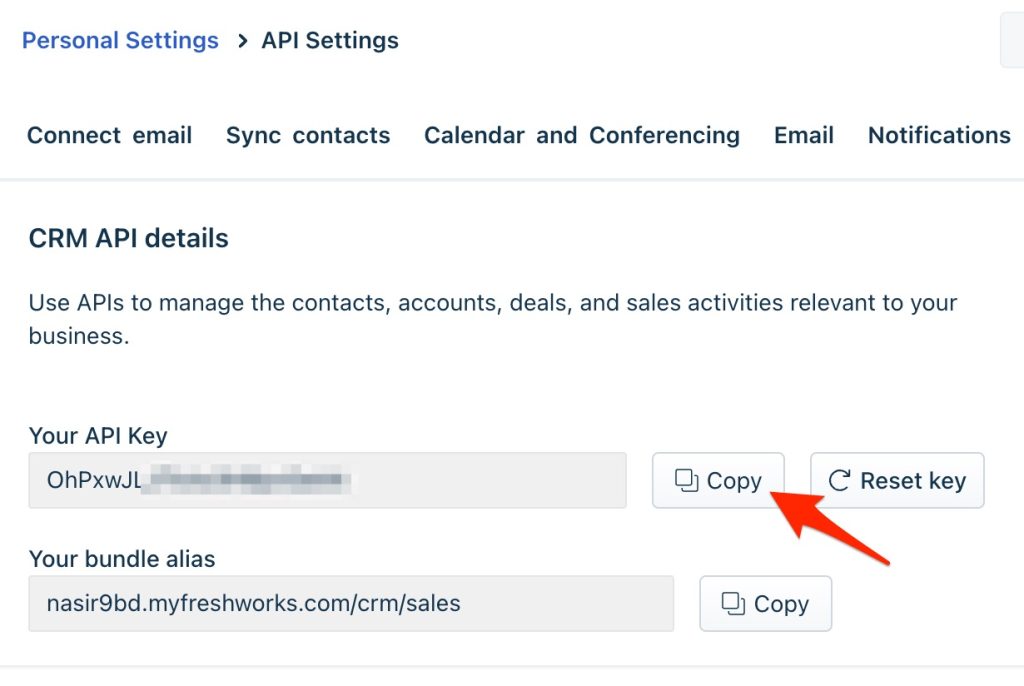
Heads up: the Freshworks subdomain is the part before .myfreshworks.com in your account URL (e.g. afi for https://afi.myfreshworks.com). The API Token is in your Freshworks profile under Personal Settings > API Settings. The full setup walkthrough (with screenshots) is below.
Obtaining Freshworks CRM API Token
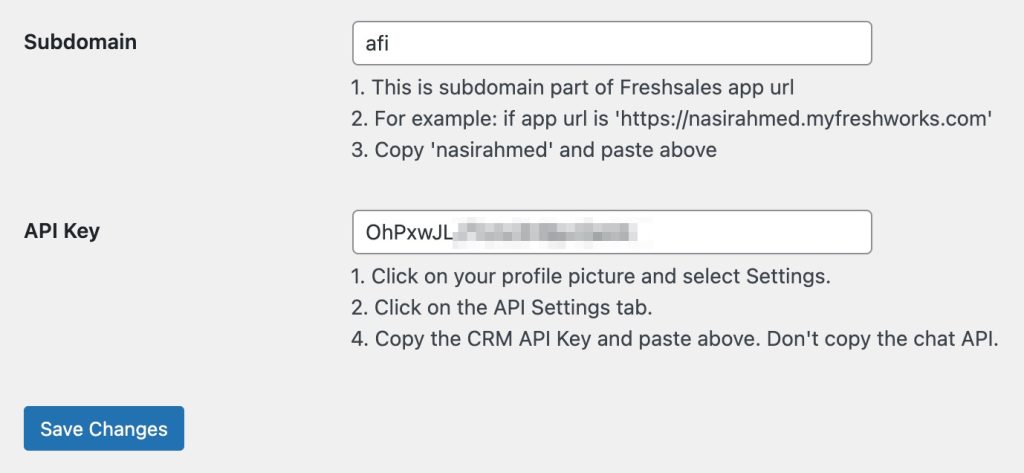
First, save the subdomain and API key in the plugin settings.
- Go to the WordPress admin area, click on AFI, then go to the Settings menu, and turn on the Freshworks CRM option. Finally, click the save button.
- Log in to your CRM account and click your profile icon in the top right corner.
- Go to Personal Settings and then API.
- You’ll see the personal API token or generate a new token if needed. Copy the token.
- Go to the Freshworks CRM tab in AFI Settings.
- Save the API Token.
- Save the subdomain as well. if app url is ‘https://afi.myfreshworks.com’ then afi is the subdomain.
Create A New Integration
After setting up the API connection, you can create a new integration. Click on “Add New” under the AFI menu, and a New Integration page will appear.
Title
A default title will be auto-generated. You can rename it to something memorable & related to the task. It will help you to quickly recognize the correct one when there is multiple integrations setup.
Trigger
Select Correct Form in Form Provider drop-down. Desired Form plugin must be installed and activated otherwise you won’t see it listed. After selecting Correct Form, all forms built under that Form will be fetched and auto-populated in the Form/Task Name drop-down. Select the form that you want to integrate.
Action
Select Freshworks CRM in the platform drop-down.
Map Fields
After selecting the task all account, contact, and deal fields will appear altogether. Now fill in the fields of the item that you want to send. For example, if you need to create the contact only, just fill the contact fields and leave the other fields blank. If you need a contact and a deal, fill in both fields. The deal will be associated with the contact.
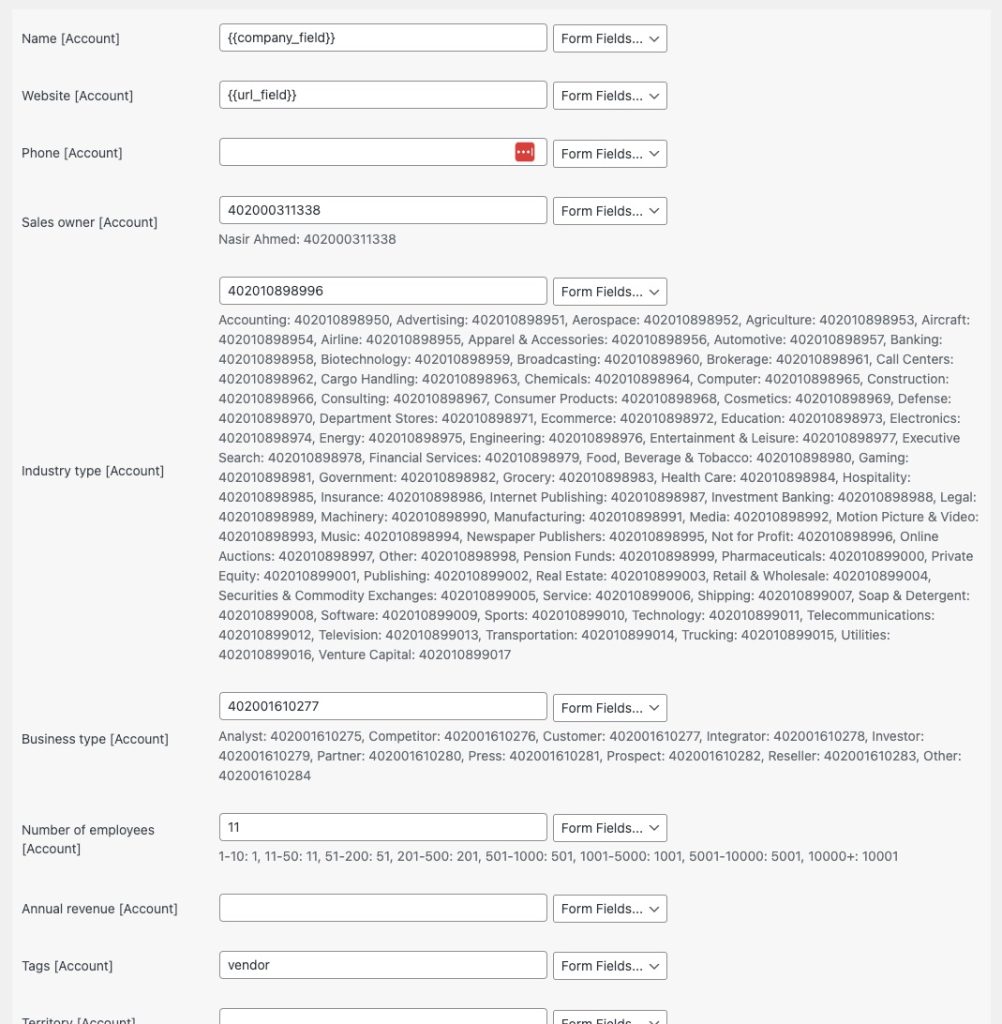
Account
To create or update an account, it is essential to map the fields from your form to the corresponding CRM account fields. This ensures that the account information is correctly captured and stored.
Account Name is the name of the organization or entity. This is a required field and must be populated with the information from the form. It serves as the primary identifier for the account.
Contact
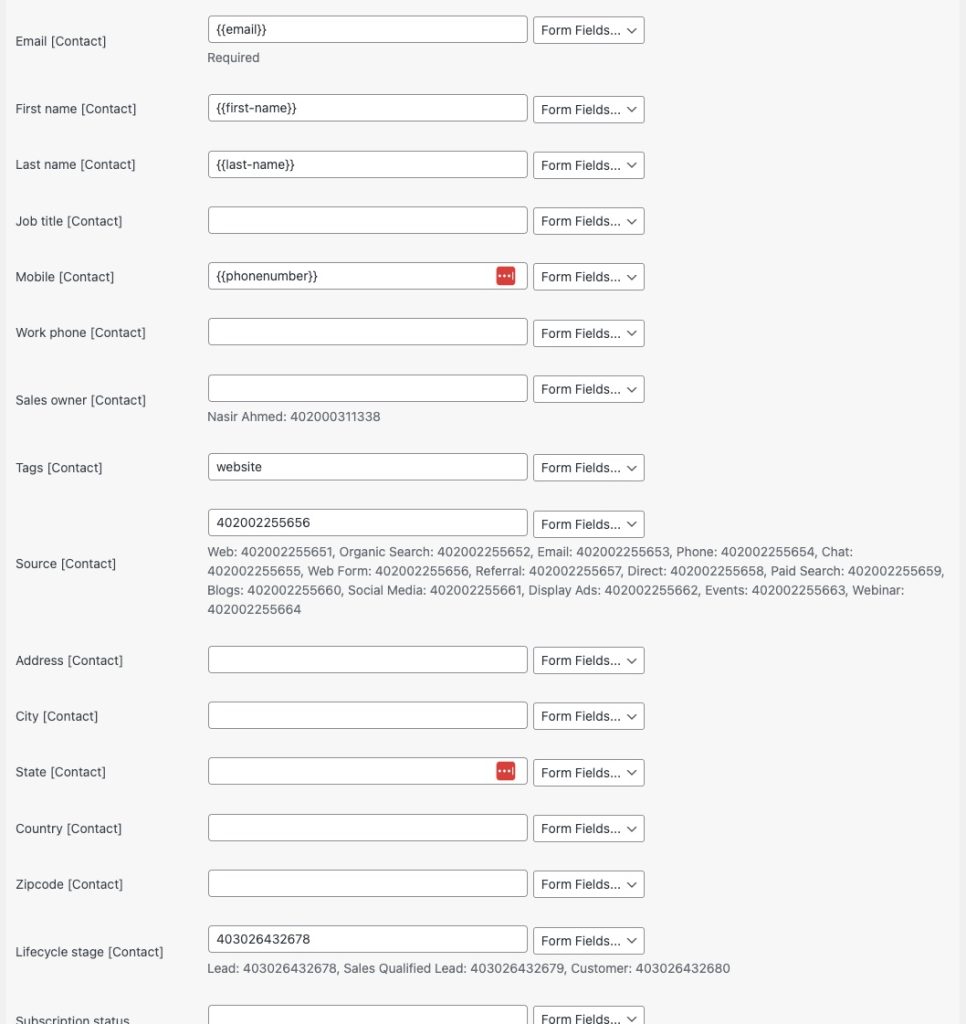
Ensure that your form captures all the required contact information. Map these fields from the form to the corresponding fields in your Freshworks CRM, with a focus on the Email Address to ensure that it is correctly captured.
Deal
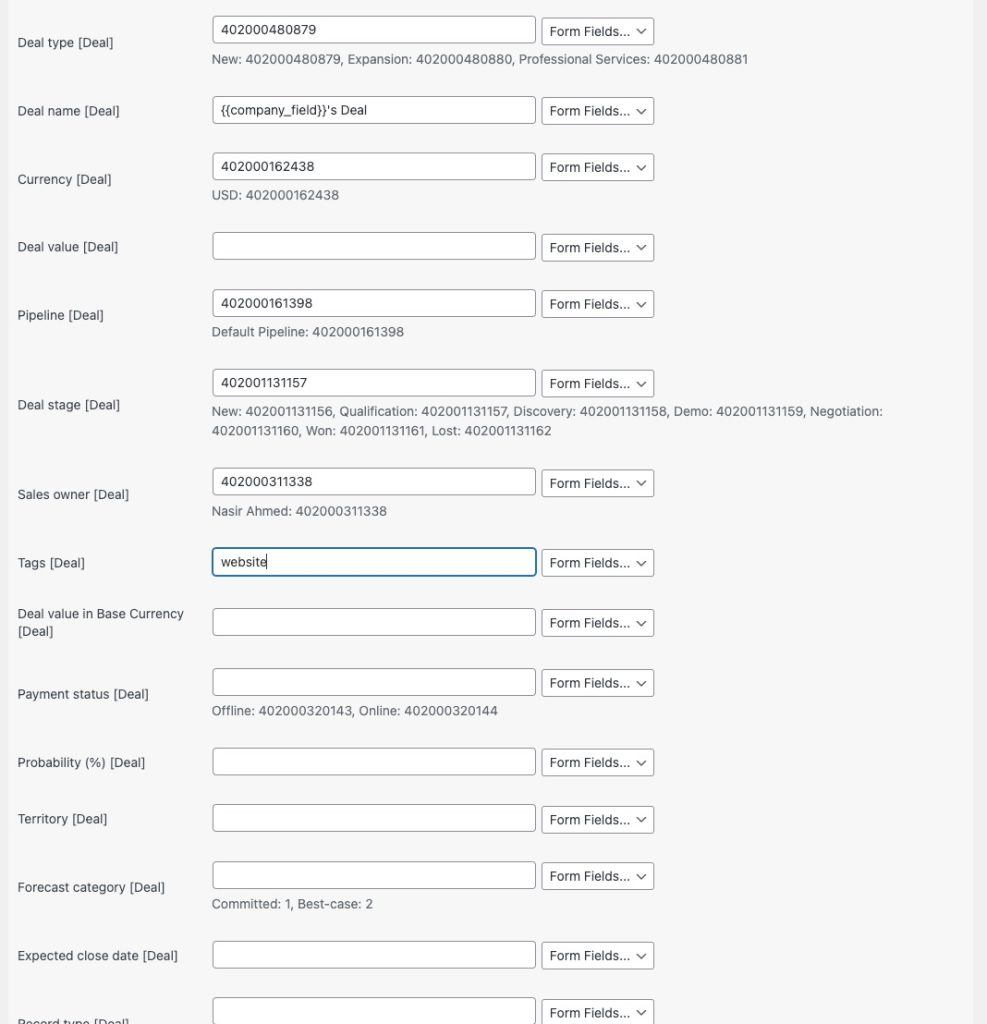
Map the fields from your form to the corresponding deal fields. If you fill in the account and/or contact fields along with the deal, the deal will automatically be linked to those entities.
Marketing List
You can add a contact to a marketing list easily. First, fill in the contact details, then go to the List option. At the bottom of the field, you’ll see all the available lists along with their IDs. Just enter the ID of the list you want in the input box.

Common issues & fixes
Most Freshworks CRM issues are credential or required-field related. Work through these in order:
- Match the subdomain exactly. Enter just the subdomain (e.g.
afi), not the full URL. The plugin appends .myfreshworks.com automatically. - Regenerate the API Token. If the token was rotated in Freshworks, paste the new value in AFI > Settings > Freshworks CRM and Save.
- Map the Email Address field on Contact. Freshworks deduplicates contacts by email; submissions without an email fail.
- Map the Account Name field if you’re creating an Account. Account Name is mandatory on the Account entity; map a form value or a smart-tag default.
Specific symptoms
- 401 Unauthorized. API Token invalid or subdomain wrong; re-check both in Freshworks > Personal Settings > API Settings.
- Validation error on save. A required field on the target entity is blank in the mapping; the AFI Log shows which field.
- Contact created but no Deal. Deal Name and Pipeline are required for a Deal; without them the Deal portion silently fails.
- List ID not adding contact to list. Confirm the list ID matches a marketing list in Freshworks; sales lists are different and aren’t addressable via this field.
Notes & caveats
- One combined task. The integration writes Account + Contact + Deal in one call; you don’t need separate integrations for each entity.
- API rate limits. Freshworks caps API calls per minute per account; enable AFI’s Job Queue (Settings > General) on high-volume forms.
- Region-specific URLs. Freshworks runs on regional data centres; the subdomain you copy already reflects the correct region, so no separate region selector is needed.