 AFI
AFI
CompanyHub
CompanyHub is a highly customizable CRM popular with sales teams that need fine-grained control over fields and workflows. Advanced Form Integration sends form submissions to CompanyHub as new contacts.
What you’ll need
- An active CompanyHub account.
- Your CompanyHub subdomain (the part before
.companyhub.comin your dashboard URL). - A CompanyHub API token (Settings → Integrations → Generate API Key).
- The Advanced Form Integration plugin installed and activated.
Connect CompanyHub to AFI
- In WordPress, go to AFI → Settings.
- Enable CompanyHub in the platforms list and click Save Changes.
- A new CompanyHub tab appears at the top. Open it.
- Enter the subdomain and API token.
- Click Save Changes.
Create the integration
- Go to AFI → Add New.
- Configure the trigger.
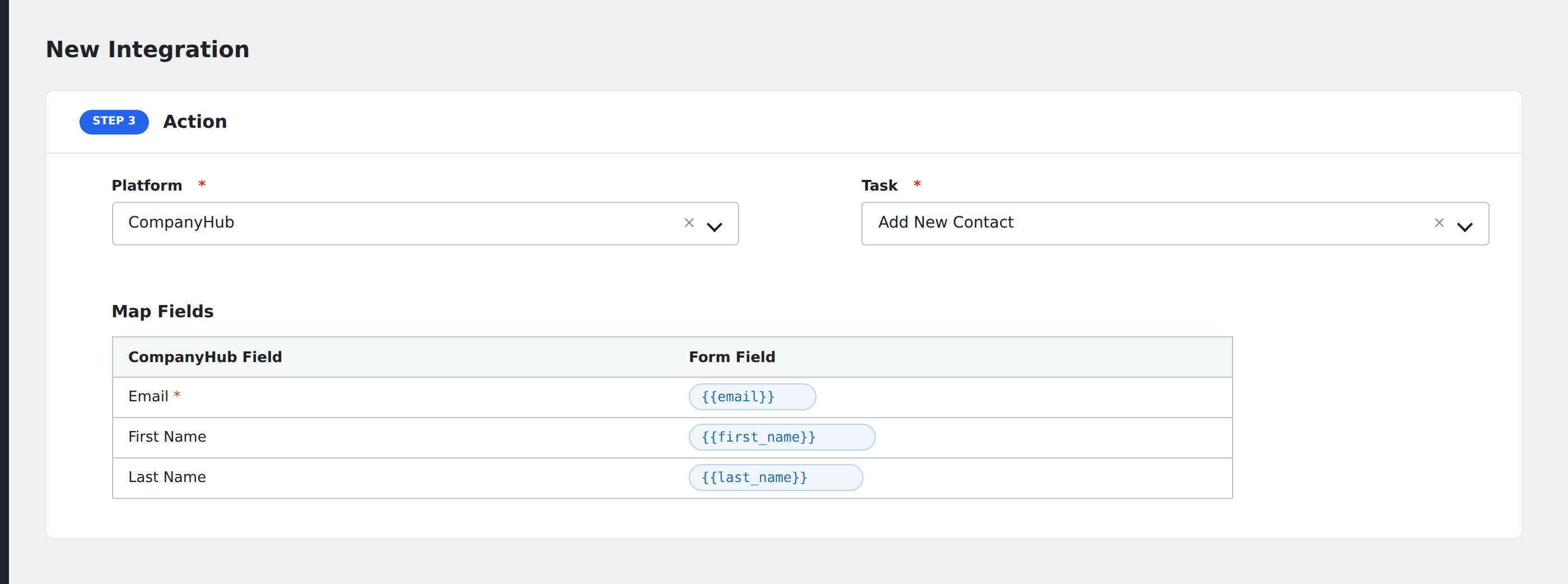
- In Action → Platform, select CompanyHub.
- In Task, choose Add New Contact.
- Map the form fields:
- Email (required).
- First Name, Last Name.
- Phone, Mobile.
- Company Name, Job Title.
- Address, City, State, Country, Zip.
- Custom fields by name (CompanyHub’s main strength is its custom fields; match the field name as configured in CompanyHub).
- Optional: configure Conditional Logic.
- Click Save Integration.
Tasks supported
Add New Contact
Creates a new contact in CompanyHub. Existing contacts with the same email won’t be updated. CompanyHub creates a duplicate. To prevent this, use conditional logic to skip submissions from known emails.
Conditional logic example
Assign the new contact to a specific sales rep based on the form’s region field: North America submissions to one rep, EMEA to another. Use one integration per region with a matching condition on each.
Troubleshooting
Integration doesn’t fire
Open AFI → Log and find the most recent entry for this integration. The log shows the request payload sent to CompanyHub and the response received, usually pointing straight at the cause.
“Invalid subdomain” or 404
The subdomain is the part before .companyhub.com, with no protocol or trailing slash. If your dashboard URL is https://acmecorp.companyhub.com, enter just acmecorp.
Email field not mapped
CompanyHub requires email on every contact. If the email field isn’t mapped or the form submission has no email value, the API call fails. Make sure your form has a required email field.