 AFI
AFI
CiviCRM
CiviCRM is an open-source CRM widely used by non-profits, associations, and political campaigns for member, donor, and supporter management. Advanced Form Integration creates new CiviCRM contacts from form submissions and assigns them to chosen groups.
Because CiviCRM runs on the same WordPress install, no API key or external auth is needed. AFI talks to CiviCRM directly through its in-process API.
What you’ll need
- The CiviCRM plugin installed and activated on the same WordPress site.
- The Advanced Form Integration plugin installed and activated.
Connect CiviCRM to AFI
- In WordPress, go to AFI → Settings.
- Enable CiviCRM. No additional credentials required: AFI detects the locally installed CiviCRM automatically.
Create the integration
- Go to AFI → Add New.
- Configure the trigger.
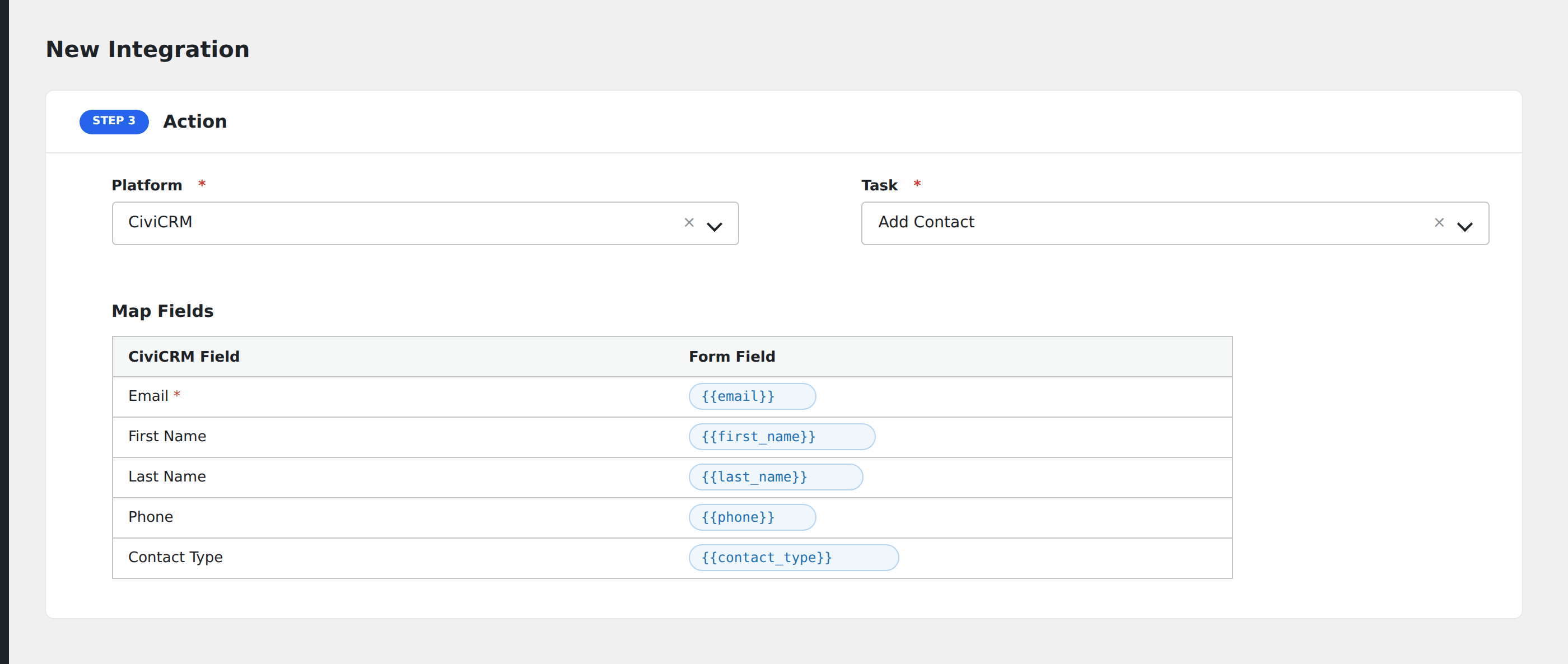
- In Action → Platform, select CiviCRM.
- In Task, choose Add Contact.
- Pick the target CiviCRM Group (optional): AFI loads groups from your CiviCRM install.
- Map the form fields:
- Email (required), First Name, Last Name, Phone.
- Contact Type (Individual / Organization / Household).
- Any CiviCRM custom fields you’ve defined on the contact entity.
- Optional: configure Conditional Logic.
- Click Save Integration.
Tasks supported
Add Contact
Creates a new CiviCRM contact and (optionally) assigns it to the chosen group. If the email already exists in CiviCRM, the contact is updated rather than duplicated: CiviCRM handles the de-dup automatically through its built-in matching rules.
Conditional logic example
Add the contact to your “Volunteers” group only when the form’s interested_in_volunteering checkbox is checked. Standard newsletter signups go into the “Subscribers” group via a separate integration.
Troubleshooting
Integration doesn’t fire
Open AFI → Log and find the most recent entry. The log shows the request payload sent to CiviCRM and the response received, usually pointing straight at the cause.
Contact not added
CiviCRM enforces required-field rules on each contact type. If you set Contact Type to “Organization” but didn’t map an Organization Name, CiviCRM rejects the submission. Check the AFI log for the specific validation error.
Custom field mapping issue
CiviCRM custom fields use IDs like custom_42. AFI’s mapping screen shows them by friendly name but stores the ID. If a custom field was renamed in CiviCRM, re-pick it in the integration to refresh.