 AFI
AFI
FormCraft 3
FormCraft 3 is a premium WordPress form builder by ByteCanvas. Advanced Form Integration captures FormCraft 3 form submissions and routes the data to any of 200+ destinations.
What you’ll need
- The FormCraft 3 plugin installed and activated.
- The Advanced Form Integration plugin installed and activated.
- A FormCraft form built and published.
Supported form fields
The free version of AFI supports one-line text and email field types only. To capture all FormCraft field types (dropdowns, checkboxes, radio buttons, textareas, dates, file uploads, matrix fields, calculations, signatures, and more), you need AFI Pro (Professional plan).
| Field type | Free | Pro |
|---|---|---|
| One-line text | ✅ | ✅ |
| ✅ | ✅ | |
| All other field types | No | ✅ |
| Entry ID | No | ✅ |
| Form ID | ✅ | ✅ |
| Special tags (user IP, submission date, page URL, etc.) | ✅ | ✅ |
Create the integration
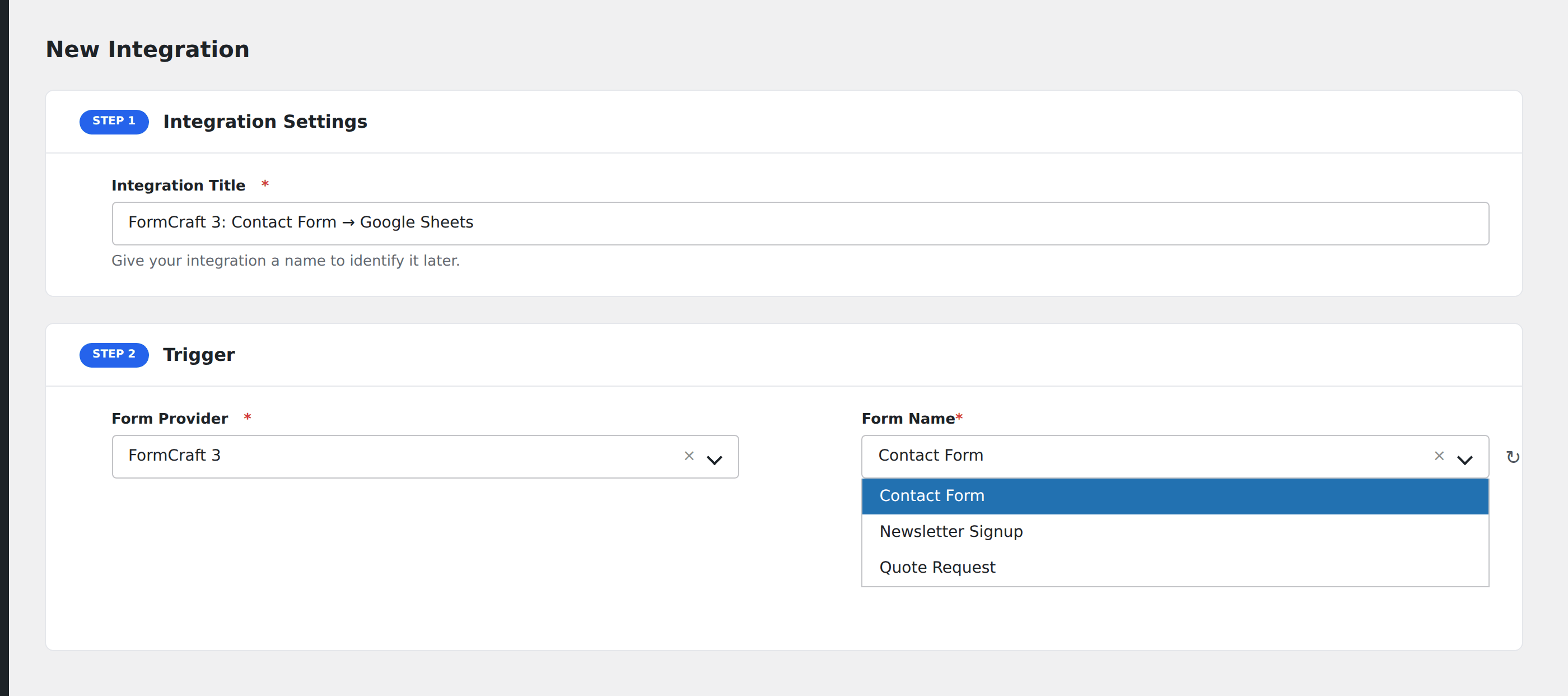
- Go to WP Admin → AFI → Add New.
- Enter an Integration Title.
- In Trigger → Form/Data Provider, select FormCraft 3.
- In Form/Task Name, choose the form to listen on.
- In Action → Platform, pick the destination and complete the field mapping.
- Optional: configure Conditional Logic.
- Click Save Integration.
Data captured on submission
When a FormCraft form is submitted, AFI captures the following:
- All field values from the submitted form (subject to the field-type limits above)
- Form ID of the submitted form
- Entry ID (Pro only) assigned by FormCraft
- Submission date and User IP
- Special tags such as page URL, post title, and user agent
For file upload fields, AFI captures the file URL. For matrix fields, AFI captures each question-answer pair separated by line breaks.
Troubleshooting
Fields missing from the mapping table
If only text and email fields appear in the field mapping section, you are using the free version of AFI. Upgrade to AFI Pro (Professional plan) to unlock all FormCraft field types.
Form not appearing in the dropdown
Make sure FormCraft 3 is installed and activated, and that at least one form has been created and saved.
Nothing arrives at the destination
Check AFI → Log for the most recent entries. The log shows the exact data sent and the response received from the destination platform.