 AFI
AFI
Cakemail
Cakemail is a Canadian email-marketing platform popular with small businesses and agencies. Advanced Form Integration sends form submissions to Cakemail as new contacts on a chosen mailing list.
What you’ll need
- An active Cakemail account.
- Your Cakemail Username and Password (Cakemail uses these to generate a secure access token via API).
- The Advanced Form Integration plugin installed and activated.
Connect Cakemail to AFI
- In WordPress, go to AFI → Settings.
- Enable Cakemail and click Save Changes.
- Open the Cakemail tab.
- Enter your Cakemail Username and Password.
- Click Save Changes. AFI exchanges these for an access token automatically.
Create the integration
- Go to AFI → Add New.
- Configure the trigger.
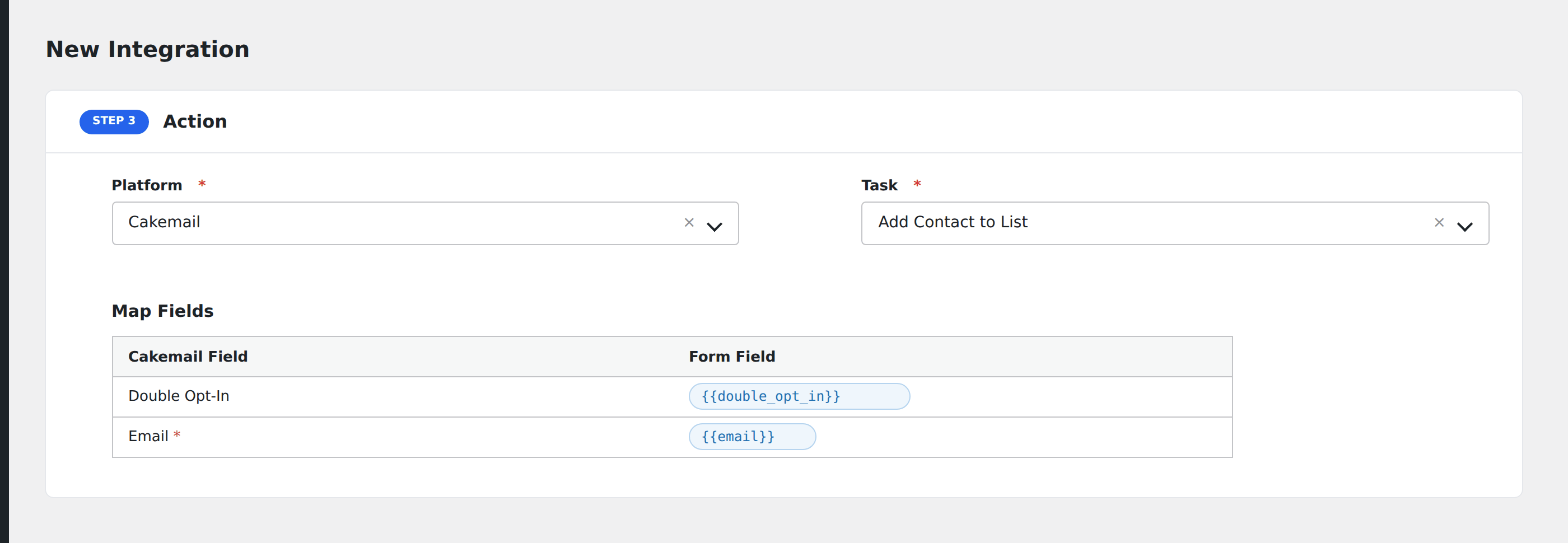
- In Action → Platform, select Cakemail.
- In Task, choose Add Contact to List.
- Pick the Mailing List: AFI loads your lists from Cakemail automatically.
- Map the form fields:
- Email (required).
- Custom contact attributes by field name.
- Tags and Interests (comma-separated).
- Double Opt-in: true to require email confirmation, false to subscribe directly.
- Optional: configure Conditional Logic.
- Click Save Integration.
Tasks supported
Add Contact to List
Adds the form submitter as a contact on the chosen Cakemail list. Custom attributes, tags, and interests are written to the contact record. Double opt-in triggers Cakemail’s confirmation email flow.
Conditional logic example
Subscribe with double opt-in OFF only when the form’s confirmed_signup hidden field is “yes” (e.g., users who arrived through a confirmed referral link). All other signups go through Cakemail’s confirmation flow via a separate integration.
Troubleshooting
Integration doesn’t fire
Open AFI → Log and find the most recent entry. The log shows the request payload sent to Cakemail and the response received, usually pointing straight at the cause.
“Authentication failed”
Cakemail’s username/password auth fails if either credential is wrong. Confirm both in your Cakemail account settings, then re-save in AFI.
Custom attribute rejected
Cakemail attributes must already exist on the chosen list. Add them under Lists → list settings → Custom Fields in Cakemail before mapping in AFI.