 AFI
AFI
Google Drive
Google Drive is Google’s file-storage and collaboration service. Advanced Form Integration creates a new file in your Google Drive for every form submission, useful for archiving submissions as JSON/CSV, saving form-uploaded files, or piping data into a shared team folder.
What you’ll need
- A Google account with Drive access.
- A Google Cloud project with the Drive API enabled and an OAuth client.
- The Advanced Form Integration plugin installed and activated.
Set up the Google Cloud project
Same flow as Google Sheets and Google Calendar. Google requires you to create your own OAuth client.
- Go to the Google Cloud Console.
- Create a new project (or use an existing one).
- APIs & Services → Library → search for Google Drive API → Enable.
- APIs & Services → OAuth consent screen → set up as External (personal) or Internal (Workspace). Add scope
https://www.googleapis.com/auth/drive.file(limited to files created by the app, recommended) ordrive(full access). - APIs & Services → Credentials → Create Credentials → OAuth client ID → Web application.
- Paste the redirect URI shown in AFI → Settings → Google Drive under Authorized redirect URIs.
- Copy the Client ID and Client Secret.
Connect Google Drive to AFI
- In WordPress, go to AFI → Settings → Google Drive.
- Click Add Account, paste the Client ID + Client Secret.
- Click Save & Authorize, sign in to Google, grant access.
- AFI shows Connected.
Create the integration
- Go to AFI → Add New.
- Configure the trigger.
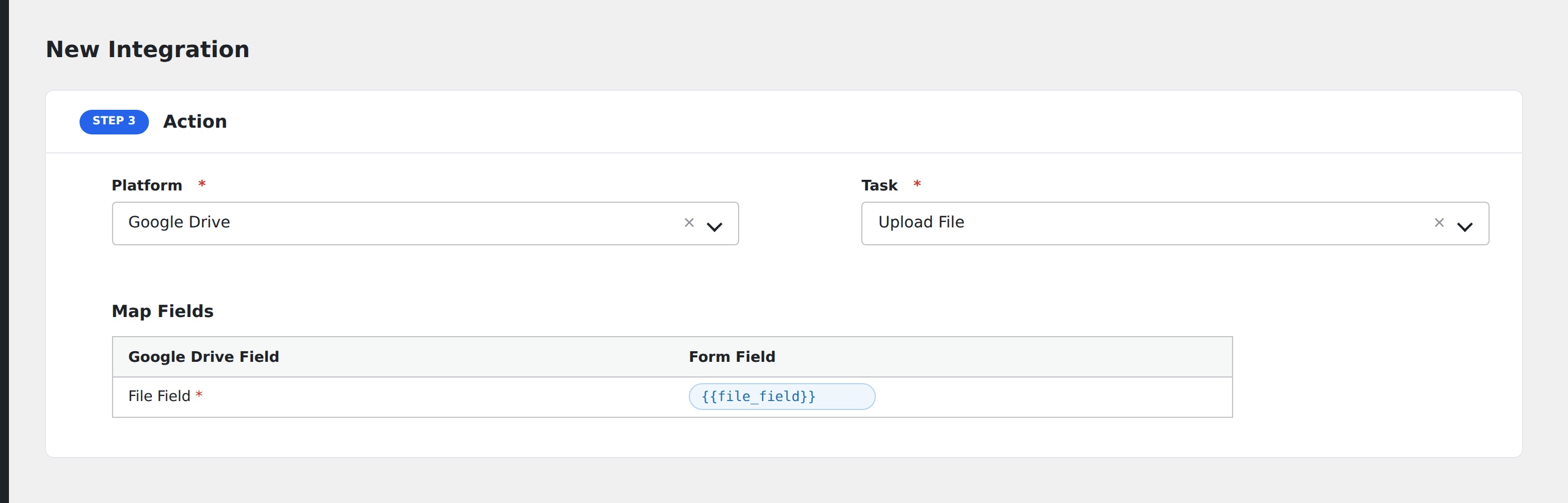
- In Action → Platform, select Google Drive.
- In Task, choose Upload File.
- Map the fields:
- Folder: pick the destination folder from the dropdown (or root).
- File Name: use Mixed Field tokens (e.g.
submission-{entry_id}.json). - File Content: text body to write, or a Mixed Field that includes form data.
- Optional: configure Conditional Logic.
- Click Save Integration.
Use cases
- Submission archive: write each submission as a text or JSON file to
/submissions/. - CSV export: daily roll-up of submissions.
- Form file mirror: pipe uploaded files into a shared Drive folder.
Conditional logic example
Goal: archive only paid orders to Drive, skip free signups.
Open Conditional Logic, add a condition with the order total field, Greater Than, value 0.
Troubleshooting
File not created
invalid_grant: token expired. Re-authorize in AFI Settings.quotaExceeded: Drive storage is full or API quota hit.insufficient permissions: the OAuth scope was too narrow. Usedrive.filefor app-created files ordrivefor full access.
Uploaded files don’t appear
If you used the drive.file scope, AFI can only see/manage files it created. That’s normal. Broader scope (drive) lets you see all files at the cost of asking for full access.
Related docs
- Google Sheets: for spreadsheet-style storage
- Send Contact Form 7 submissions to Google Drive
- Conditional Logic