 AFI
AFI
RomeTheme Form
RomeTheme Form is a form builder that runs inside Elementor. With Advanced Form Integration (AFI), you can send every RomeTheme Form submission to more than 180 platforms automatically. For example, you can add a new row in Google Sheets, subscribe the visitor to a Mailchimp list, or create a contact in a CRM like Pipedrive, all without writing any code.
What You’ll Need
- The RomeTheme Form plugin (with Elementor) installed and active
- At least one published RomeTheme form
- The AFI plugin installed and active. The free version sends name and email fields; AFI Pro unlocks all form fields
- An account on the receiving platform you want to connect
How to Create the Integration
- Log in to your WordPress admin area and go to AFI > Add New.
- A default title is auto-filled in the Integration Title box. Rename it to something recognizable, like “RomeTheme Contact Form to Mailchimp”.
- In Trigger > Form Provider, select RomeTheme Form. If you don’t see it in the dropdown, make sure the RomeTheme Form plugin is active.
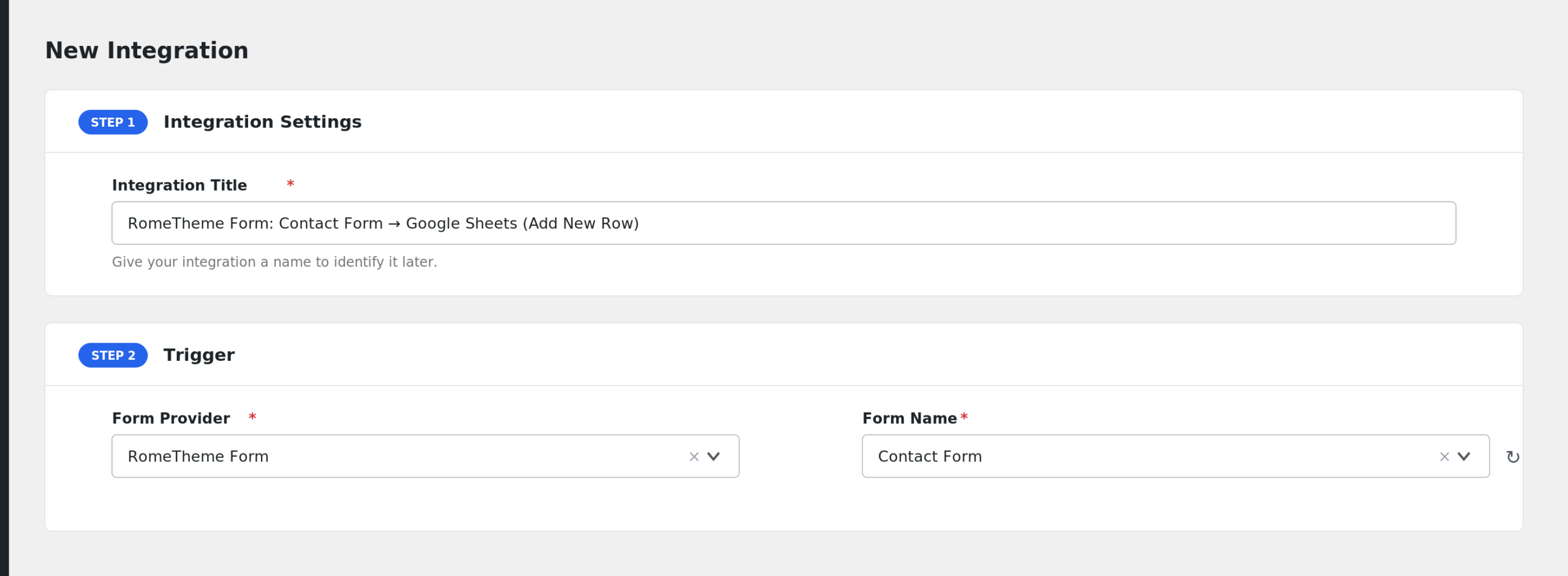
- The Form/Task Name dropdown lists all your published RomeTheme forms. Select the one you want to connect.
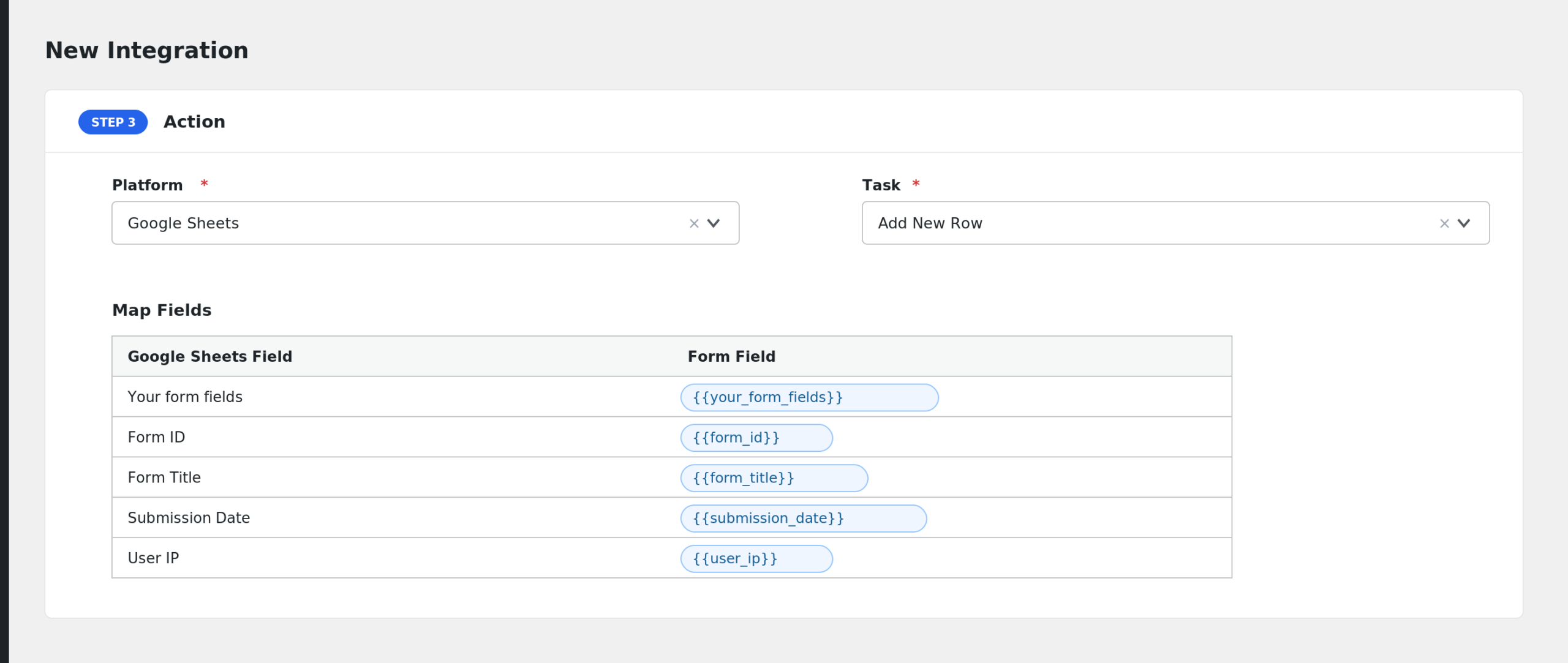
- Under Action, select the receiver platform and task, for example Google Sheets with the Add New Row task.
- Map your form fields to the receiver’s fields. AFI reads the field names straight from your Elementor form widgets.
- Add Conditional Logic if you only want certain submissions to be sent (optional).
- Click Save Integration. You are done. Submit a test entry to confirm everything works.
Fields You Can Send
AFI detects the fields from your form design. Field names come from each widget’s Input Name setting. On top of your own form fields, these are always available:
| Field | Description |
|---|---|
| Your form fields | Every input in the form, listed by its label. Free version: name and email fields only. AFI Pro: all fields |
| Form ID | The ID of the RomeTheme form |
| Form Title | The title of the form |
| Submission Date | Date and time of the submission |
| User IP | The visitor’s IP address |
| Entry ID | The ID of the saved RomeTheme entry |
| Entry Admin URL | Direct link to the entry in your WordPress admin |
Conditional Logic Example
Suppose your form has a Subject dropdown and you only want sales inquiries in your CRM. Add a condition: select the subject field, choose Equal to, and enter the value “Sales”. Only matching submissions will be sent. See the Conditional Logic docs for all operators.
Troubleshooting
RomeTheme Form is not in the Form Provider dropdown
The RomeTheme Form plugin must be installed and active on the same site. Deactivate and reactivate it if it was installed after AFI, then reload the New Integration page.
My form is not listed in Form/Task Name
Only published forms appear. Check that the form post is published, not a draft.
Only name and email fields show up
That is the free version limit for this trigger. Upgrade to AFI Pro to map every field in the form.
Submissions are not arriving at the receiver
Go to AFI > Log and check the most recent entries. The log shows exactly what data AFI sent and what the receiving platform answered, which usually points straight to the problem.