 AFI
AFI
FormLayer
FormLayer is a lightweight WordPress form builder that stores each form as its own post type and saves entries in the database. Advanced Form Integration captures form submissions and routes the data to any of 200+ destinations.
What you’ll need
- The FormLayer plugin installed and activated.
- At least one form built under FormLayer → Forms.
- The Advanced Form Integration plugin installed and activated.
When the trigger fires
AFI lists every FormLayer form separately in Form/Task Name, so each integration listens on one specific form. It fires when a FormLayer form is submitted successfully.
Data captured
FormLayer forms are a real custom post type, so AFI lists each of your forms individually in Form/Task Name and reads that form’s exact field set with Util::get_form_field_labels(). Your own field labels appear in the mapping dropdown. Two identifiers and AFI’s standard special tags are appended to every form:
| Field | Field key | Format |
|---|---|---|
| Entry ID | entry_id |
Numeric ID of the saved FormLayer entry |
| Form ID | form_id |
Numeric ID of the formlayer_form post |
Create the integration
- Go to WP Admin → AFI → Add New.
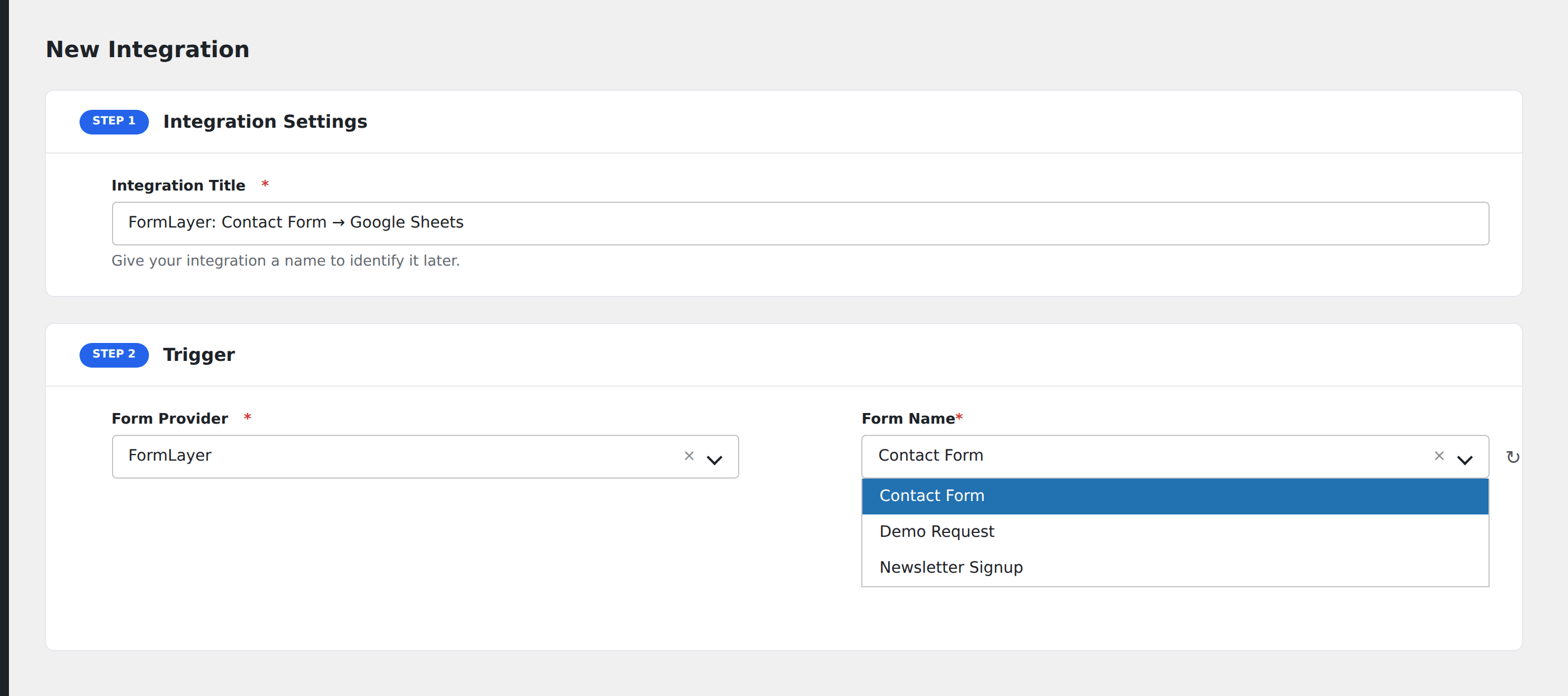
- Enter an Integration Title, e.g.
FormLayer: Contact Form → Google Sheets. - In Trigger → Form/Data Provider, select FormLayer.
- In Form/Task Name, choose the form you want to listen on.
- In Action → Platform, pick the destination and complete the field mapping.
- Optional: configure Conditional Logic so only matching events are sent.
- Click Save Integration.
How AFI listens for submissions
AFI hooks formlayer_after_submission, fired from main/ajax.php after the notification email step. The plugin’s own source carries the comment “Trigger integrations via action hook” directly above it, so this is an intentional public extension point. By the time it fires, $form_id has already been resolved from the public display ID to the real formlayer_form post ID, and the submitted data is a flat array keyed by field name, so AFI dispatches it without reshaping.
Troubleshooting
A form is missing from the Form/Task Name dropdown
AFI lists forms in publish and draft status. If yours is in the trash, restore it. Then use the refresh icon beside the dropdown to re-read the list.
Field mapping shows raw field names instead of labels
That happens when FormLayerUtil is unavailable, usually a partially updated install. Deactivate and reactivate FormLayer, then reload the AFI integration screen.