 AFI
AFI
Softr
Softr is a no-code app builder that turns Airtable, Google Sheets, or its own native database into client portals, marketplaces, and member sites. Advanced Form Integration sends form submissions to Softr’s underlying data source as new records.
What you’ll need
- An active Softr account with at least one published app.
- A Softr API token with write access to the relevant tables (Settings → Workspace → API).
- The Advanced Form Integration plugin installed and activated.
Connect Softr to AFI
- In WordPress, go to AFI → Settings → Softr.
- Paste the API token and click Save Changes.
Create the integration
- Go to AFI → Add New.
- Configure the trigger.
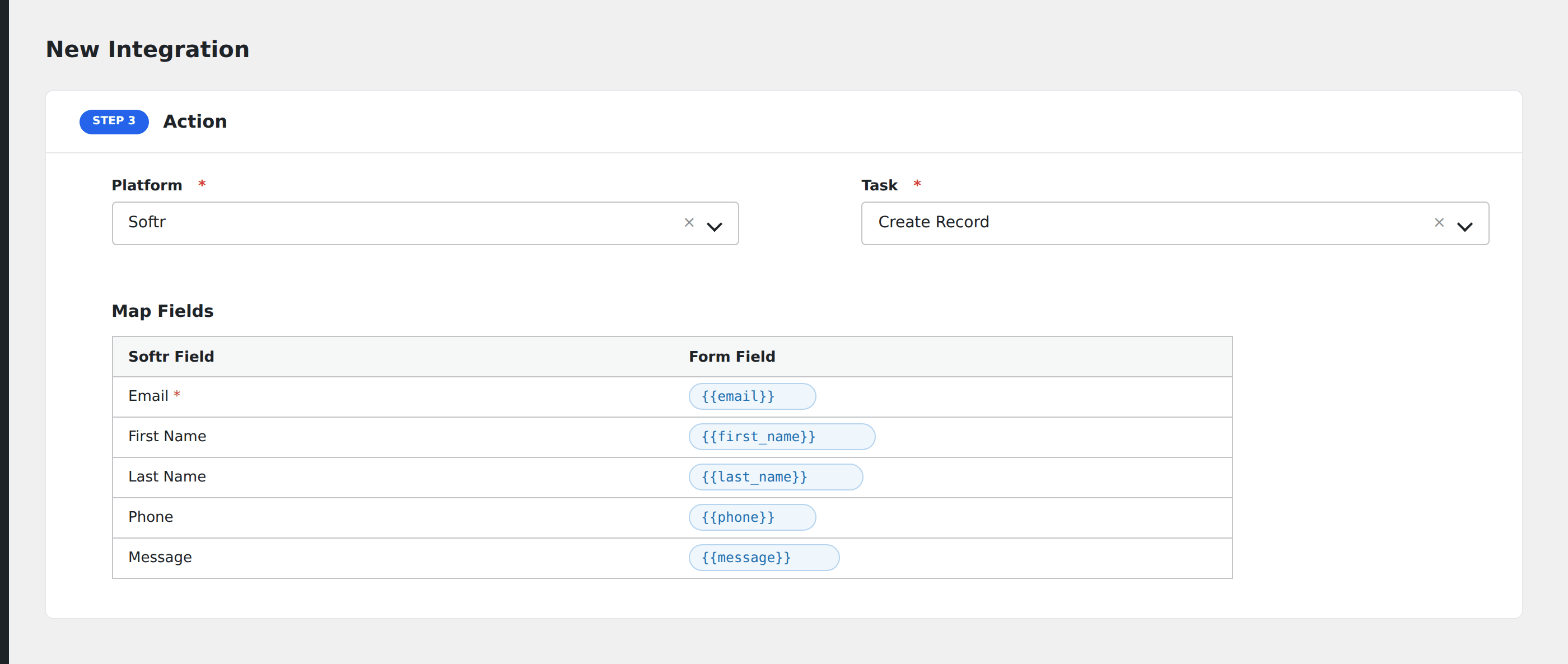
- In Action → Platform, select Softr.
- In Task, choose Create Record.
- Pick the Application and the Table within that application.
- Map the form fields to Softr columns. AFI loads available columns from the chosen table.
- Optional: configure Conditional Logic.
- Click Save Integration.
Conditional logic example
Create the Softr record on the “Approved members” table only when the form’s approved field is “yes”. Pending applications go to a separate “Awaiting review” table via a second integration.