 AFI
AFI
Cart Abandonment Recovery for WooCommerce
Cart Abandonment Recovery for WooCommerce, from the CartFlows team, captures checkout details as shoppers type and flags a cart as abandoned once they leave without paying. Advanced Form Integration captures abandoned carts and routes the data to any of 200+ destinations.
What you’ll need
- WooCommerce and the Cart Abandonment Recovery plugin installed and activated.
- A cart cutoff time configured in WooCommerce → Cart Abandonment → Settings.
- The Advanced Form Integration plugin installed and activated.
When the trigger fires
AFI registers a single Cart Abandoned trigger for Cart Abandonment Recovery. It fires when a captured cart passes your configured cutoff time and flips from normal to abandoned.
Data captured
| Field | Field key | Format |
|---|---|---|
email |
Email address | |
| First Name | first_name |
Text |
| Last Name | last_name |
Text |
| Phone | phone |
Text, exactly as the shopper typed it |
| Cart Total | cart_total |
Numeric, unformatted, in the store currency |
| Cart Items | cart_items |
Product name x Qty, comma separated |
| Recovery Coupon Code | coupon_code |
Text, empty unless recovery coupons are enabled |
| Checkout Page ID | checkout_id |
Numeric ID |
| Billing Company | billing_company |
Text |
| Billing Address 1 | billing_address_1 |
Text |
| Billing Address 2 | billing_address_2 |
Text |
| Billing State | billing_state |
Text |
| Billing Postcode | billing_postcode |
Text |
| Shipping First Name | shipping_first_name |
Text |
| Shipping Last Name | shipping_last_name |
Text |
| Shipping Company | shipping_company |
Text |
| Shipping Country | shipping_country |
Text |
| Shipping Address 1 | shipping_address_1 |
Text |
| Shipping Address 2 | shipping_address_2 |
Text |
| Shipping City | shipping_city |
Text |
| Shipping State | shipping_state |
Text |
| Shipping Postcode | shipping_postcode |
Text |
| Order Comments | order_comments |
Text |
| Country | country |
Text |
| Location | location |
Country, City |
Create the integration
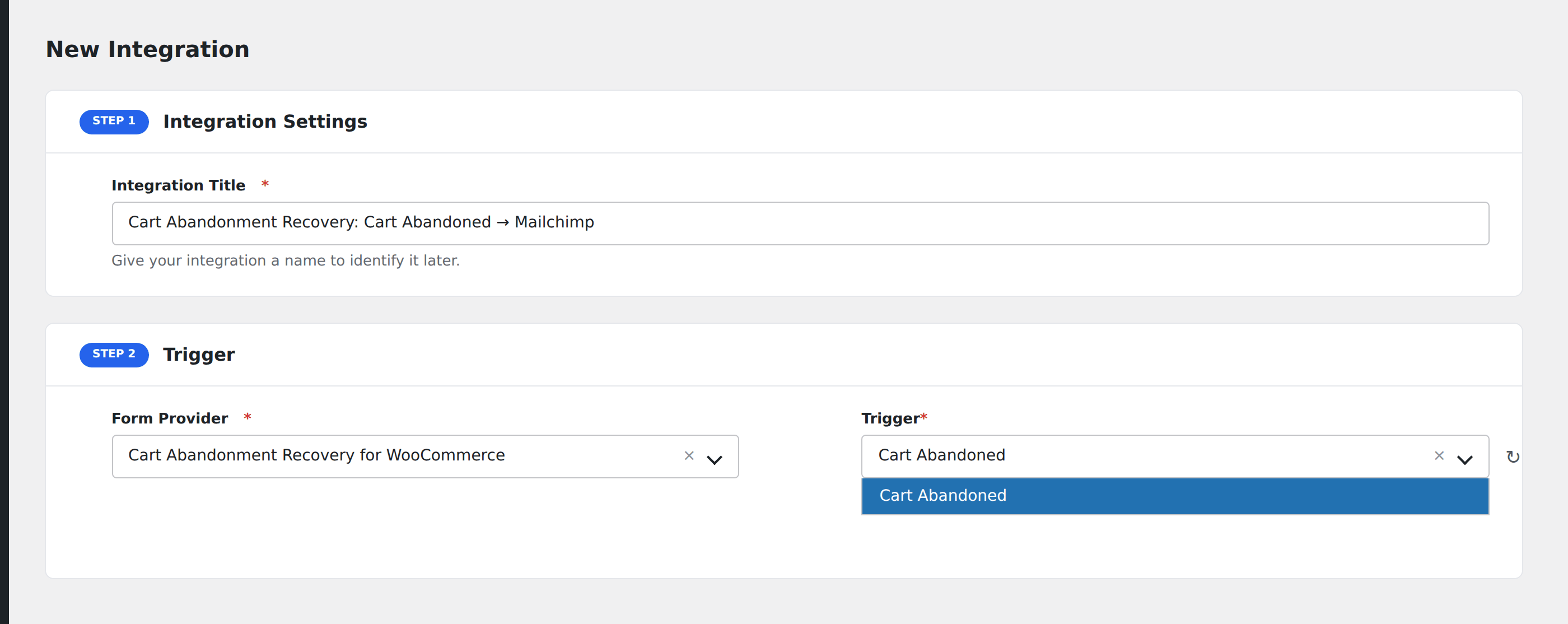
- Go to WP Admin → AFI → Add New.
- Enter an Integration Title, e.g.
Cart Abandonment Recovery: Cart Abandoned → Mailchimp. - In Trigger → Form/Data Provider, select Cart Abandonment Recovery for WooCommerce.
- In Form/Task Name, choose Cart Abandoned.
- In Action → Platform, pick the destination and complete the field mapping.
- Optional: configure Conditional Logic so only matching events are sent.
- Click Save Integration.
How AFI listens for abandoned carts
AFI hooks wcf_ca_process_abandoned_order, fired from update_order_status() in modules/cart-abandonment/classes/class-cartflows-ca-tracking.php. That call runs on the plugin’s own cron sweep and only for carts whose order_status just changed from normal to abandoned, so each cart dispatches exactly once. AFI deliberately avoids the earlier wcf_ca_after_save_abandonment_data hook, which fires on every AJAX autosave while the shopper is still typing and would flood your destination with partial rows.
Timing
Nothing dispatches at the moment the shopper leaves. The cart has to sit untouched past the cutoff you set in WooCommerce → Cart Abandonment → Settings (15 minutes by default) and then be picked up by the next WordPress cron run. On a low-traffic site where cron only fires on page views, expect a delay.
Cart contents formatting
The plugin stores the cart as a serialized WooCommerce snapshot. AFI flattens it into a readable Name x Qty comma-separated string in Cart Items, so it drops straight into an email body or a spreadsheet cell without further processing.
Troubleshooting
No carts are ever marked abandoned
Confirm WP-Cron is running. On sites with DISABLE_WP_CRON set, wire a real server cron to wp-cron.php, otherwise the status sweep never executes and the hook never fires.
Name and address fields arrive empty
Those live in the plugin’s serialized other_fields column and are only captured once the shopper has actually typed into the checkout fields. A cart abandoned after entering only an email will carry the email alone.
The recovery coupon is empty
That field is only populated when coupon-based recovery is enabled in the plugin’s follow-up email settings. Without it there is no coupon to send.