 AFI
AFI
SendGrid
SendGrid (a Twilio product) is a high-deliverability email platform handling both transactional and marketing email at scale. Advanced Form Integration sends form submissions to SendGrid Marketing as new contacts. the Pro version adds transactional email send.
What you’ll need
- An active SendGrid account with Marketing Campaigns enabled.
- A SendGrid API key with
mail.sendandmarketing.contactsscopes (Settings → API Keys → Create API Key → Restricted Access). - The Advanced Form Integration plugin installed and activated.
Connect SendGrid to AFI
- In WordPress, go to AFI → Settings → SendGrid.
- Paste the API key and click Save Changes.
Create the integration
- Go to AFI → Add New.
- Configure the trigger.
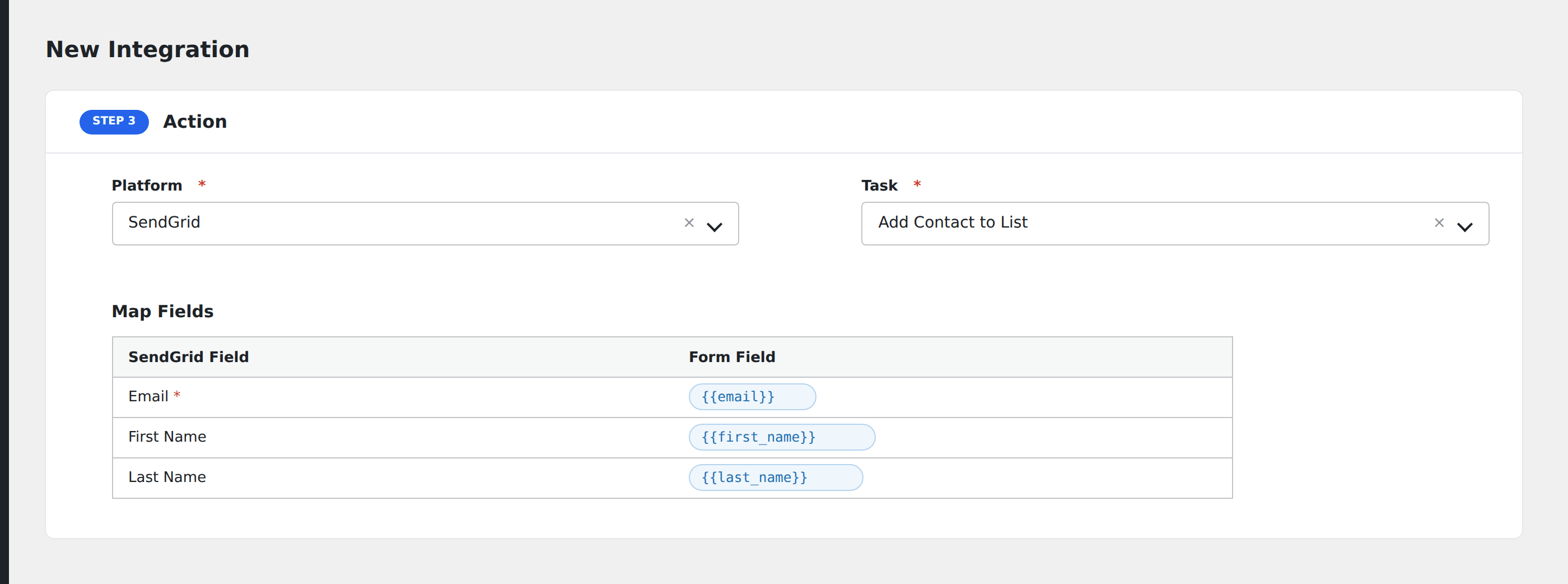
- In Action → Platform, select SendGrid.
- In Task, choose Add Contact to List.
- Pick the target Lists (one or more).
- Map the form fields:
- Email (required), First Name, Last Name.
- Phone Number, Address Line 1, Address Line 2, City, State/Province, Country, Postal Code.
- Custom fields by API name (find them under SendGrid → Marketing → Custom Fields).
- Optional: configure Conditional Logic.
- Click Save Integration.
Pro features
The Pro SendGrid integration adds transactional template send. Fire a one-off SendGrid template directly from the form submission, with form fields available as Handlebars variables in the template.
Conditional logic example
Add the contact to your “Webinar attendees” list only when the form’s event_id field equals the current webinar’s ID. Past-event attendees skip the list.
Troubleshooting
“Unauthorized”
SendGrid API keys are scope-restricted. The key needs marketing.contacts for list management; without it, contact creation fails with 403. Edit the key under Settings → API Keys.
Contact created but not in list
SendGrid’s add-to-list endpoint is asynchronous. The contact creation may be processed seconds before the list assignment shows up in the UI. Wait 30 seconds and refresh.