 AFI
AFI
Customer Reviews for WooCommerce
Customer Reviews for WooCommerce collects product and store reviews from your buyers. When you connect it to Advanced Form Integration (AFI), every new review can be sent to another platform automatically. You can log reviews in Google Sheets, add reviewers to a Mailchimp audience, or push review details into your CRM so your support team can follow up on low ratings.
What You’ll Need
- The Customer Reviews for WooCommerce plugin installed and active
- WooCommerce installed and active
- Advanced Form Integration (free version is enough for this trigger)
- An account on the receiving platform, such as Google Sheets or Mailchimp
How to Create the Integration
- Go to AFI > Add New in your WordPress dashboard.
- AFI fills in a default Integration Title. Rename it to something you will recognize later, such as “Product Reviews to Google Sheets”.
- In the Trigger section, open the Form Provider dropdown and select Customer Reviews for WooCommerce. If you do not see it, the Customer Reviews for WooCommerce plugin is not active on your site.
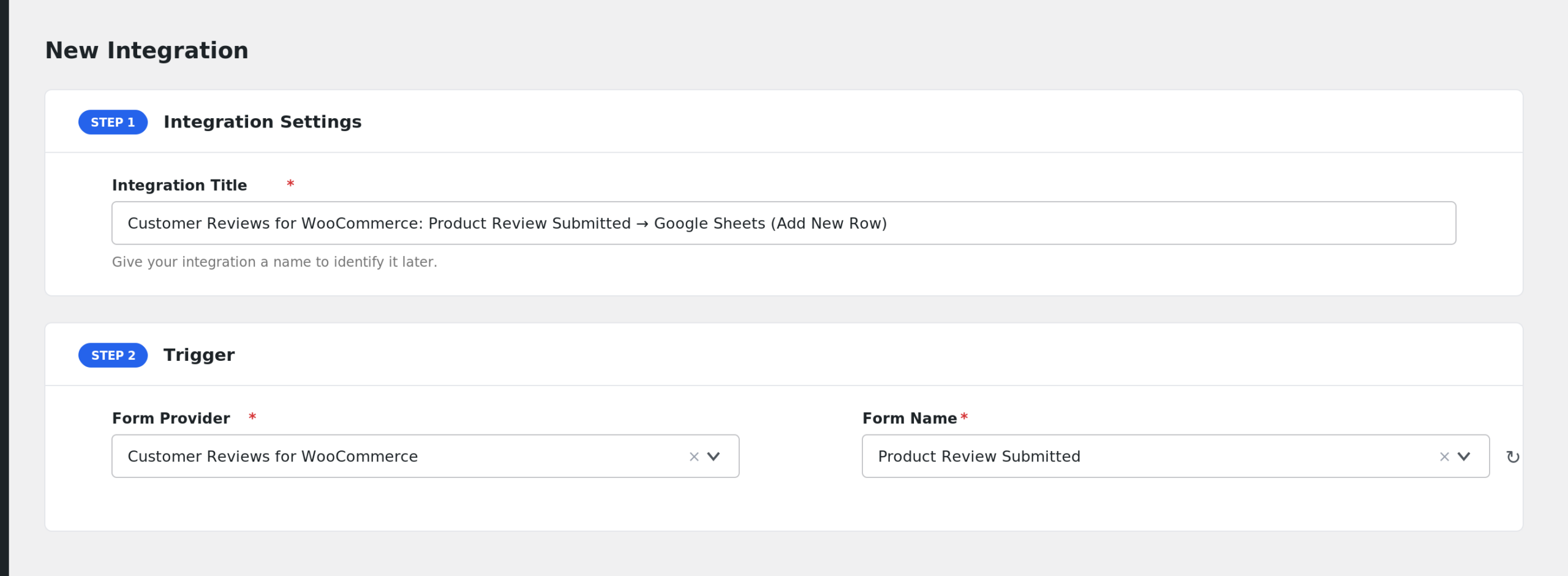
- In the Form/Task Name dropdown, pick the event you want: Product Review Submitted or Store Review Submitted.
- Under Action, select your receiver platform, for example Google Sheets.
- Map the review fields to the columns or fields on the receiving side. For example, map Reviewer Name, Reviewer Email, Review Rating, and Review Content.
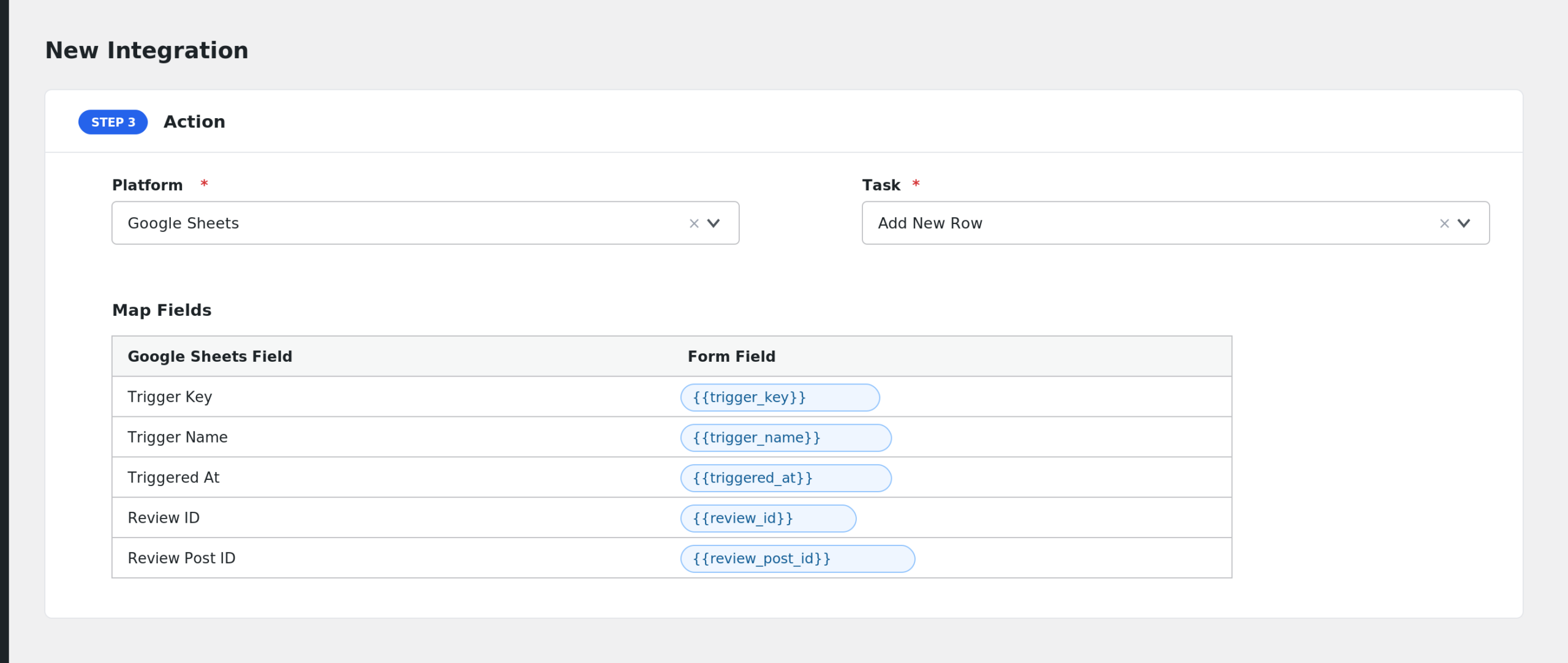
- Click Save Integration.
- Submit a test review on a product and confirm the data arrives.
Available Events
- Product Review Submitted: fires when a customer submits a review on a WooCommerce product.
- Store Review Submitted: fires when a customer submits a store (shop) review.
Both events run when the review is posted. AFI only processes reviews created through the Customer Reviews for WooCommerce plugin, so plain WordPress comments are ignored.
Fields You Can Send
| Field | Description |
|---|---|
| Trigger Key | Internal event key, productReviewSubmitted or shopReviewSubmitted |
| Trigger Name | Readable event name |
| Triggered At | Date and time the event fired |
| Review ID | WordPress comment ID of the review |
| Review Post ID | ID of the product or page the review belongs to |
| Review Post Type | Post type of the reviewed item |
| Review Post Title | Title of the reviewed product or page |
| Review Type | product or store |
| Review Status | approved, pending, spam, or trash |
| Review Rating | Star rating given by the reviewer |
| Review Content | Full review text |
| Review Excerpt | Review text trimmed to 30 words |
| Review Date | Review date in site time |
| Review Date (GMT) | Review date in GMT |
| Review Permalink | Direct link to the review |
| Reviewer Country | Country recorded by the review plugin |
| Review Verified Owner | true when the reviewer is a verified buyer |
| Reviewer Name | Name of the reviewer |
| Reviewer Email | Email of the reviewer |
| Reviewer URL | Website URL the reviewer entered |
| Reviewer IP Address | IP address of the reviewer |
| Reviewer User ID | WordPress user ID, if logged in |
| Review Meta (JSON) | All review meta as JSON |
| Review Media URLs (JSON) | Uploaded review images and videos as JSON |
| Order ID | Related WooCommerce order ID, when detected |
| Order Number | Order number |
| Order Status | Order status |
| Order Total | Order total |
| Order Currency | Order currency |
| Billing Email | Billing email from the order |
| Billing First Name | Billing first name from the order |
| Billing Last Name | Billing last name from the order |
| Customer User ID | Customer user ID from the order |
| Product ID | Reviewed product ID |
| Product Name | Reviewed product name |
| Product SKU | Reviewed product SKU |
| Product Permalink | Link to the reviewed product |
AFI also appends its standard special tags, such as _Submission_Date, _User_IP, and _Site_URL, to the field list.
Send Only 5-Star Reviews
Conditional logic is a good fit here. Say you only want glowing reviews in your testimonial sheet:
- Open the integration and enable Conditional Logic.
- Set the condition to: Review Rating equals 5.
- Save the integration.
Now AFI sends the review only when the rating is 5. You could also flip it: send reviews with a rating below 3 to a CRM so your team can reach out.
Troubleshooting
The provider is not in the dropdown
AFI hides Customer Reviews for WooCommerce unless the plugin file customer-reviews-woocommerce/ivole.php is active. Check Plugins and activate it, then reload the AFI screen.
The integration is not firing
Go to AFI > Log and check for recent entries. If nothing appears, confirm the review was created by the Customer Reviews for WooCommerce plugin. AFI skips reviews that lack the plugin’s order meta, so a manually added WordPress comment will not trigger it.
Order fields arrive blank
Order fields only fill in when AFI can detect the originating order from the review meta. Reviews submitted without a review invitation may not carry an order reference. Product and reviewer fields still populate.
Store reviews land in the wrong event
AFI decides between product and store reviews based on the reviewed post type and your WooCommerce shop page. If store reviews are stored on a custom page, make sure your shop page is set under WooCommerce > Settings > Products.