 AFI
AFI
Site Reviews
Site Reviews is a popular WordPress plugin for collecting star ratings and written reviews. When you connect it to Advanced Form Integration (AFI), every review event on your site can trigger an automation. You can log each new review in Google Sheets, add the reviewer to a Mailchimp audience, or push review details into a CRM so your team can follow up with unhappy customers.
What You’ll Need
- The Site Reviews plugin installed and active on your site
- Advanced Form Integration (free version works, AFI Pro adds conditional logic and multi-step actions)
- An account on the receiving platform, such as Google Sheets or Mailchimp
How to Create the Integration
- Log in to your WordPress dashboard and go to Advanced Form Integration > Add New.
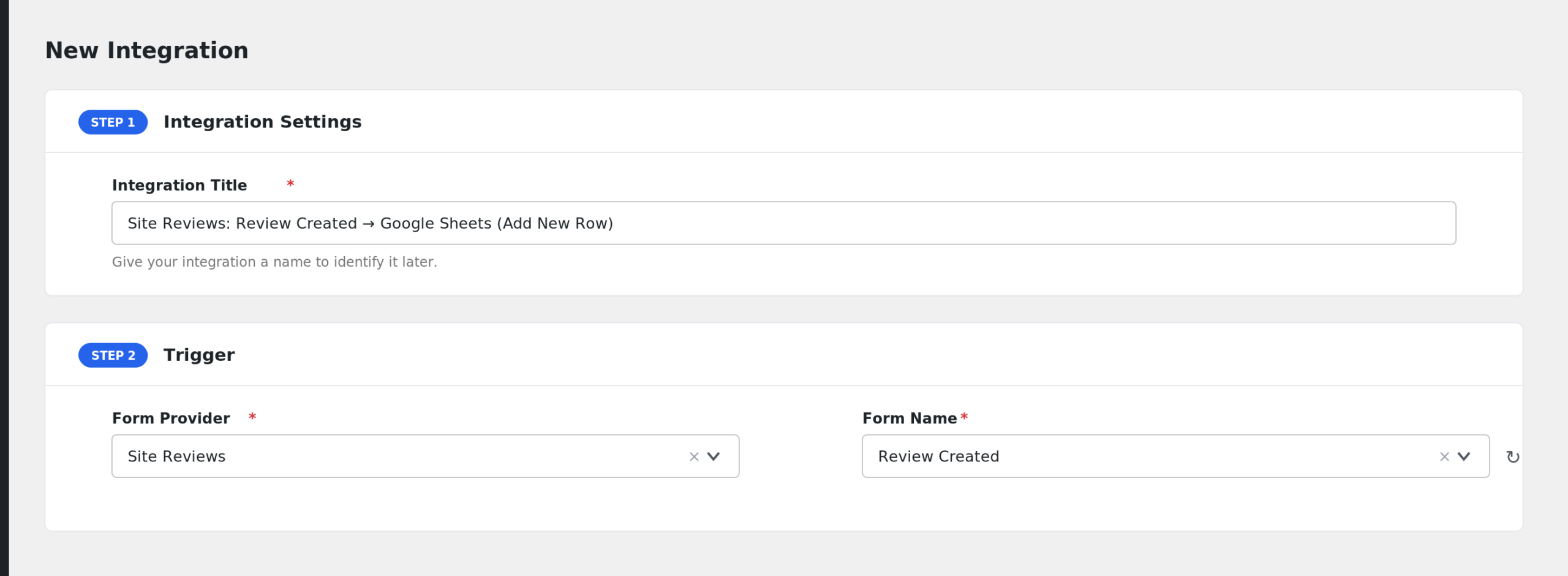
- AFI auto-fills a default Integration Title. Rename it to something recognizable, like “Site Reviews to Google Sheets”.
- In the Trigger section, open the Form Provider dropdown and select Site Reviews. If it does not appear, the Site Reviews plugin is not active on your site.
- In the Form/Task Name dropdown, choose the event you want to react to, such as Review Created.
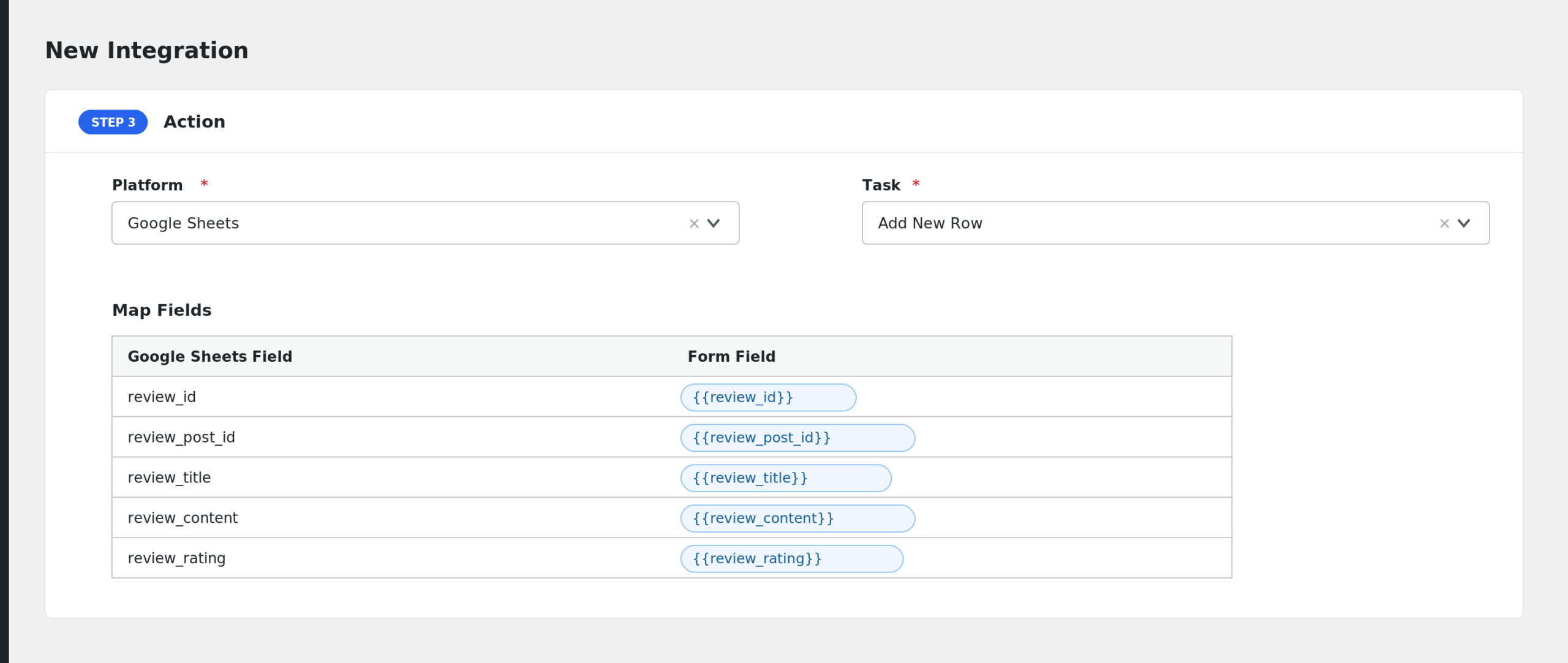
- Under Action, select the receiver platform, for example Google Sheets, and connect your account.
- Map the Site Reviews fields to the receiver’s fields. For example, map Reviewer Name and Review Rating to spreadsheet columns.
- Click Save Integration. Submit a test review on your site to confirm the data arrives.
Available Events
- Review Created: fires when a visitor submits a new review through a Site Reviews form.
- Review Updated: fires when an existing review is edited.
- Review Status Changed: fires whenever a review moves from one status to another.
- Review Approved: fires when a pending review is approved.
Fields You Can Send
These fields are available for every Site Reviews event:
| Field | Description |
|---|---|
| review_id | The internal rating ID of the review |
| review_post_id | The WordPress post ID that stores the review |
| review_title | The review title |
| review_content | The full review text |
| review_rating | The star rating the reviewer gave |
| review_score | The calculated review score |
| review_status | The current review status |
| review_type | The review type label |
| review_type_key | The raw review type key |
| review_date | The review date in site time |
| review_date_gmt | The review date in GMT |
| review_url | The permalink of the review |
| review_author | The reviewer’s name |
| review_author_email | The reviewer’s email address |
| review_author_id | The reviewer’s WordPress user ID, if logged in |
| review_ip_address | The reviewer’s IP address |
| review_is_approved | Whether the review is approved, true or false |
| review_is_verified | Whether the review is verified |
| review_is_pinned | Whether the review is pinned |
| review_assigned_posts | Posts the review is assigned to |
| review_assigned_terms | Terms the review is assigned to |
| review_assigned_users | Users the review is assigned to |
| review_custom_fields | Any custom review fields, as JSON |
| review_response | The owner’s response to the review |
| review_response_by | The user ID of the response author |
| review_url_source | The URL the review was submitted from |
Some events add extra fields:
| Field | Event | Description |
|---|---|---|
| form_id | Review Created | The ID of the submission form |
| form_referer | Review Created | The referring page of the submission |
| submission_success | Review Created | Whether the submission passed validation |
| submission_message | Review Created | The message shown to the reviewer |
| request_data | Review Created | The raw submitted data, as JSON |
| updated_fields | Review Updated | The changed values, as JSON |
| previous_status | Review Updated, Review Approved | The status before the change |
| new_status | Review Status Changed, Review Approved | The status after the change |
| old_status | Review Status Changed | The status before the change |
Only Send 5-Star Reviews
With AFI Pro you can add conditional logic to an integration. A common setup: only push a review to your testimonial sheet when it is a 5-star review. In the Conditional Logic panel, set the condition to run the action only if review_rating equals 5. You could also send reviews with a rating below 3 to a support CRM instead, so your team can reach out.
Troubleshooting
Site Reviews is missing from the Form Provider dropdown
AFI only lists providers whose plugins are active. Go to Plugins and confirm Site Reviews is installed and activated, then reload the AFI screen.
The integration is not firing
Check AFI > Log after submitting a test review. If no entry appears, confirm you picked the right event. For example, a pending review does not fire Review Approved until you approve it in the dashboard.
Fields arrive blank at the receiver
Open the integration and re-check the field mapping. Optional review fields, like the reviewer email on forms that do not ask for it, will be empty in the payload. Map only fields your review form actually collects.
Approval events fire twice
Review Status Changed also fires when a review is approved, since approval is a status change. If you have separate integrations for both events, expect both to run. Keep only the event you need.