 AFI
AFI
Salesflare
Salesflare is a CRM designed for small and mid-sized B2B businesses, with strong automation around contact enrichment from email and LinkedIn. Advanced Form Integration sends form submissions to Salesflare as new accounts, contacts, opportunities, and tasks: any combination in a single submission. the Pro version adds custom fields and tag application.
What you’ll need
- An active Salesflare account.
- A Salesflare API Key (Settings → API keys → click the plus button).
- The Advanced Form Integration plugin installed and activated.
Get your Salesflare API key
- Log in to your Salesflare CRM account.
- Go to Settings → API keys.
- Click the plus button to generate a new API key.
- Copy the API Key.
Connect Salesflare to AFI
- In WordPress, go to AFI → Settings.
- Enable Salesflare and click Save Changes.
- Open the Salesflare tab.
- Paste the API Key.
- Click Save Changes.
Create the integration
- Go to AFI → Add New.
- Configure the trigger.
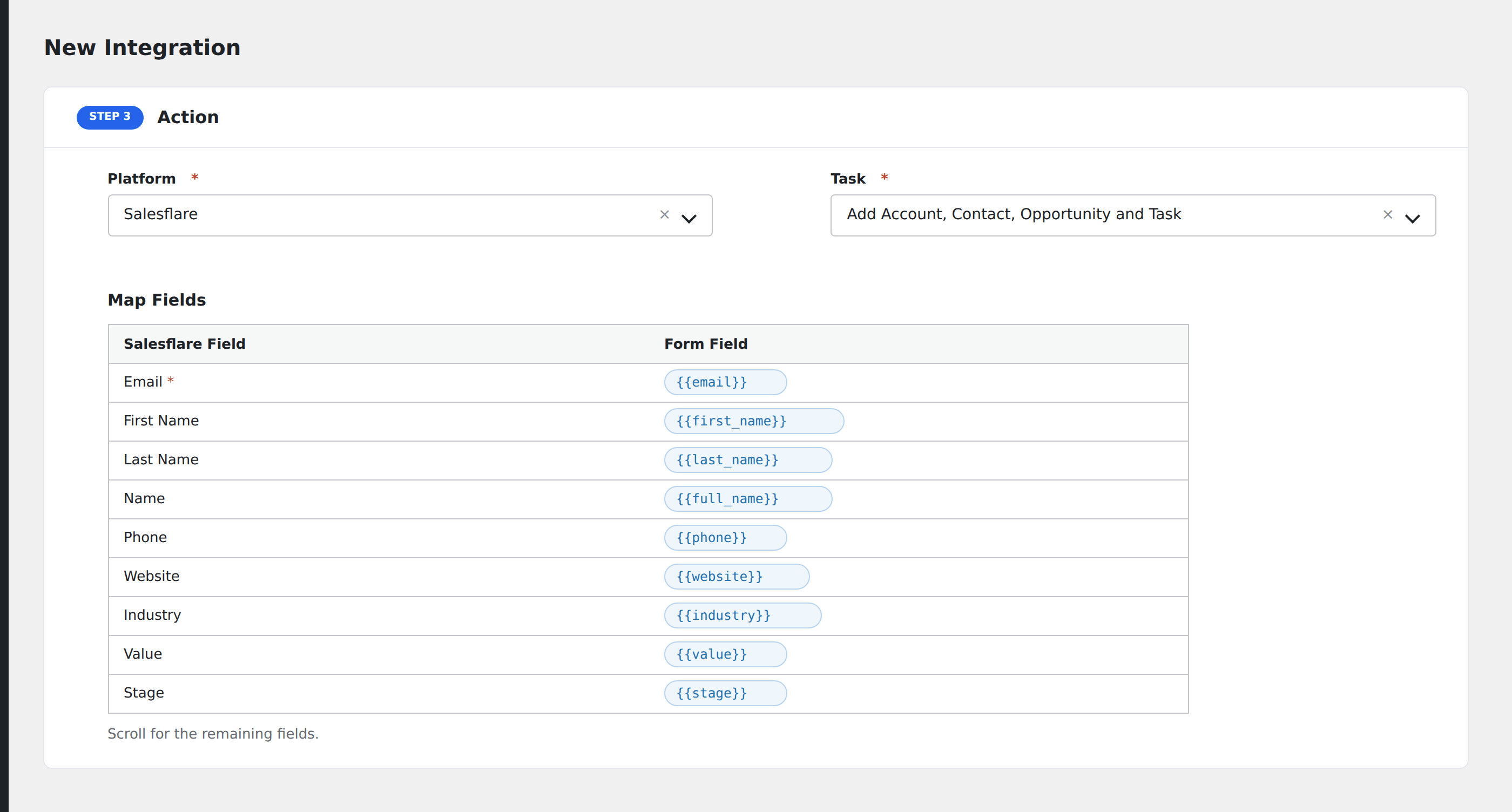
- In Action → Platform, select Salesflare (or Salesflare [PRO] if using Pro for custom fields and tags).
- In Task, choose Add Account, Contact, Opportunity and Task.
- Pick the Owner: the Salesflare user assigned to the new records.
- Tick one or more entity checkboxes:
- Account
- Contact
- Opportunity
- Task
Click Get Fields to load the field schema for each selected entity.
- Map the form fields:
- For Contact: Email, First Name, Last Name.
- For Account: Name, Phone, Website, Industry.
- For Opportunity: Name, Value, Stage, Expected Close Date.
- For Task: Title, Description, Due Date.
- On Pro: any custom fields, plus tags applied to each entity.
- Optional: configure Conditional Logic.
- Click Save Integration.
Tasks supported
Add Account, Contact, Opportunity and Task
Creates one or more linked Salesflare records in a single submission. Useful for “Lead inquiry → Account + Contact + Opportunity” workflows where the entire CRM hierarchy needs to be created at once. Pick which entities you need. Unticked entities are skipped.
Pro features
The Pro Salesflare integration adds:
- Custom field mapping: any custom field defined on Account, Contact, Opportunity, Case, or Task entities.
- Tag application: apply tags to each created entity for downstream segmentation.
- Case entity creation alongside the standard four.
Conditional logic example
Create an Opportunity (in addition to the Contact) only when the form’s interested_in_buying field is “yes”. Information-only inquiries create just the Contact via a separate integration.
Troubleshooting
Integration doesn’t fire
Open AFI → Log and find the most recent entry. The log shows the request payload sent to Salesflare and the response received, usually pointing straight at the cause.
“Authentication failed”
Salesflare API keys are user-scoped. If the user who created the key is removed from your Salesflare organization, the key stops working. Generate a new key under an active admin user.
Required field missing
Each entity has its own required-field rules. If you tick “Account” but don’t map a Name, the entire request fails. Either map the required field or untick that entity.