 AFI
AFI
Fluent Boards
Fluent Boards is a project management plugin that brings kanban boards to WordPress. Connect it to Advanced Form Integration (AFI) and your board activity can flow to other tools automatically. You can log every new task in Google Sheets, notify your team through a webhook or Slack style receiver, or add new board members to a Mailchimp audience.
What You’ll Need
- The Fluent Boards plugin installed and active
- Advanced Form Integration (free version is enough for this trigger)
- An account on the receiving platform, such as Google Sheets or Mailchimp
How to Create the Integration
- Go to AFI > Add New.
- AFI fills in a default Integration Title. Rename it to something recognizable, such as “New Tasks to Google Sheets”.
- In the Trigger section, select Fluent Boards from the Form Provider dropdown. Fluent Boards must be active on your site or the provider will not appear.
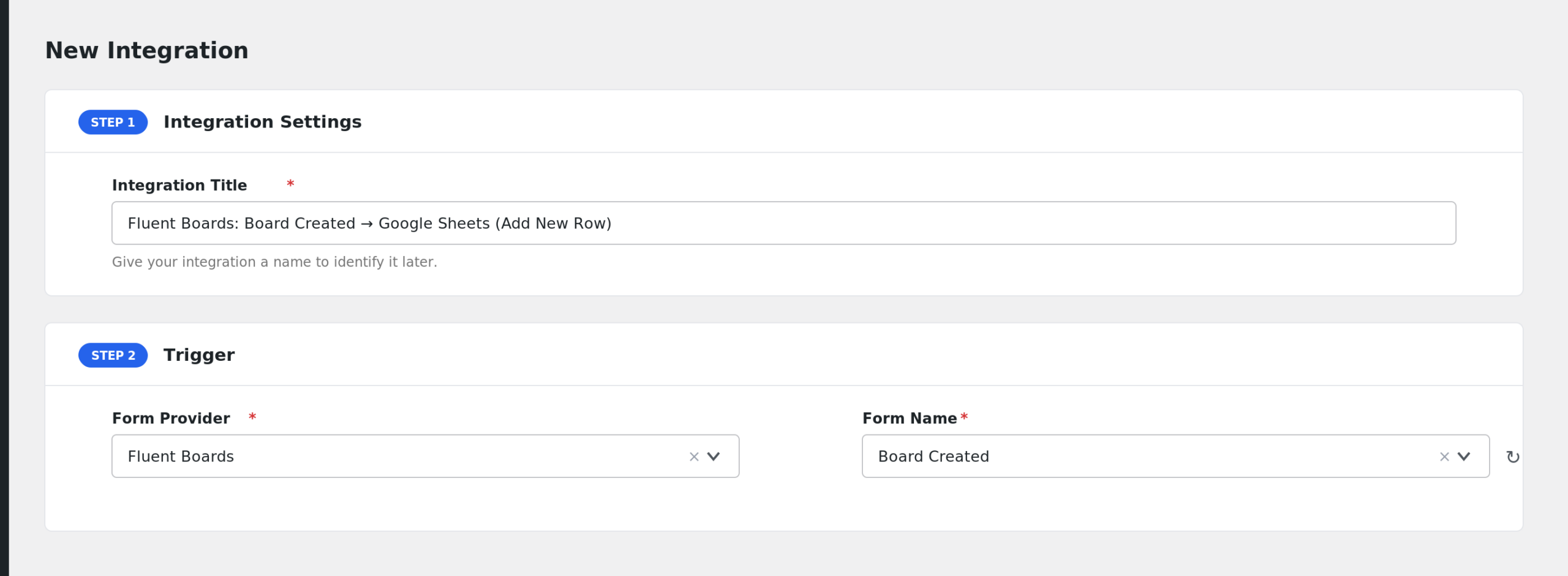
- In the Form/Task Name dropdown, choose the event: Board Created, Board Member Added, or Task Created.
- Under Action, select your receiver platform and connect your account.
- Map the Fluent Boards fields to the receiver fields. For tasks you would typically map Task Title, Description, Priority, and Due At.
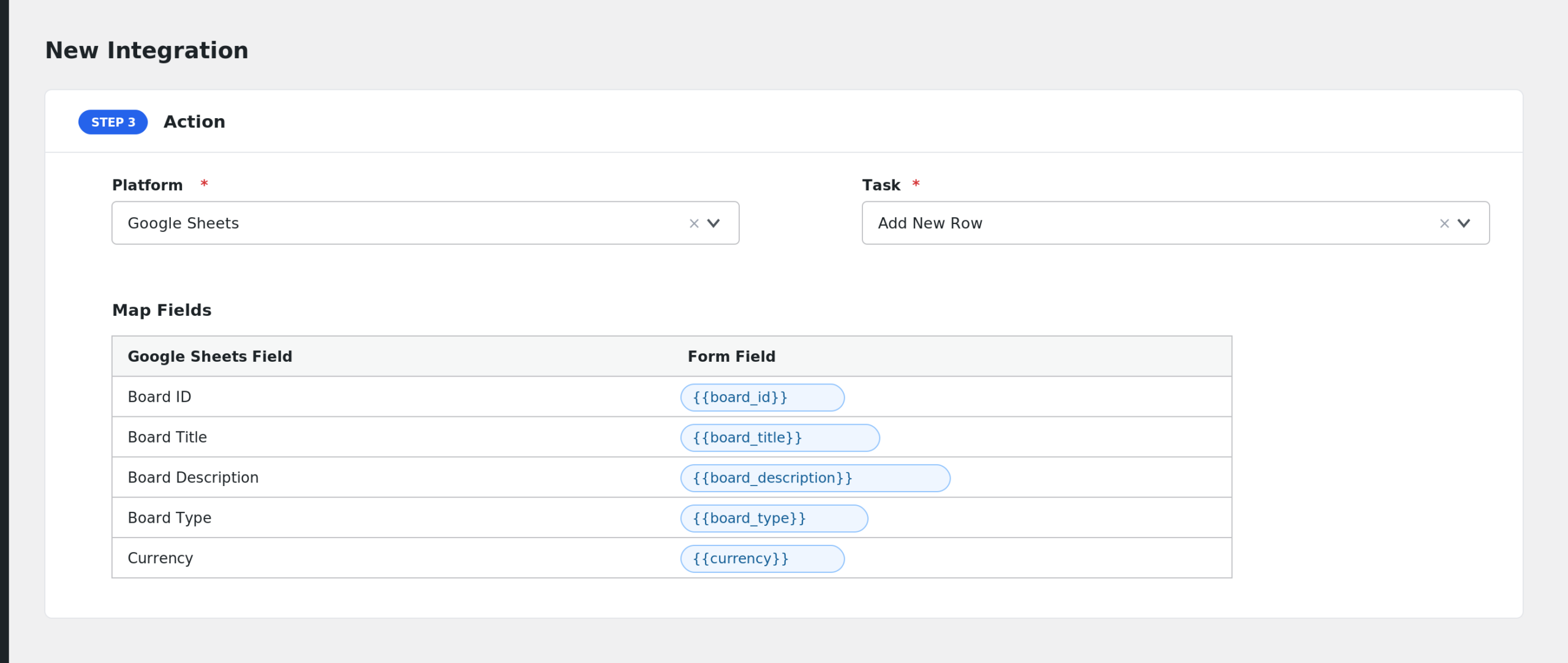
- Click Save Integration.
- Create a test task or board and check the data arrives.
Available Events
- Board Created: fires when a new board is created in Fluent Boards.
- Board Member Added: fires when a user is added to a board as a member or viewer.
- Task Created: fires when a new task is created on any board.
Fields You Can Send
Board Created
| Field | Description |
|---|---|
| Board ID | ID of the new board |
| Board Title | Board name |
| Board Description | Board description |
| Board Type | Board type |
| Currency | Currency assigned to the board |
| Background | Board background setting |
| Settings (JSON) | Board settings as JSON |
| Created By (User ID) | User who created the board |
| Archived At | Archive timestamp, if any |
| Board Meta (JSON) | Board meta as JSON |
| Raw Board (JSON) | The complete board object as JSON |
Board Member Added
| Field | Description |
|---|---|
| Board ID | Board the member was added to |
| User ID | WordPress user ID of the member |
| User Login | Member username |
| User Email | Member email address |
| Display Name | Member display name |
| User Registered | Date the user registered on the site |
| User Status | WordPress user status |
| User Photo URL | Member photo, when available |
| Board Settings (JSON) | Membership settings as JSON |
| Board Preferences (JSON) | Membership preferences as JSON |
| Raw User (JSON) | The complete user object as JSON |
Task Created
| Field | Description |
|---|---|
| Task ID | ID of the new task |
| Board ID | Board the task belongs to |
| Stage ID | Stage (column) the task sits in |
| Parent Task ID | Parent task, for subtasks |
| Task Title | Task name |
| Task Slug | Task slug |
| Task Type | Task type |
| Status | Task status |
| Priority | Task priority |
| CRM Contact ID | Linked FluentCRM contact, if any |
| Lead Value | Lead value assigned to the task |
| Description | Task description |
| Due At | Due date and time |
| Started At | Start date and time |
| Remind At | Reminder date and time |
| Created By (User ID) | User who created the task |
| Settings (JSON) | Task settings as JSON |
| Events (JSON) | Task events as JSON |
| Meta (JSON) | Task meta as JSON |
| Raw Task (JSON) | The complete task object as JSON |
Note: AFI drops fields that are empty for a given task or board, so some mapped fields may arrive blank on the receiver when the source value was not set.
Send Only High Priority Tasks
You may not want every task in your report. Use conditional logic:
- Create an integration on the Task Created event.
- Enable Conditional Logic.
- Set the condition to: Priority equals high.
- Save the integration.
Now only high priority tasks are sent to the receiver.
Troubleshooting
Fluent Boards is not in the dropdown
Make sure the Fluent Boards plugin is active. AFI only shows providers whose plugin is running on the site.
The integration is not firing
Open AFI > Log after creating a test task. If no entry appears, confirm the integration status is active and that you selected the correct event in Form/Task Name.
Fields arrive blank
Fluent Boards only sends values that exist on the task or board. Optional values like Due At, Lead Value, or Description stay empty until someone fills them in. Map the Raw Task (JSON) field if you want everything in one column for debugging.