 AFI
AFI
Greater Than
Use Greater Than in AFI conditional logic to fire an integration only when a submitted numeric value is larger than the threshold you configure. Built for numeric thresholds: order totals, donation amounts, ratings, signup counts.
How it works
When a form is submitted, AFI parses both the field value and the threshold as numbers, then compares them. If the field value is strictly larger than the threshold, the rule passes and the integration runs. If it’s equal or smaller, AFI skips this destination.
Greater Than is strict. A value equal to the threshold does not pass. Use Greater Than 99 to mean “100 and above”.
Example
Goal: when a WooCommerce order’s total is over $500, ping a #vip-orders Slack channel for white-glove handling.
Setup:
- Create a Slack integration on the WooCommerce trigger, pointing at the
#vip-orderswebhook URL. - Open the Conditional Logic panel.
- Click Add Condition.
- In the field dropdown, pick the order-total field (e.g.
{order_total}). - Set the operator to Greater Than.
- In the value box, type
500. - Click Save Integration.
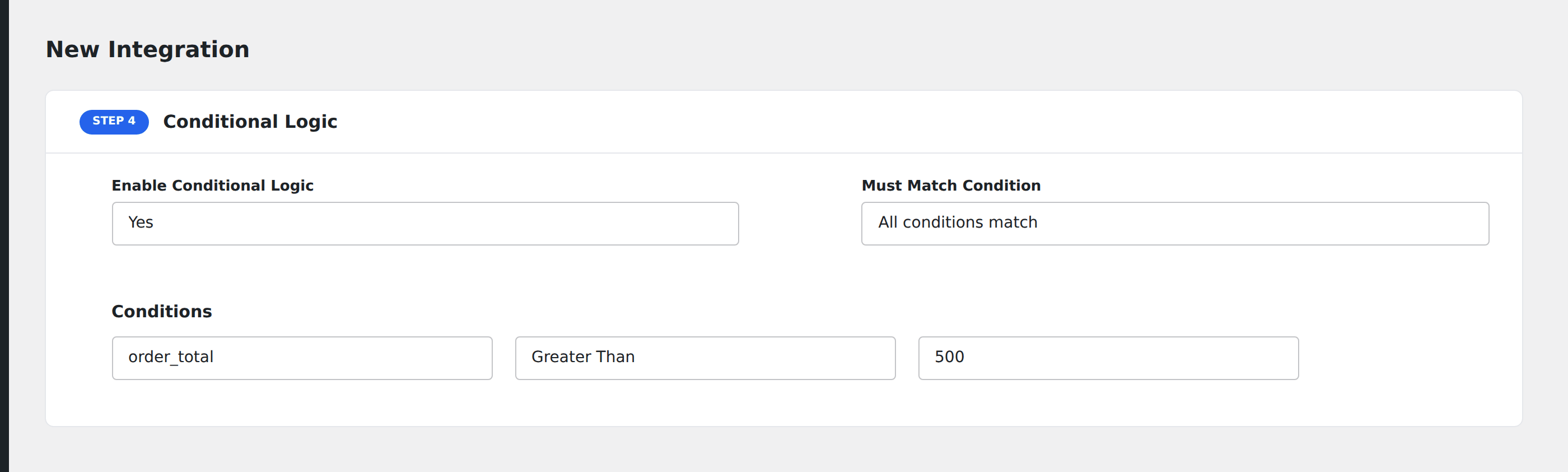
Now only orders over $500 ping the VIP channel; smaller orders flow through your standard integrations untouched.
Notes
- Strict comparison. Greater Than
100does not match exactly100. If you need “100 or more”, use Greater Than99. - Numbers only. Both sides are parsed as numbers. Non-numeric values (e.g.
abc, blank) fail the comparison and the rule does not pass. - Currency symbols. If your form’s value field includes a currency symbol (
$500.00), AFI tries to strip it. To be safe, store totals as plain numbers in the form’s hidden fields. - Decimal precision. Comparisons use floating-point math.
0.1 + 0.2famously isn’t exactly0.3: for currency, work in whole cents (12345) instead of decimals (123.45) where possible.