 AFI
AFI
Curated
Curated is a newsletter publishing platform built for editorial-style email newsletters. Advanced Form Integration adds form submitters to your Curated publication’s email subscriber list.
What you’ll need
- An active Curated account.
- A Curated API Key and your Publication Domain (Account → API).
- The Advanced Form Integration plugin installed and activated.
Get your Curated API key
- Log in to your Curated account.
- Open Account → API.
- Copy your API Key.
- Note your Publication Domain: only the subdomain (e.g.,
yournewsletterfromyournewsletter.curated.co).
Connect Curated to AFI
- In WordPress, go to AFI → Settings.
- Enable Curated and click Save Changes.
- Open the Curated tab.
- Enter your Publication Domain and API Key.
- Click Save Changes.
Create the integration
- Go to AFI → Add New.
- Configure the trigger.
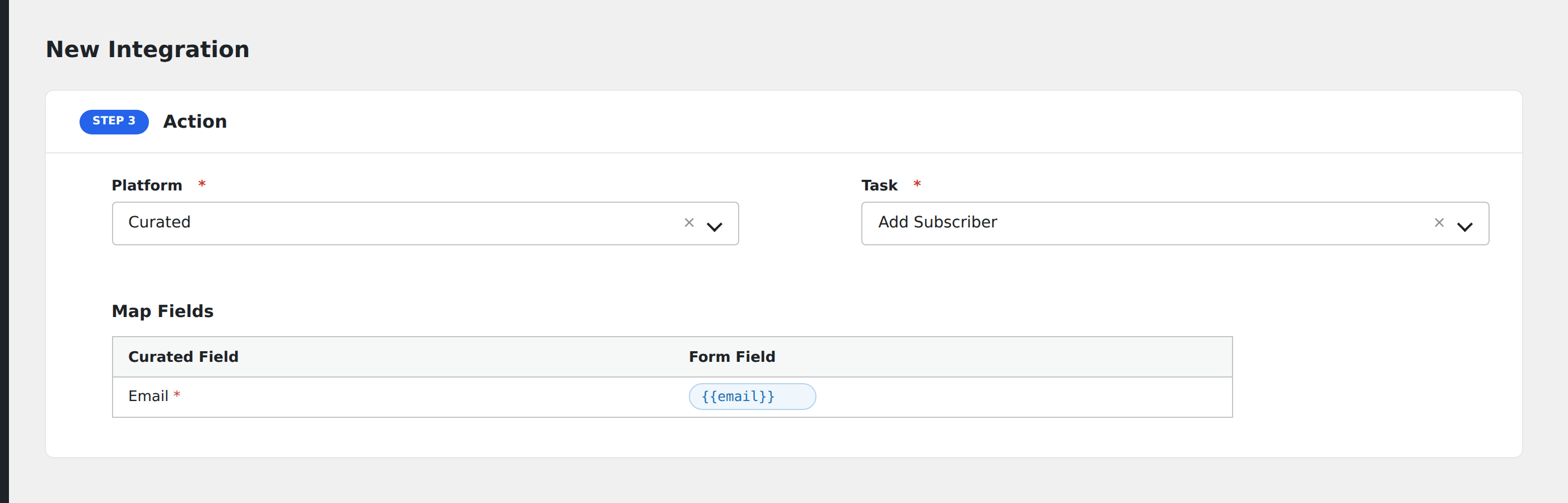
- In Action → Platform, select Curated.
- In Task, choose Add Subscriber.
- Map the form’s Email field to Curated’s Email field. This is the only field Curated currently accepts.
- Optional: configure Conditional Logic.
- Click Save Integration.
Tasks supported
Add Subscriber
Adds the form submitter as a new email subscriber to the configured Curated publication. The integration is intentionally minimal, only the email field is sent because that’s all Curated’s API accepts.
Conditional logic example
Subscribe to Curated only when the form’s consent_marketing checkbox is checked. Submitters without consent are skipped.
Troubleshooting
Integration doesn’t fire
Open AFI → Log and find the most recent entry. The log shows the request payload sent to Curated and the response received, usually pointing straight at the cause.
“Subscriber not added”
Double-check both API Key and Publication Domain. The publication domain is just the subdomain. Don’t include https:// or .curated.co.
Email field not provided
Curated rejects requests with an empty email field. Make sure the email field is mapped and required on your form.