 AFI
AFI
Must Match Condition (All / Any)
When you add more than one condition to an AFI integration, the Must Match Condition dropdown decides how those rules combine. Two choices: All means every rule must pass for the integration to run; Any means it’s enough for one rule to pass.
This is AND/OR for AFI’s conditional logic.
How it works
You build conditions by stacking rules in the Conditional Logic panel. Each row is one rule (field + operator + value). The Must Match Condition setting applies to the whole stack:
- All conditions match: AND. Every rule must pass on this submission. If even one fails, the integration is skipped.
- Any condition matches: OR. At least one rule must pass. If none pass, the integration is skipped.
If there’s only a single rule in the stack, the All/Any choice doesn’t matter. There’s nothing to combine.
Example: All (AND)
Goal: add a contact to a special “Premium International” Mailchimp segment only when the user is on the Premium plan and outside the US.
Setup:
- Open the Mailchimp integration in AFI → All Integrations and click Edit.
- Open the Conditional Logic panel.
- Add a condition:
planEqual ToPremium. - Add a second condition:
countryNot Equal ToUS. - Set Must Match Condition to All conditions match.
- Click Save Integration.
Both rules must pass for the integration to fire.
Example: Any (OR)
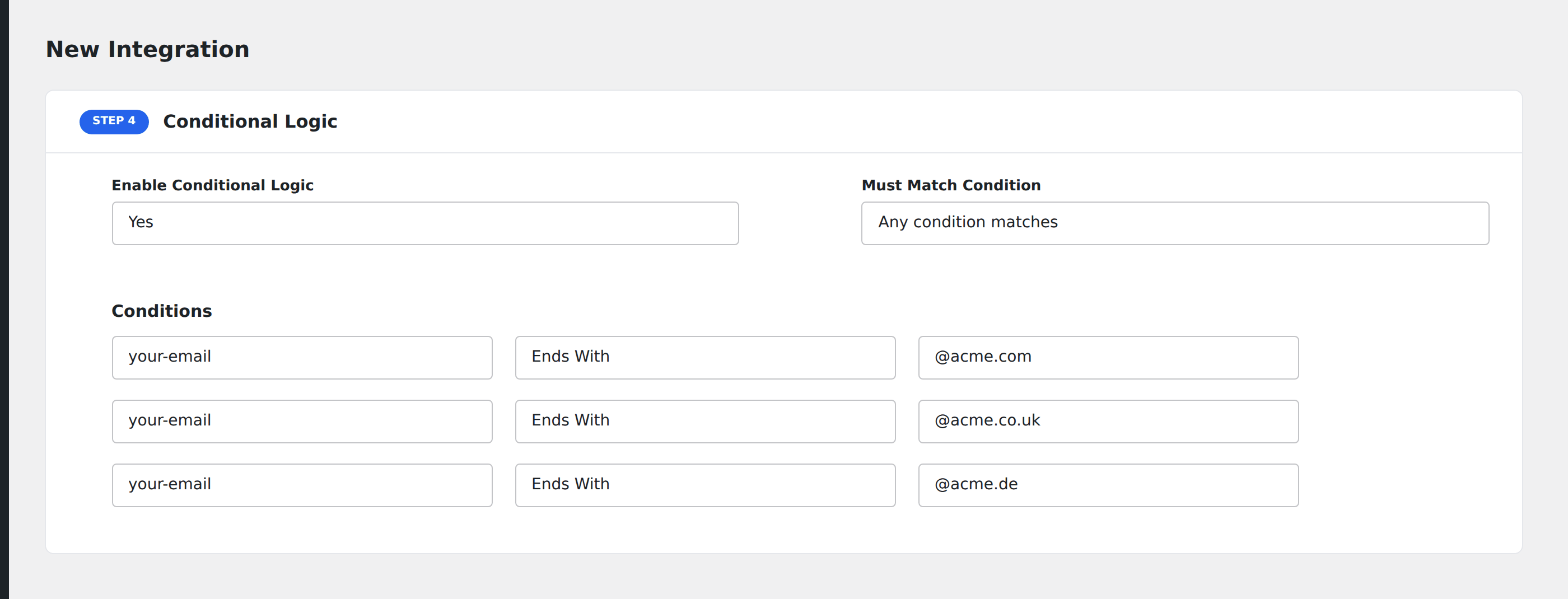
Goal: ping a #new-vips Slack channel when a submission comes from any of three high-value email domains.
Setup:
- Create a Slack integration on the form.
- Open the Conditional Logic panel.
- Add three conditions, each on the email field with the Ends With operator:
@biggorporate.com@enterprise.io@globalfortune500.com
- Set Must Match Condition to Any condition matches.
- Click Save Integration.
Any submission with an email ending in one of those three domains fires the Slack ping.
When to choose which
- All for narrowing. Start with a broad source, layer on filters until only the rows you want pass.
- Any for whitelists. List the cases that should match; everything else is excluded.
If you find yourself wanting both AND and OR in the same integration (e.g. (US AND Premium) OR (Enterprise)), AFI’s UI doesn’t support nested groups. Split into two separate integrations on the same form, each with its own simpler ruleset.