 AFI
AFI
Academy LMS
Academy LMS is a free WordPress LMS plugin from Themeum. As a receiver, AFI enrolls or unenrolls users in courses based on form submissions, useful for paid course signups, free-trial gates, or conditional enrollment workflows.
(For the sender version, capturing Academy LMS events like enrollments and completions and routing them to other tools, see the Academy LMS sender doc.)
What you’ll need
- The Academy LMS plugin installed and activated.
- At least one published course in Academy LMS.
- The Advanced Form Integration plugin installed and activated.
Create the integration
- Go to AFI → Add New.
- Configure the trigger.
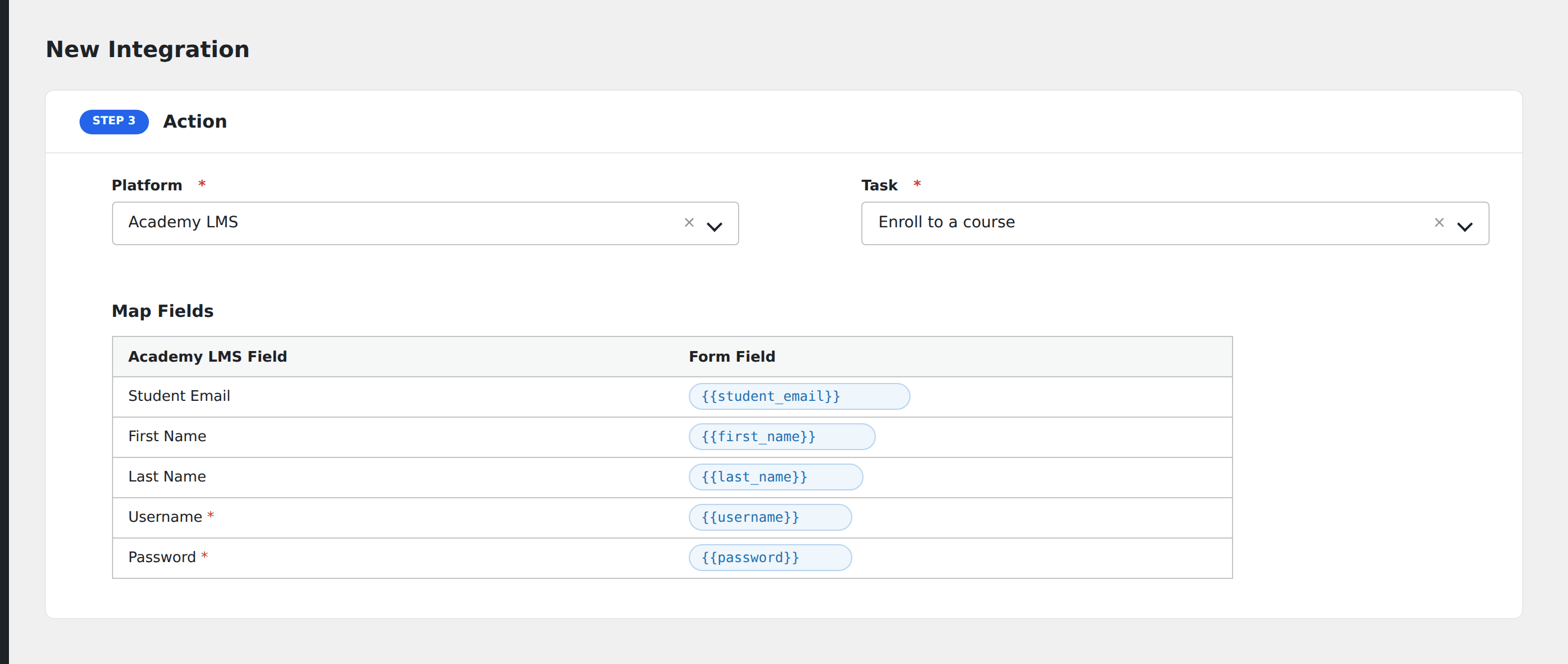
- In Action → Platform, select Academy LMS.
- In Task, choose Enroll to a course or Unenroll from a course.
- Pick the Course from the dropdown. AFI loads every published course on the connected site.
- Map the form fields:
- Email (required): AFI looks up the WordPress user by email.
- For new users (when the email isn’t yet a WP user), AFI auto-creates a WordPress account.
- Optional: configure Conditional Logic.
- Click Save Integration.
Tasks supported
Enroll to a course
Adds the form submitter to the chosen Academy LMS course. If the email already belongs to a WordPress user, that user is enrolled directly. If not, AFI creates a new WP user account first, then enrolls them.
Unenroll from a course
Removes the user from the chosen course. Useful for cancellation forms or refund workflows where access should end immediately on submission.
Conditional logic example
Enroll the user in the “Premium content” course only when the form’s plan field equals “premium”. Free signups go to the free intro course via a separate integration on the same form.
Troubleshooting
Course dropdown empty
Academy LMS uses the academy_courses post type. If no courses have been published (status: publish), the dropdown stays empty. Publish at least one course in Academy LMS, then refresh the AFI page.
User created but not enrolled
Open AFI → Log for the most recent entry. The most common cause is a course ID mismatch. Re-pick the course in the integration to refresh the cached ID.
Related docs
- Academy LMS (sender): for capturing Academy LMS events
- Send Contact Form 7 to Academy LMS
- Send WPForms to Academy LMS
- Conditional Logic