 AFI
AFI
Form Maker by 10Web
Form Maker by 10Web is a drag and drop form builder for WordPress. Connect it to Advanced Form Integration (AFI) and every form submission can go wherever you need it. You can collect leads in Google Sheets, subscribe respondents to Mailchimp, or create contacts in your CRM the moment a form is submitted.
What You’ll Need
- The Form Maker plugin installed and active, with at least one published form
- Advanced Form Integration (free version is enough for this trigger)
- An account on the receiving platform, such as Google Sheets or Mailchimp
How to Create the Integration
- Go to AFI > Add New.
- AFI fills in a default Integration Title. Rename it to something recognizable, such as “Contact Form to Google Sheets”.
- In the Trigger section, select Form Maker by 10Web from the Form Provider dropdown. Form Maker must be active on your site or the provider will not appear.
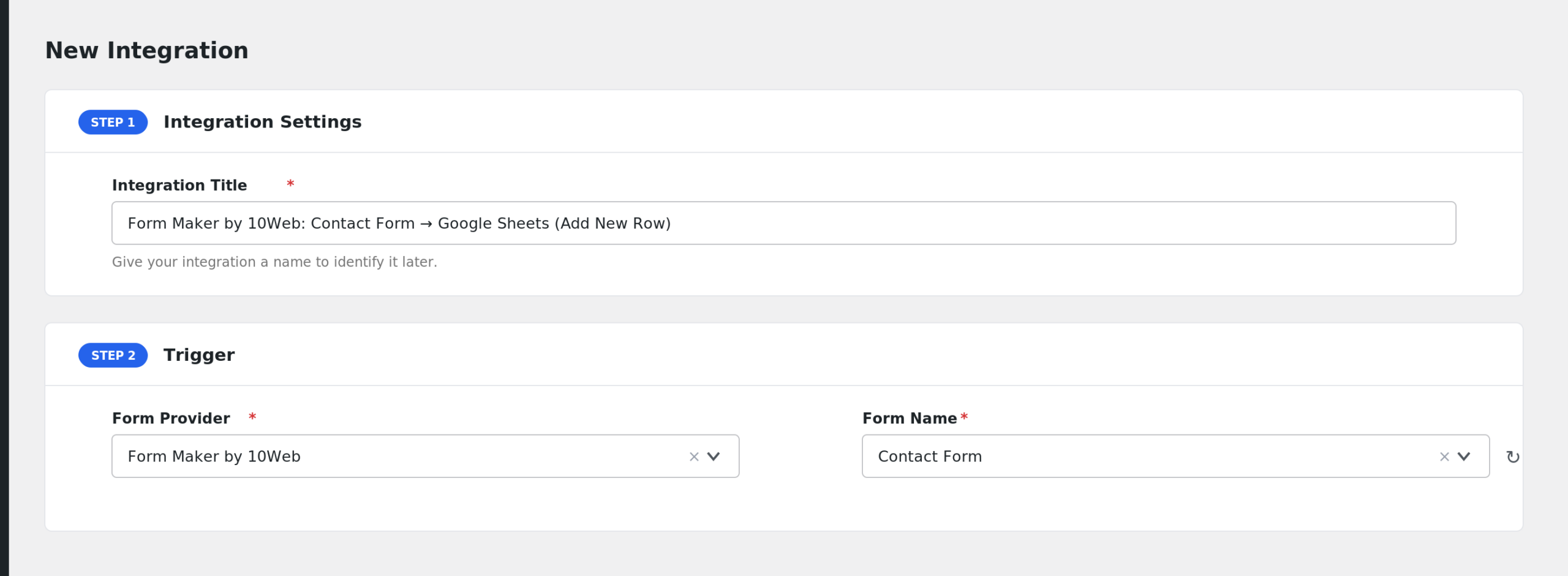
- In the Form/Task Name dropdown, pick the form you want to connect. AFI lists all your Form Maker forms by title.
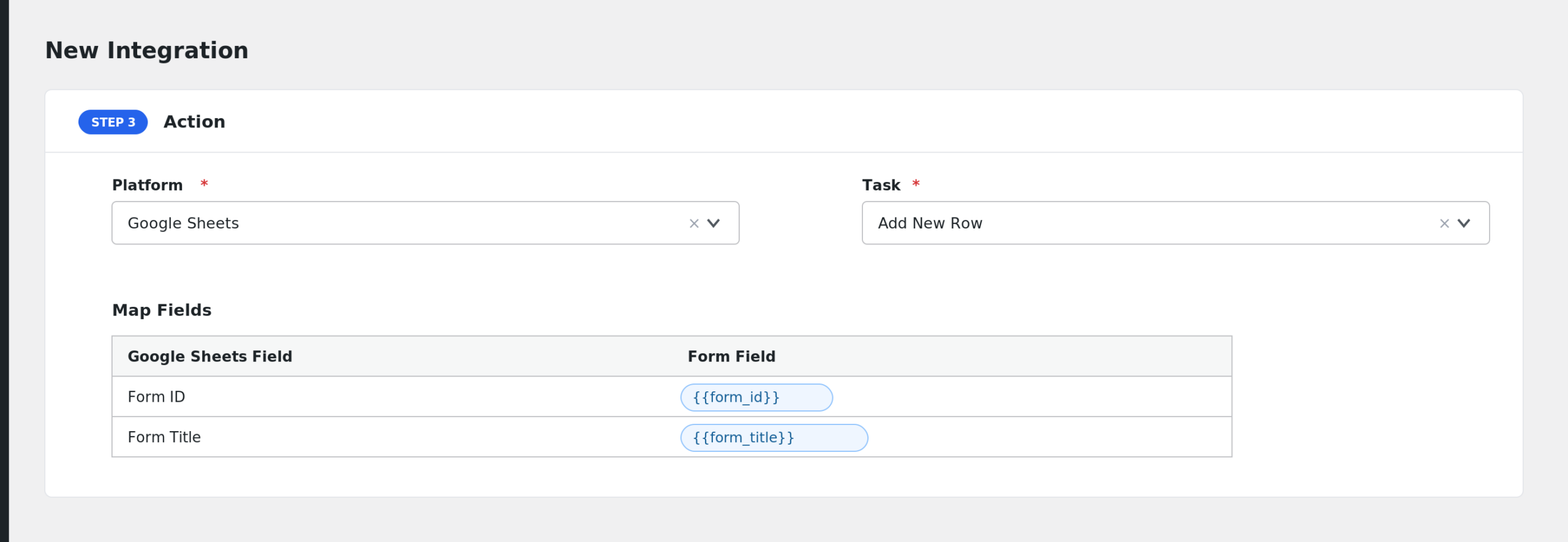
- Under Action, select your receiver platform and connect your account.
- Map the form fields to the receiver fields. AFI shows every field from the form you selected, using the labels you gave them in the form builder.
- Click Save Integration.
- Submit a test entry on the form and confirm the data arrives.
Fields You Can Send
The field list is built from your form, so it is different for every form. AFI always includes these two fields:
| Field | Description |
|---|---|
| Form ID | Numeric ID of the Form Maker form |
| Form Title | Title of the form |
Then AFI adds one field per form element, labeled with the field label from the form builder. Behind the scenes these are keyed as field_1, field_2, and so on, matching the field IDs in Form Maker.
Two extras worth knowing:
- File upload fields get a second entry labeled with (File URL). Map it to send the link to the uploaded file.
- Special tags are appended to the list, such as _Submission_Date, _User_IP, _User_Agent, and _Site_URL. When UTM tracking is enabled in AFI settings, UTM and ad click ID fields appear too.
If a field has no label, AFI names it “Field” followed by its ID.
Multi part values, such as multi select answers, arrive as comma or JSON formatted text depending on the field type. AFI also cleans Form Maker’s internal separators from stored values before sending.
Send Only Submissions From One Page
Because AFI appends special tags, you can filter by where the form was submitted:
- Open the integration and enable Conditional Logic.
- Set the condition to use a page related special tag, or a form field, for example: a dropdown field named Department equals Sales.
- Save the integration.
Only submissions matching the condition are sent to the receiver.
Troubleshooting
Form Maker is not in the dropdown
Confirm the Form Maker plugin is active. AFI reads forms straight from the Form Maker database table, so the plugin must be installed and have created its tables.
My form is missing from Form/Task Name
The dropdown lists every row in the Form Maker forms table. If a form is missing, make sure it was saved in Form Maker and reload the AFI page. Newly created forms appear after a refresh.
The integration is not firing
Check AFI > Log after a test submission. AFI hooks into Form Maker’s frontend submission event, so submissions must come from the published form on the front end. Entries added manually in the admin do not fire the trigger. Also note that AFI skips payment forms when the visitor cancels the payment step.
Fields arrive blank
AFI first reads the stored submission from the Form Maker database and falls back to the raw submitted values. If a specific field is blank, confirm it has a label in the form builder and that the field actually collected a value. Remapping the integration after editing the form also helps, since field IDs can change when fields are deleted and recreated.
Duplicate submissions
AFI fingerprints each submission by form and submission ID, so the same submission is dispatched only once even when Form Maker fires its hook more than once during a request.