 AFI
AFI
Zoho Books
Zoho Books is an online accounting platform for small businesses. Advanced Form Integration creates contacts, estimates, invoices, sales orders, and payments in Zoho Books from WordPress form submissions using the Zoho OAuth2 API.
What you’ll need
- An active Zoho Books account.
- Your Zoho Books API credentials (see below).
- The Advanced Form Integration plugin installed and activated.
Connect Zoho Books via OAuth
- Go to the Zoho API Console.
- Create a Self Client or Server-based Application.
- Copy the Client ID and Client Secret.
- Select your Data Center (.com, .eu, .in, .com.au, .com.cn).
- In WordPress, go to AFI → Settings → Zoho Books.
- Click Add Account, enter the Client ID, Client Secret, and Data Center.
- Click Save & Authorize to complete the OAuth2 flow.
Create the integration
- Go to AFI → Add New.
- Give the integration a name, for example
Form to Zoho Books. - Under Trigger, pick the form plugin and the specific form.
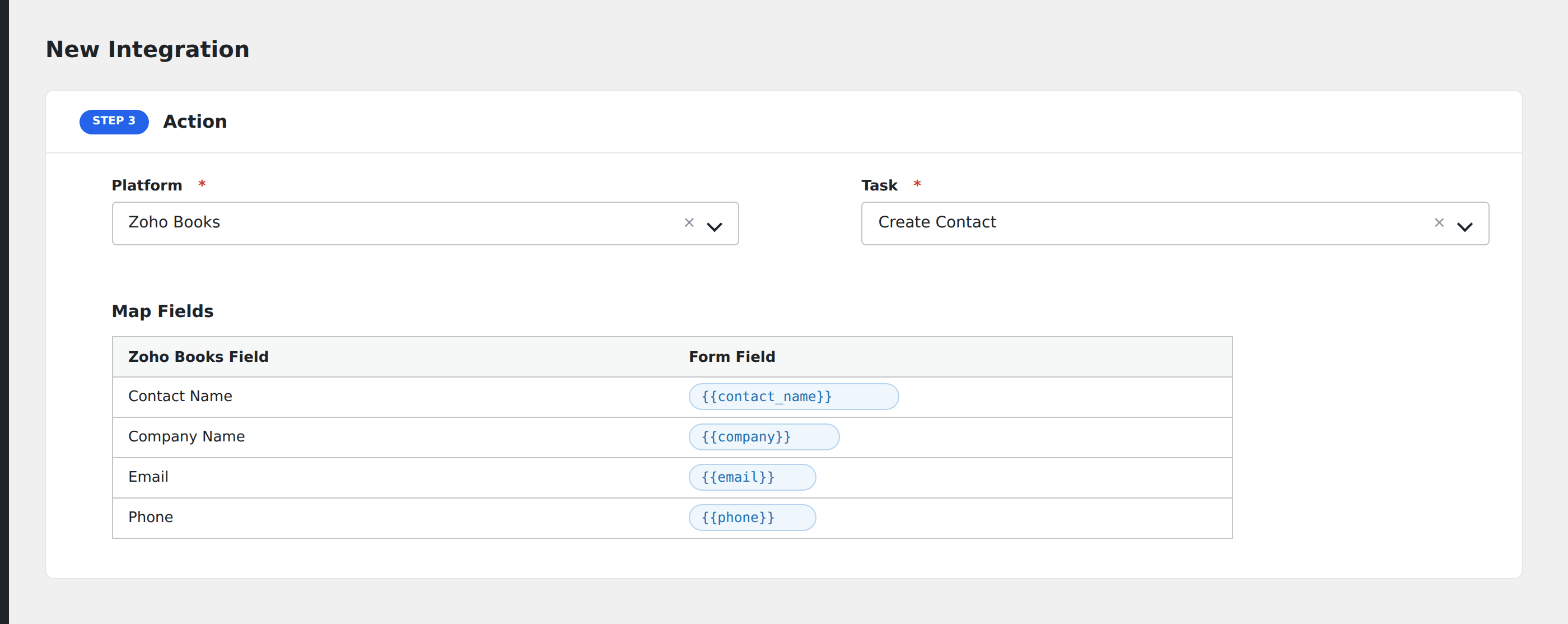
- Under Action → Platform, select Zoho Books.
- In Task, choose Multiple tasks supported.
- Pick the saved account.
- Map your form fields onto the fields listed below.
- Optional: open Conditional Logic to limit which submissions are sent.
- Click Save Integration.
Tasks supported
Multiple tasks supported
Zoho Books supports multiple tasks: Customer (search or create), Item (search or create), Quote (Estimate), Invoice, Recurring Invoice, Sales Receipt (Sales Order), and Customer Payment. Each task creates the corresponding record linked to a customer.
| Field | Field key | Required | Notes |
|---|---|---|---|
| Contact Name | contact_name |
Yes | Customer or vendor name |
| Company Name | company_name |
No | |
email |
No | ||
| Phone | phone |
No | |
| Website | website |
No | |
| Currency Code | currency_code |
No | |
| Payment Terms | payment_terms |
No | |
| Billing Address | billing_address |
No | |
| Shipping Address | shipping_address |
No | |
| Contact Type | contact_type |
No | customer or vendor |
Pro features
The Pro integration extends the free version with additional capabilities. Pro uses the same Zoho Books connection.
Create Contact (extended)
Pro extends the free Create Contact task with tags, custom fields, and full billing/shipping address blocks.
Feature comparison
| Feature | Free | Pro |
|---|---|---|
| Customer/Item search or create | ✅ | ✅ |
| Create invoice, estimate, sales order, payment | ✅ | ✅ |
| Create recurring invoice | ✅ | ✅ |
| Create contact (with tags + custom fields) | No | ✅ |
Conditional logic example
Only send data to Zoho Books when specific conditions are met. For example, add a condition on a form field to control which submissions are forwarded.
Troubleshooting
Nothing arrives in Zoho Books
Open AFI → Log and find the most recent entry. AFI stores the request URL, body, and raw response.
API credentials rejected
Verify your credentials in your Zoho Books account settings. If they were regenerated, update them in AFI → Settings → Zoho Books.