 AFI
AFI
Mailercloud
Mailercloud is an email marketing and automation platform. Advanced Form Integration adds subscribers to your Mailercloud lists from WordPress form submissions.
What you’ll need
- An active Mailercloud account.
- Your Mailercloud API credentials (see below).
- The Advanced Form Integration plugin installed and activated.
Get your Mailercloud API key
- Sign in to your Mailercloud account.
- Go to Settings → API and generate an API Key.
- In WordPress, go to AFI → Settings → Mailercloud.
- Click Add Account, paste the API Key, and give the account a name.
- Click Save.
Create the integration
- Go to AFI → Add New.
- Give the integration a name, for example
Form to Mailercloud. - Under Trigger, pick the form plugin and the specific form.
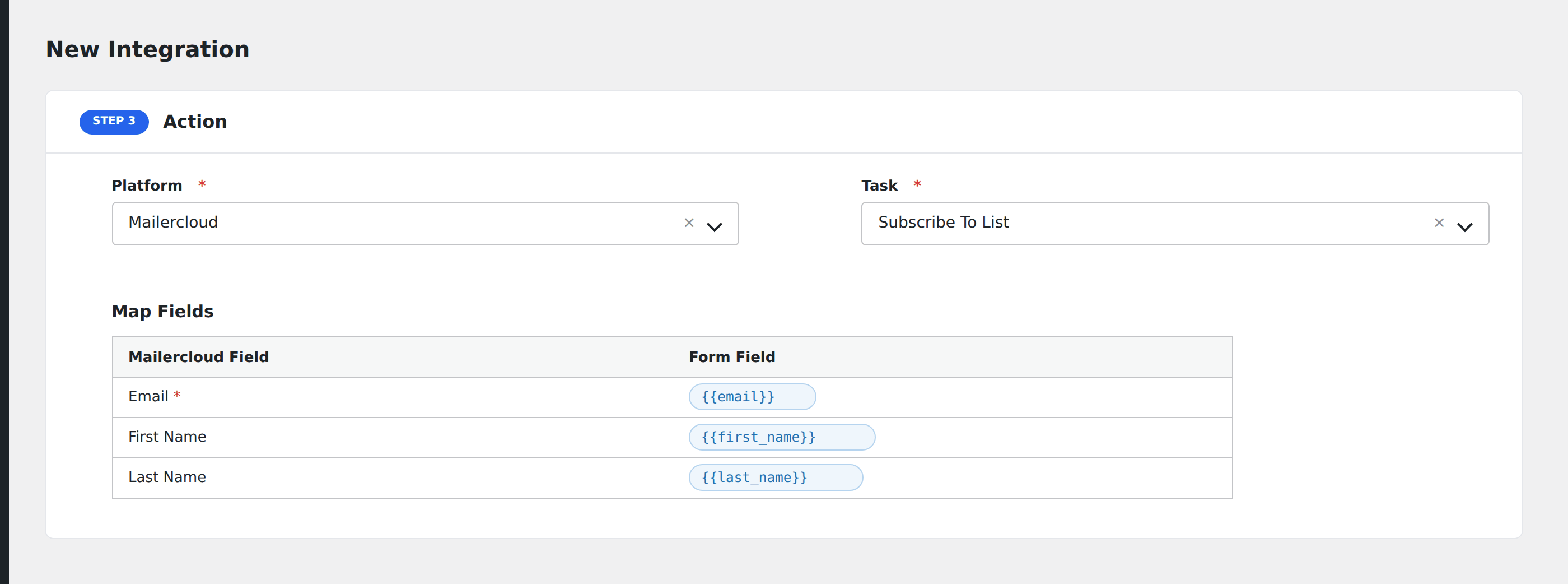
- Under Action → Platform, select Mailercloud.
- In Task, choose Subscribe To List.
- Pick the saved account.
- Map your form fields onto the fields listed below.
- Optional: open Conditional Logic to limit which submissions are sent.
- Click Save Integration.
Tasks supported
Subscribe To List
Adds a subscriber to the selected Mailercloud list. Pro auto-loads custom fields defined in your Mailercloud account for the selected list.
| Field | Field key | Required | Notes |
|---|---|---|---|
email |
Yes | ||
| Name | name |
No |
Pro features
The Pro integration extends the free version with additional capabilities. Pro uses the same Mailercloud connection.
Feature comparison
| Feature | Free | Pro |
|---|---|---|
| Subscribe to list | ✅ | ✅ |
| Email + name | ✅ | ✅ |
| Custom fields (auto-loaded from list) | No | ✅ |
Conditional logic example
Only send data to Mailercloud when specific conditions are met. For example, add a condition on a form field to control which submissions are forwarded.
Troubleshooting
Nothing arrives in Mailercloud
Open AFI → Log and find the most recent entry. AFI stores the request URL, body, and raw response.
API credentials rejected
Verify your credentials in your Mailercloud account settings. If they were regenerated, update them in AFI → Settings → Mailercloud.