 AFI
AFI
Does Not Contain
Use Does Not Contain in AFI conditional logic to fire an integration only when a submitted form value does not include a substring you configure. It’s the inverse of Contains, useful for blocking spam keywords, excluding internal email domains, or filtering out certain options from multi-select fields.
How it works
When a form is submitted, AFI checks whether the substring appears anywhere inside the field value. If it does not appear, the rule passes and the integration runs. If it appears (anywhere), AFI skips this destination for that submission.
The check is case-sensitive and looks for an exact substring: no wildcards or regex.
Example
Goal: add every signup to the public Mailchimp list except those from your own company’s email domain.
Setup:
- Open your Mailchimp integration in WP Admin → AFI → All Integrations and click Edit.
- Open the Conditional Logic panel.
- Click Add Condition.
- In the field dropdown, pick the email field.
- Set the operator to Does Not Contain.
- In the value box, type
@yourcompany.com. - Click Save Integration.
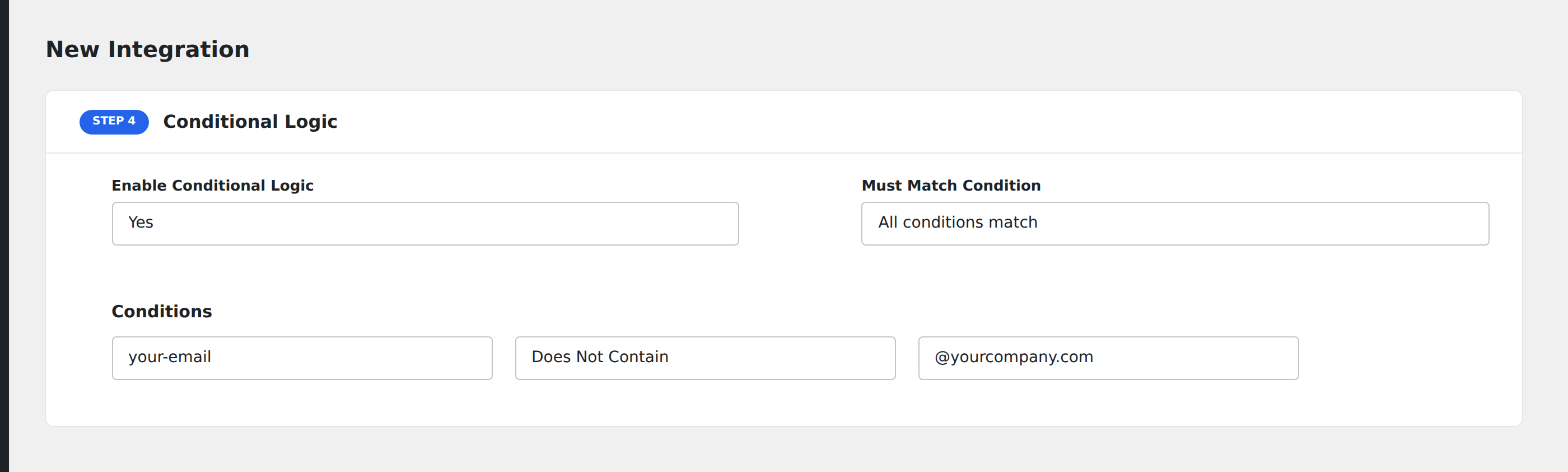
Now any signup from a @yourcompany.com address is excluded from the public Mailchimp list, useful when you don’t want internal users polluting your subscriber count.
Notes
- Case-sensitive. A submission with
@YourCompany.comwould still pass this rule even though it’s the same domain logically. Either normalize the value on your form or add a second rule for the alternate casing joined with All semantics. - Empty values pass. A submission where the field is empty does not contain
@yourcompany.com, so the rule passes. Add an Equal To check against blank to also exclude empty submissions. - Spam keyword blocking. Use Does Not Contain with terms like
viagra,bitcoin, orcryptoon a message field to keep obvious spam out of your CRM. Pair multiple rules with All semantics.