 AFI
AFI
Contains
Use Contains in AFI conditional logic to fire an integration only when a submitted form value includes a substring you configure. It’s the right pick for partial matches, checking whether a comment includes a keyword, an email belongs to a domain, or a multi-select includes an option.
How it works
When a form is submitted, AFI checks whether the substring you provide appears anywhere inside the field value. If it does, the rule passes and the integration runs. If it doesn’t, AFI skips this destination for that submission.
Substring matching is case-sensitive and looks for the value anywhere in the field: beginning, middle, or end. No wildcards or regex.
Example
Goal: when a contact-form message contains the word urgent, ping a #leads-urgent Slack channel as well as the standard CRM destination.
Setup:
- Create a Slack integration on the same form, pointing at the
#leads-urgentwebhook URL. - Open the Conditional Logic panel.
- Click Add Condition.
- In the field dropdown, pick the message field (e.g.
{your-message}). - Set the operator to Contains.
- In the value box, type
urgent. - Click Save Integration.
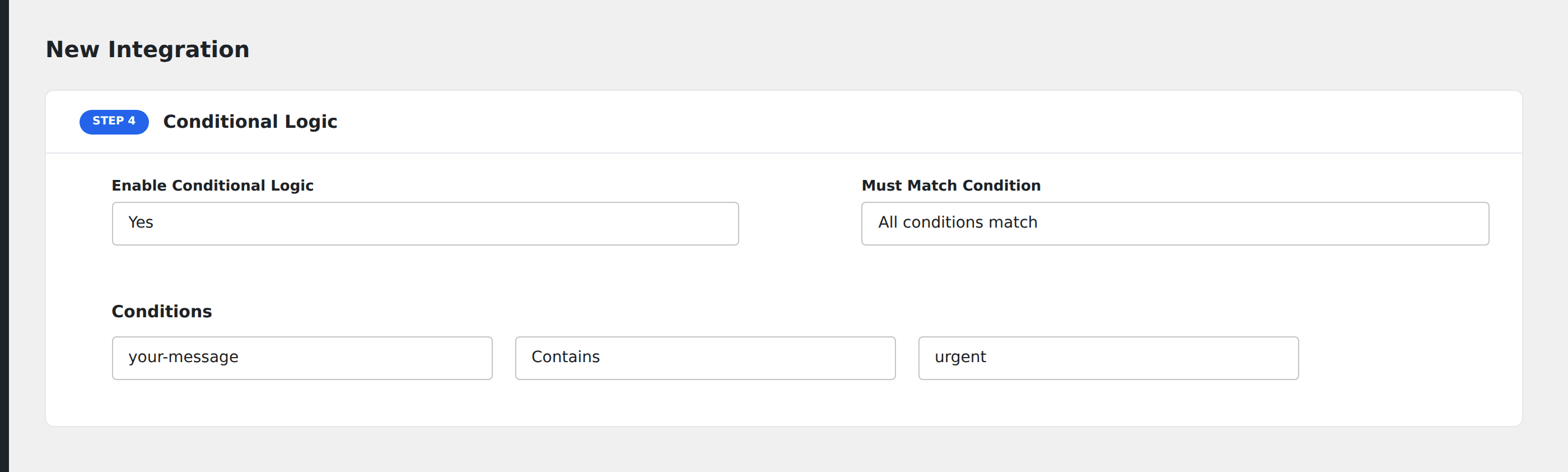
Submissions whose message includes the word urgent (anywhere in the text) now fire both the standard CRM integration and the Slack ping.
Notes
- Case-sensitive.
Urgent,URGENT, andurgentare different. If you want any casing to match, set up multiple Contains conditions joined with Any semantics, or normalize the input on your form. - Whitespace counts. A search for
urgent(with surrounding spaces) won’t matchurgent.(with a period). Pick the most distinctive substring you can. - Multi-select fields. When the field is a checkbox group or multi-select, AFI receives the values as a comma-separated string.
Contains "Pro"matches when any selected option includesPro. - Email domain check. Use
Containswith@yourcompany.comto match any address from your company. Pair with Does Not Contain for the opposite.