 AFI
AFI
Jetpack Forms
Jetpack Forms is the contact form builder bundled with Jetpack, also available as a standalone plugin. Both ship the same underlying Grunion contact-form package. Advanced Form Integration captures contact form submissions and routes the data to any of 200+ destinations.
What you’ll need
- Jetpack with the Forms module active, or the standalone Jetpack Forms plugin.
- At least one form block or contact form shortcode published on your site.
- The Advanced Form Integration plugin installed and activated.
When the trigger fires
AFI registers a single Any Jetpack Form Submitted (site-wide) trigger for Jetpack Forms. It fires when a Jetpack form passes validation and its feedback record is written.
Data captured
| Field | Field key | Format |
|---|---|---|
| Name | name |
Text |
email |
Email address | |
| Subject | subject |
Text |
| Message | message |
Text, line breaks preserved |
| Post ID | post_id |
Numeric ID, page the form was on |
| Feedback Post ID | feedback_post_id |
Numeric ID, the submission record |
| All Fields | all_fields_json |
JSON object serialised as a string, jSON, for fields not listed above |
Create the integration
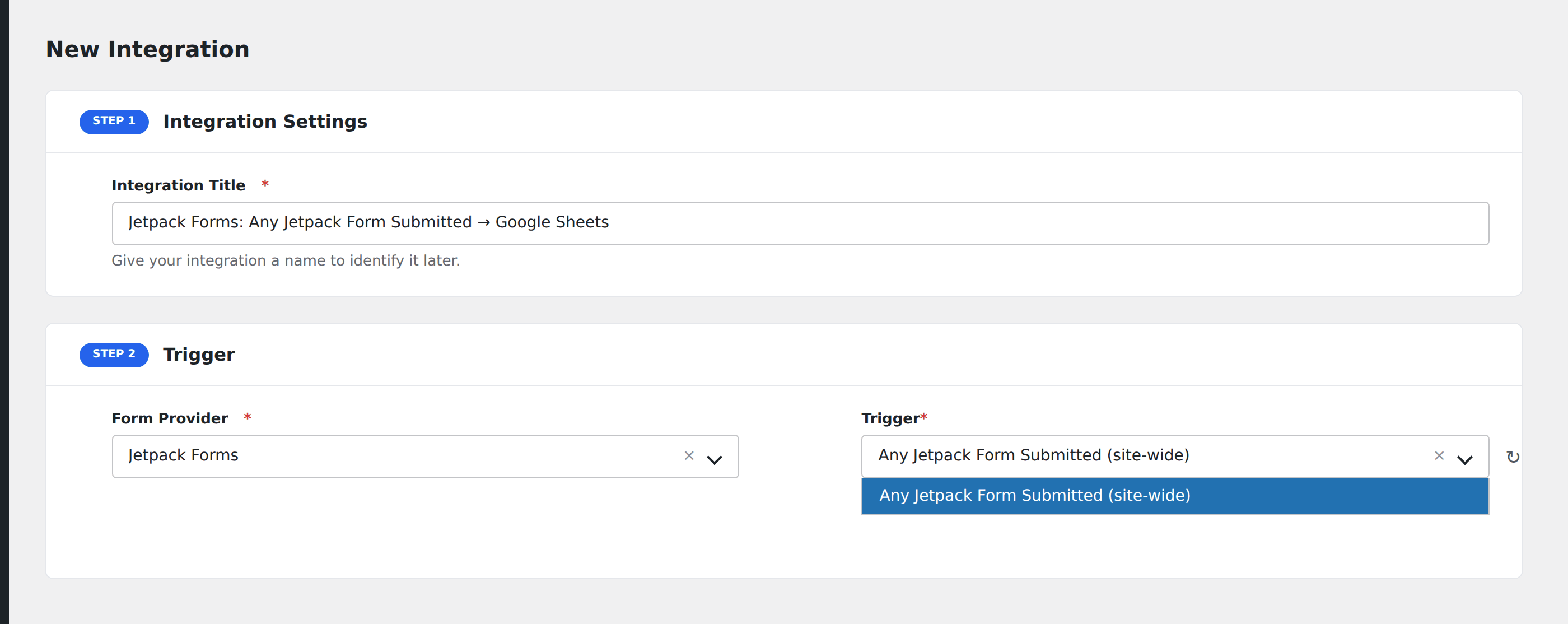
- Go to WP Admin → AFI → Add New.
- Enter an Integration Title, e.g.
Jetpack Forms: Any Jetpack Form Submitted → Google Sheets. - In Trigger → Form/Data Provider, select Jetpack Forms.
- In Form/Task Name, choose Any Jetpack Form Submitted (site-wide).
- In Action → Platform, pick the destination and complete the field mapping.
- Optional: configure Conditional Logic so only matching events are sent.
- Click Save Integration.
How AFI listens for submissions
AFI hooks grunion_after_feedback_post_inserted from the Jetpack forms package (projects/packages/forms/src/contact-form/class-contact-form.php). It fires unconditionally once validation passes, whether or not the form’s own Email Notifications setting is enabled. The two obvious alternatives, grunion_pre_message_sent and grunion_after_message_sent, are both gated behind that email setting and silently stop firing the moment a site owner turns notifications off in favour of an integration, so AFI does not use them.
One trigger for the whole site
Most Jetpack forms are inline blocks or shortcodes dropped into ordinary post content, with no separate record to list. Only the newer reusable forms are a queryable post type, and that is the minority case. Rather than offer a picker that would silently miss the common case, AFI registers one honest site-wide trigger. Post ID identifies the page the form was on, so use Conditional Logic on it to route different pages differently.
How field values are read
AFI reads values from $_POST using Jetpack’s own g{contact-form-id}-{field-id} naming convention, taking the form ID from the hidden contact-form-id input Jetpack always renders. The hook’s own $all_values and $entry_values arrays are keyed in a {index}_{label} shape that shifts whenever you reorder or rename a field, which would quietly break existing mappings.
Custom fields
Name, Email, Subject, and Message are mapped directly. Anything else you add to the form arrives in All Fields (JSON).
Troubleshooting
Nothing fires
Confirm the submission is stored. Jetpack saves every valid submission as a Feedback entry under Feedback → Form Responses. If it is not there, the form did not pass validation or spam checks and the hook never ran.
Akismet is filtering submissions
Jetpack runs Akismet before inserting the feedback post. Submissions classified as spam never reach the hook. Check the spam tab under Feedback.