 AFI
AFI
UTM Parameters and Special Tags
Every field-mapping dropdown in Advanced Form Integration offers more than the fields on your form. Two extra groups sit alongside them: UTM parameters and click IDs, which carry campaign attribution, and special tags, which carry submission, site, page, and visitor context.
Neither group requires a hidden field on the form. AFI resolves the values at the moment the submission runs and sends them like any other mapped value.
Turning them on
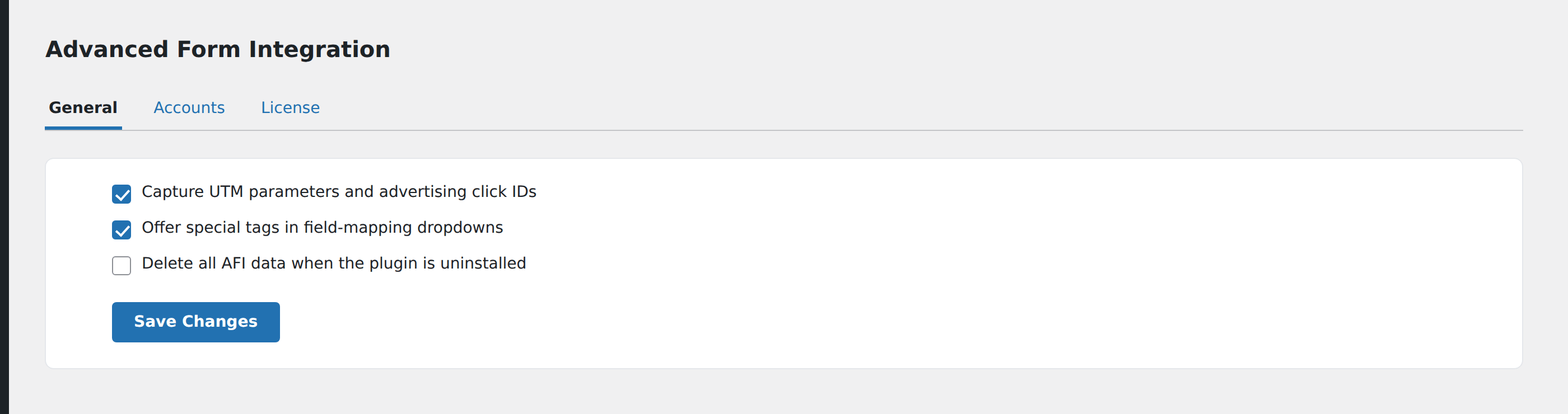
Both groups are controlled from AFI → Settings → General.
UTM tracking is off by default. Switch on the UTM setting to start capturing campaign parameters and to make the UTM group appear in your field-mapping dropdowns.
Special tags are on by default. There is a setting to disable them if you would rather keep the dropdown short; disabling it removes the whole special-tags group from the mapping UI.
Changing either setting affects the dropdown only. Integrations you have already saved keep the mappings you gave them.
UTM parameters and click IDs
Thirteen tags are available once UTM tracking is enabled.
| Tag | What it holds |
|---|---|
utm_source |
Campaign source |
utm_medium |
Campaign medium |
utm_campaign |
Campaign name |
utm_term |
Campaign term |
utm_content |
Campaign content |
gclid |
Google Ads click ID |
gbraid |
Google Ads click ID, iOS app traffic |
wbraid |
Google Ads click ID, web traffic |
fbclid |
Meta Ads click ID |
msclkid |
Microsoft Ads click ID |
ttclid |
TikTok Ads click ID |
li_fat_id |
LinkedIn Ads click ID |
dclid |
Google Display click ID |
How capture works
When a visitor lands on any page of your site with one of these parameters in the URL, AFI reads it and stores it in a cookie that lasts 30 days.
Capture is first-touch. Once a value has been stored, a later visit with a different value does not overwrite it. The campaign that originally brought the visitor to your site is the one that gets credited, even if they return through a different link before submitting.
Each parameter is tracked independently, so a visitor who arrives with utm_source only, and later with gclid only, ends up with both stored.
The cookies are set at the site root with a Lax same-site policy, and marked secure on HTTPS sites. They are readable by JavaScript, so your analytics tooling can use the same values.
If a parameter has never been seen for that visitor, the tag resolves to an empty value rather than to a placeholder.
Using them
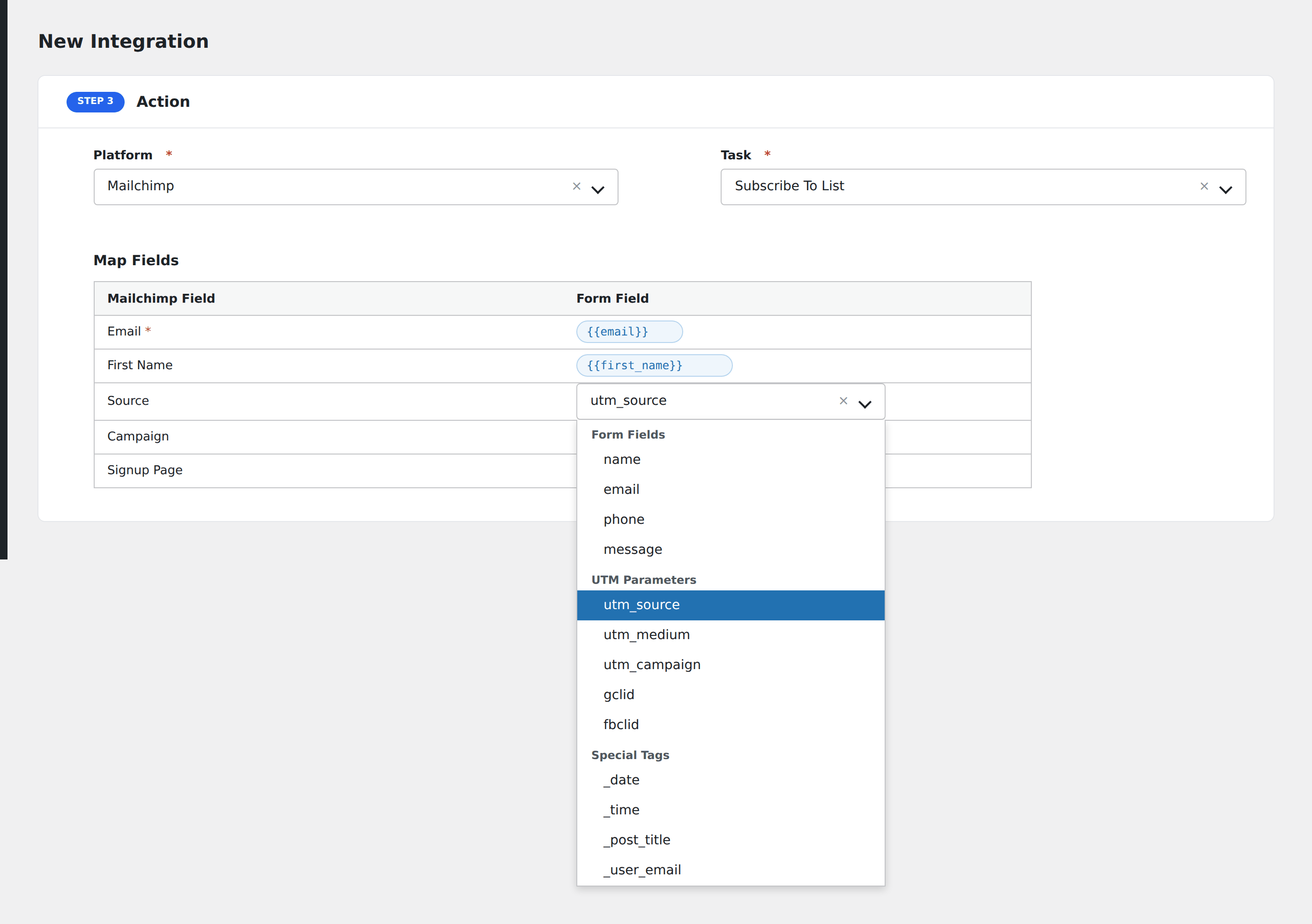
Open your integration, find the destination field you want to populate, and pick the UTM tag from the mapping dropdown. Most CRMs and email platforms have custom fields for source and campaign; that is usually where these belong.
Click IDs are worth capturing even if you have nowhere obvious to put them today. They are what offline conversion imports need later, and they cannot be reconstructed after the fact.
Special tags
Twenty-one tags cover submission context, site details, page details, and the logged-in user.
Submission
| Tag | Resolves to |
|---|---|
_submission_date |
Full timestamp, Y-m-d H:i:s, in your site’s timezone |
_date |
The date, in your site’s date format |
_time |
The time, in your site’s time format |
_weekday |
Day name, such as Tuesday |
_user_ip |
The submitting visitor’s IP address |
_user_agent |
The browser user-agent string, truncated to 254 characters |
_date and _time follow the formats set in Settings → General in WordPress. If a destination platform needs a fixed machine-readable format, map _submission_date instead, which is always Y-m-d H:i:s.
Site
| Tag | Resolves to |
|---|---|
_site_title |
Site title |
_site_description |
Tagline |
_site_url |
Home URL |
_site_admin_email |
Administration email address |
These are most useful on multisite networks or when several sites feed one shared account, so records can be traced back to their origin.
Page
| Tag | Resolves to |
|---|---|
_post_id |
ID of the page the form was submitted from |
_post_name |
Its slug |
_post_title |
Its title |
_post_url |
Its permalink |
_form_id |
ID of the submitted form |
_form_name |
Name of the submitted form |
_post_url answers the question every sales team eventually asks: which page was this lead reading when they got in touch. The post tags resolve to an empty value when the submission has no page context, such as an API or webhook-triggered submission.
Logged-in user
| Tag | Resolves to |
|---|---|
_user_id |
WordPress user ID |
_user_first_name |
First name |
_user_last_name |
Last name |
_user_display_name |
Display name |
_user_email |
Account email address |
These resolve from the currently logged-in WordPress user. On a public-facing form that is usually the visitor, and for anonymous visitors there is no user, so the tags resolve to empty values.
Do not assume these describe an administrator. On a membership site or a logged-in customer portal they are exactly what you want; on an open contact form they will usually be blank.
Combining tags with form fields
Special tags work anywhere a mapped value works, including inside a longer string. A destination “notes” field mapped to:
Submitted {{_date}} at {{_time}} from {{_post_title}} (source: {{utm_source}})produces a single readable line in the destination record.
Extending the list
Developers can register additional tags with the adfoin_special_tags filter and supply their values with adfoin_special_tag_value. Both are documented in the hooks reference.
Troubleshooting
The UTM group is missing from the dropdown. UTM tracking is off. Enable it in AFI → Settings → General.
UTM values arrive empty. Confirm the visitor actually reached the site with the parameter in the URL, and that they were not blocked from setting cookies. Testing in a private window with a parameterised URL is the quickest check, but remember that first-touch capture means a second test in the same window keeps the first value. Use a fresh private window for each test.
A UTM value is stale. That is first-touch capture working as designed. Clear the relevant cookie in your browser to test a new value, or wait out the 30-day expiry.
The user tags are blank. The submission came from someone who is not logged in.
A tag sends the literal text instead of a value. Make sure you selected the tag from the mapping dropdown rather than typing it by hand. Typed tags must match the key exactly, including the leading underscore.