 AFI
AFI
Salesforce Field Service
Salesforce Field Service (FSL) is Salesforce’s field-service management module, extending Service Cloud with work orders, scheduling, and mobile dispatch. Advanced Form Integration sends form submissions to FSL as new work orders or service appointments.
What you’ll need
- An active Salesforce org with Field Service Lightning installed.
- A Salesforce Connected App with OAuth enabled and the right scopes (
api,refresh_token). - The Advanced Form Integration plugin installed and activated.
Connect Salesforce Field Service to AFI
- In WordPress, go to AFI → Settings → Salesforce Field Service.
- Enter the Connected App’s Consumer Key and Consumer Secret.
- Click Authorize and complete the Salesforce OAuth flow.
- AFI shows Connected.
Create the integration
- Go to AFI → Add New.
- Configure the trigger.
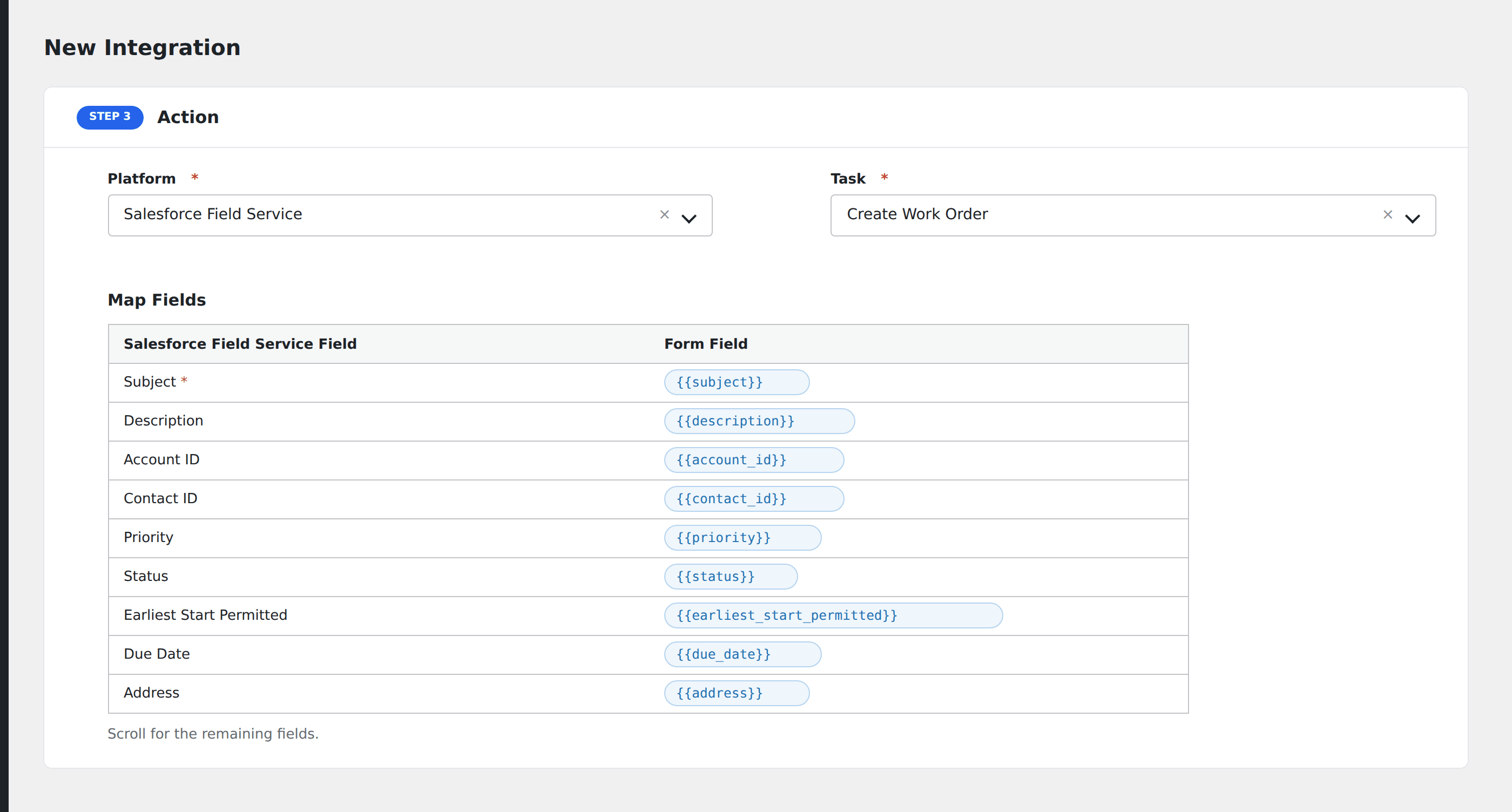
- In Action → Platform, select Salesforce Field Service.
- In Task, choose Create Work Order or Create Service Appointment.
- Map the form fields:
- Subject (required): work order title.
- Description.
- Account ID or Contact ID to link to an existing record.
- Priority (Low / Medium / High / Critical).
- Status (New / In Progress / Completed).
- Earliest Start Permitted and Due Date in ISO format.
- Address, City, State, Country, Postal Code for service location.
- Custom Field Service object fields by API name.
- Optional: configure Conditional Logic.
- Click Save Integration.
Conditional logic example
Set the work order’s Priority to “Critical” only when the form’s service_type field equals “outage”. Routine maintenance requests come in at Medium priority instead.
Troubleshooting
“INVALID_FIELD” on custom field
Salesforce custom fields end in __c (e.g., Customer_Tier__c). The mapping must include the suffix.
Re-authorization needed
Salesforce OAuth refresh tokens are long-lived but can be revoked from the org’s connected app management. Return to AFI → Settings → Salesforce Field Service and re-authorize if integrations stop firing.