 AFI
AFI
ServiceM8
ServiceM8 is a field-service management platform for small trade businesses, popular in Australia, the UK, and New Zealand. Advanced Form Integration sends form submissions to ServiceM8 as new clients or jobs.
What you’ll need
- An active ServiceM8 account.
- A ServiceM8 OAuth client registered at the developer portal.
- The Advanced Form Integration plugin installed and activated.
Connect ServiceM8 to AFI
- In WordPress, go to AFI → Settings → ServiceM8.
- Enter the OAuth Client ID and Client Secret.
- Click Authorize and approve the connection.
Create the integration
- Go to AFI → Add New.
- Configure the trigger.
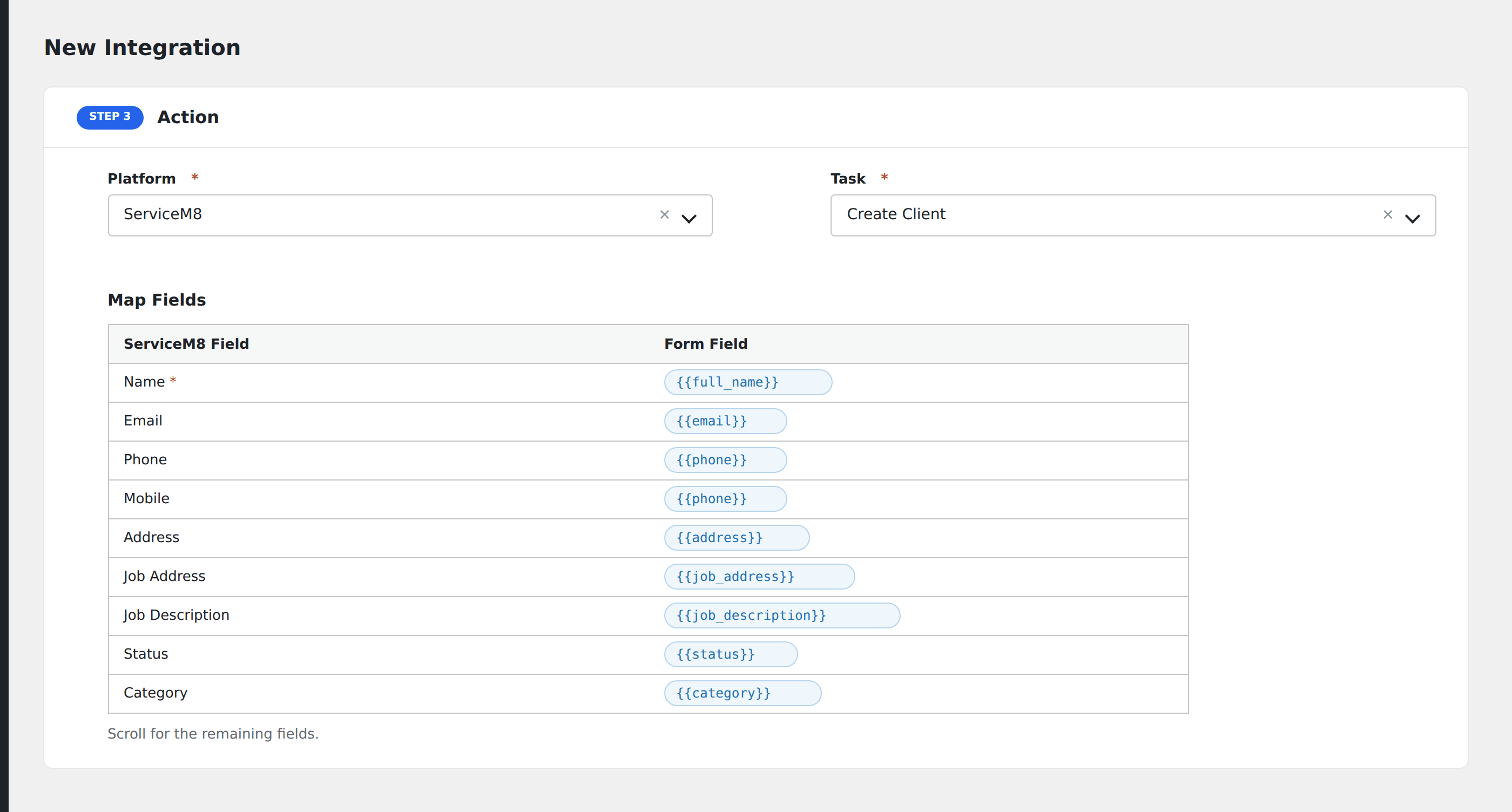
- In Action → Platform, select ServiceM8.
- In Task, choose Create Client or Create Job.
- Map the form fields:
- For client: Name (required), Email, Phone, Mobile, Address.
- For job: Job Address, Job Description, Status (Quote / Work Order / Invoice / Unsuccessful), Category, Client UUID (link to existing client).
- Optional: configure Conditional Logic.
- Click Save Integration.
Conditional logic example
Create a ServiceM8 job in Quote status when the form’s request_type field is “estimate”. Confirmed bookings come in as Work Order instead.