 AFI
AFI
Marketo
Adobe Marketo Engage is an enterprise marketing-automation platform widely used for lead nurturing, scoring, and account-based marketing. Advanced Form Integration sends form submissions to Marketo as new leads.
What you’ll need
- An active Marketo Engage subscription.
- A Marketo API-only user with permission to create leads.
- A Marketo REST API custom service (Admin → Integration → LaunchPoint → New Service) with Client ID and Client Secret.
- Your Marketo REST API endpoint URL (Admin → Integration → Web Services).
- The Advanced Form Integration Pro plugin installed and activated.
Connect Marketo to AFI
- In WordPress, go to AFI → Settings → Marketo.
- Enter the REST API endpoint, Client ID, and Client Secret.
- Click Save Changes.
Create the integration
- Go to AFI → Add New.
- Configure the trigger.
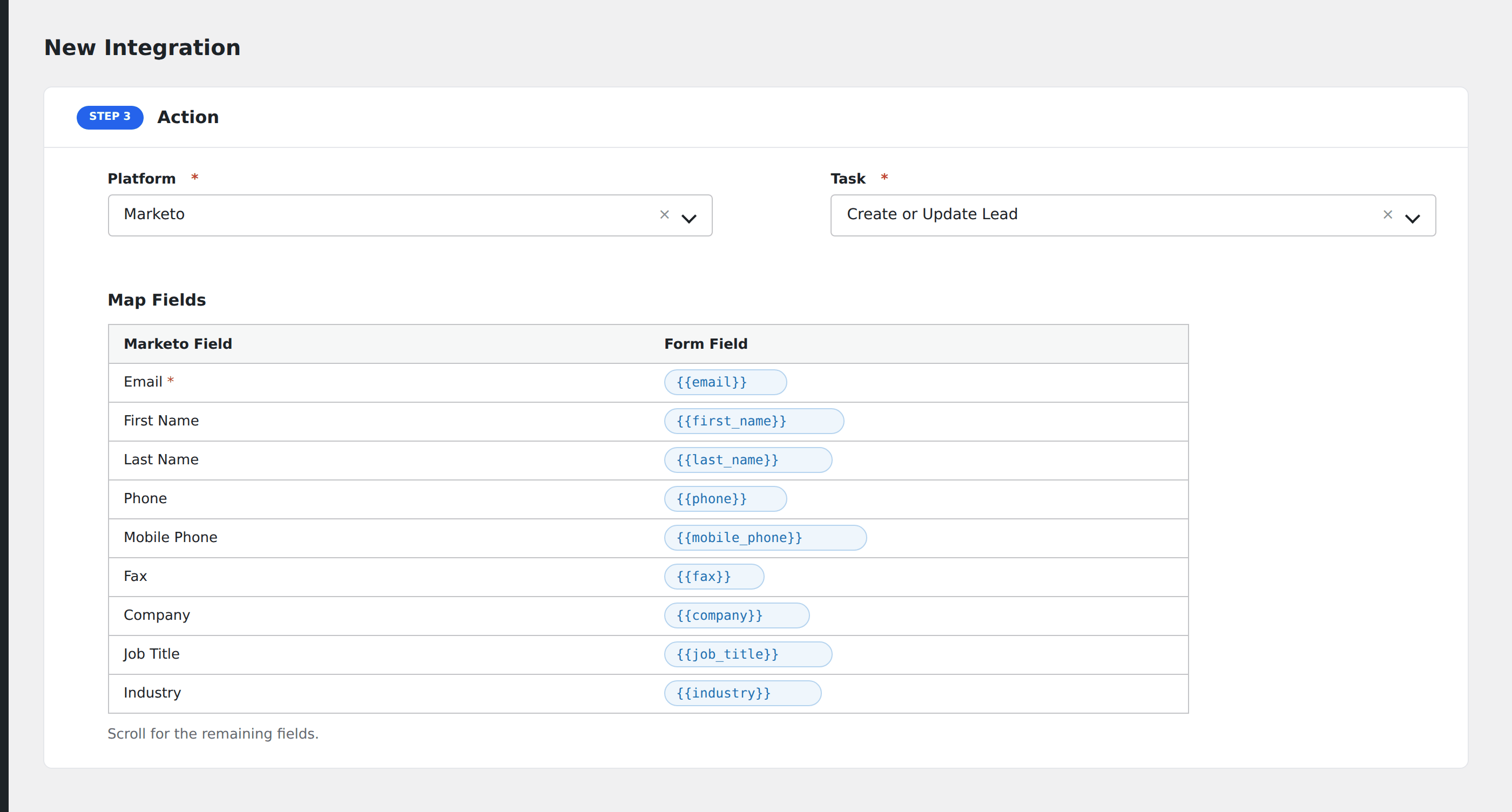
- In Action → Platform, select Marketo.
- In Task, choose Create or Update Lead.
- Map the form fields:
- Email (required), First Name, Last Name.
- Phone, Mobile Phone, Fax.
- Company, Job Title, Industry, Annual Revenue.
- Address, City, State, Country, Postal Code.
- Marketo custom fields by API name.
- List ID to add the lead to a static list on creation.
- Optional: configure Conditional Logic.
- Click Save Integration.
Pro features
The Pro Marketo integration is the only way to send to Marketo from AFI. It includes:
- createOrUpdate lookup by email. No duplicates if the lead already exists.
- Custom-field mapping by API name.
- Static list assignment on creation.
- Smart-campaign trigger via list assignment.
Conditional logic example
Add to the “Webinar attendees” Marketo list only when the form’s event_id field equals the current webinar’s ID. Past-event registrants skip the list to avoid skewing your campaign metrics.
Troubleshooting
“Invalid client” or 401
Marketo’s API uses 2-legged OAuth: Client ID and Secret only, no user redirect. The credentials must come from a REST API custom service (not Web App or Single Page App).
Custom field rejected
Marketo custom fields use API names (often camelCase, e.g., leadSource), not display labels. Find the API name in Admin → Field Management.
Rate limit (606)
Marketo enforces a 100-call/20-second rate limit per API user. High-traffic forms may need to throttle. Set Marketo’s REST API user to a dedicated user shared by no other integrations.