 AFI
AFI
Dynamics 365 Marketing
Dynamics 365 Marketing (now part of Dynamics 365 Customer Insights) is Microsoft’s marketing automation platform built on Dataverse. It manages marketing contacts, consent, lead scoring, segments, and outbound marketing journeys. Advanced Form Integration creates or updates marketing contacts from your WordPress form submissions, with GDPR consent flags and optional marketing list membership.
Shared connection with Dynamics 365 CRM
Dynamics 365 Marketing runs on the same Dataverse instance as Dynamics 365 CRM. It reuses the connection you configure under AFI → Settings → Dynamics 365 CRM. No separate credentials are needed.
If you have not yet set up the Dynamics 365 CRM connection, follow the steps in the Dynamics 365 & Dataverse doc first.
Create the integration
- Go to AFI → Add New.
- Give the integration a name, for example
Newsletter signup to Dynamics 365 Marketing. - Under Trigger, pick the form plugin and the specific form.
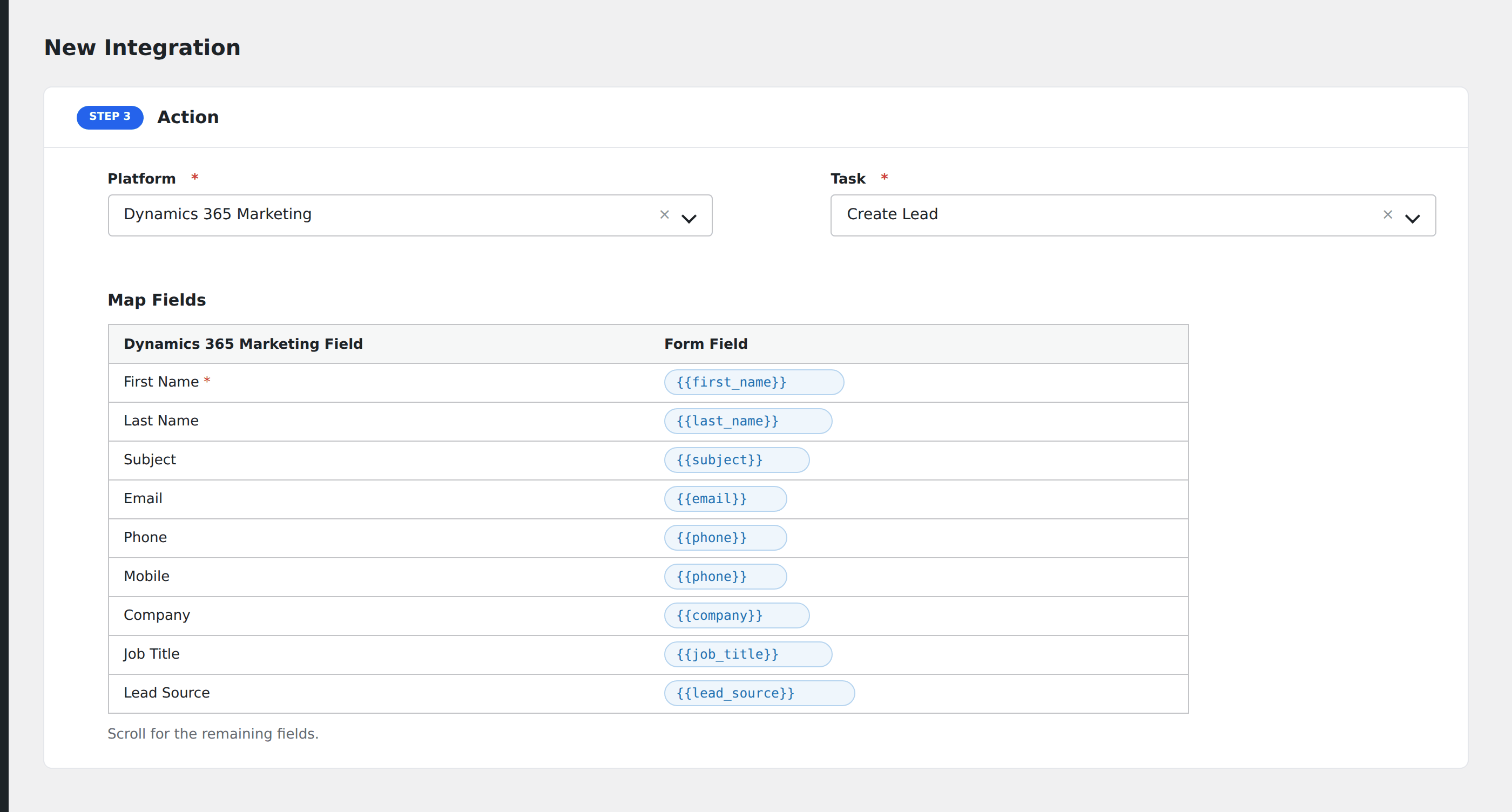
- Under Action → Platform, select Dynamics 365 Marketing.
- In Task, choose Create / Update Marketing Contact.
- Pick the same Dynamics 365 Account you configured for CRM.
- Optional: select a Marketing List to add the contact to. AFI loads your static contact lists from Dataverse.
- Map your form fields onto the marketing fields listed below.
- Optional: open Conditional Logic to limit which submissions are sent.
- Click Save Integration.
Tasks supported
Create / Update Marketing Contact (by email)
Creates or updates a contact in Dataverse, optimized for marketing use cases. If a contact with the same emailaddress1 already exists, AFI patches their fields instead of creating a duplicate.
When a Marketing List is selected, AFI adds the contact to that list via the OData /Members/$ref association after creating or updating the contact. Only static contact lists appear in the dropdown; dynamic segments are populated by query and cannot accept members via the API.
| Field | Field key | Required | Notes |
|---|---|---|---|
| First Name | firstname |
No | |
| Last Name | lastname |
No | |
emailaddress1 |
Yes | Used for dedupe / upsert matching | |
| Business Phone | telephone1 |
No | |
| Mobile Phone | mobilephone |
No | |
| Company Name | companyname |
No | |
| Job Title | jobtitle |
No | |
| City | address1_city |
No | |
| Country | address1_country |
No | |
| Lead Source | leadsourcecode |
No | Numeric option set value (e.g. 1 = Advertisement) |
| Do Not Email | donotemail |
No | Boolean: true/false. GDPR consent flag. |
| Do Not Bulk Email | donotbulkemail |
No | Boolean: true/false |
| Do Not Phone | donotphone |
No | Boolean: true/false |
Consent flags (Do Not Email, Do Not Bulk Email, Do Not Phone) are available in the free version so GDPR-aware sites can honour unsubscribe and preference choices without upgrading.
Pro features
The Pro integration extends the free version with a full field map, custom Dataverse fields, and Account linking. Pro uses the same Dynamics 365 CRM connection.
Extended field map
Pro adds: secondary email, fax, full address block (address lines, state, postal code), Account name lookup (links contact to existing Account via parentcustomerid), department, website, preferred contact method, gender, birth date, description, and additional consent flags (Do Not Postal Mail, Do Not Send Marketing Materials, Do Not Fax).
Custom fields
Pro adds a Custom Fields repeater where you can map any custom Dataverse column on the Contact entity using the schema (logical) name as the key, for example new_lifecyclestage or prefix_segment.
Feature comparison
| Feature | Free | Pro |
|---|---|---|
| Create/update marketing contact (email upsert) | ✅ | ✅ |
| Basic fields (name, email, phone, company, job title) | ✅ | ✅ |
| GDPR consent flags (email, bulk email, phone) | ✅ | ✅ |
| Marketing list membership | ✅ | ✅ |
| Extended fields (address, secondary email, demographics) | No | ✅ |
| Account linking (parentcustomerid) | No | ✅ |
| Extended consent flags (postal mail, fax, marketing materials) | No | ✅ |
| Custom Dataverse fields | No | ✅ |
Conditional logic example
Only add contacts to your “Webinar Attendees” marketing list when the form’s event_type field is “webinar”. Other signups still create the contact but skip list membership via a separate integration that leaves the Marketing List unselected.
Troubleshooting
Contact not added to marketing list
Only static contact lists appear in the dropdown (filtered by createdfromcode eq 2 and type eq false). Dynamic segments cannot accept members via the API. If your list does not appear, verify in Dynamics that it is a static list with Contact-type members.
Contact created but fields not updated
When updating an existing contact, AFI sends a PATCH with only the mapped fields. If the contact was originally created by another system, some fields may be locked or read-only in Dynamics. Check the AFI log for any PATCH error responses.
Nothing in the log
If there is no log entry at all, the trigger never fired. Submit a real test entry from the front end, not a preview. Also verify that the email field is mapped, since the upsert requires it.